for Edge and Chrome you can use window.navigator.onLine or event listeners (for the 'offline' and 'online' events) but this can produce false positives in Firefox.
add any of the follow code to your apps Preloaded JS code under your apps settings.
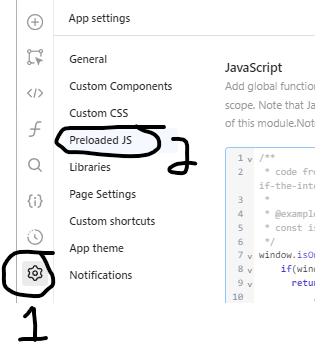
you can use it anywhere with {{ window.isOnline() }} or {{ window.isOnline }} for the event listener option.
if you don't care about firefox use:
window.isOnline = function() { return window.navigator.onLine }
to support firefox, chrome and edge and be backwards compatible you can use either option1:
/**
 * code from https://stackoverflow.com/questions/189430/detect-if-the-internet-connection-is-offline
 *
 * @example
 * const isOnline = await window.isOnline();
 */
window.isOnline = async function() {
  return new Promise((resolve, /*reject*/) => {
      // approach taken from https://github.com/HubSpot/offline/blob/master/js/offline.js#L223
      const img = document.createElement('img');
      img.onerror = () => {
          // calling `reject` basically means `throw` if using `await`.
          // Instead, we'll just resovle with `false`. (https://www.swyx.io/errors-not-exceptions)
          resolve(false);
      };
      img.onload = () => {
          resolve(true);
      };
      img.src = 'https://www.google.com/favicon.ico?_=' + ((new Date()).getTime());
  });
}
or option2 is to use event listeners:
window.isOnline = true;
window.addEventListener("offline", () => {
  window.isOnline = false;
});

window.addEventListener("online", () => {
  window.isOnline = true;
});
- docs for the events
- this is the doc page for Navigator.onLine
- Stackoverflow reference