Issue: I have used the Query library recently and bumped into issues, this is a general feedback
Hi,
I have been trying to use the Query library but there are a few problems I encountered or expectations that become false.
Accessibility:
To use a query library request, I have to create a query [any] then modify it and change the type to query library. It should probably be proposed in the choices.
Organization:
A query library is a library thus supposed to grow, but there are no folders or similar.
I expected the queries to be below the resources it is referring to
An import of an OpenAPI spec would be a perfect addition.
The variables:
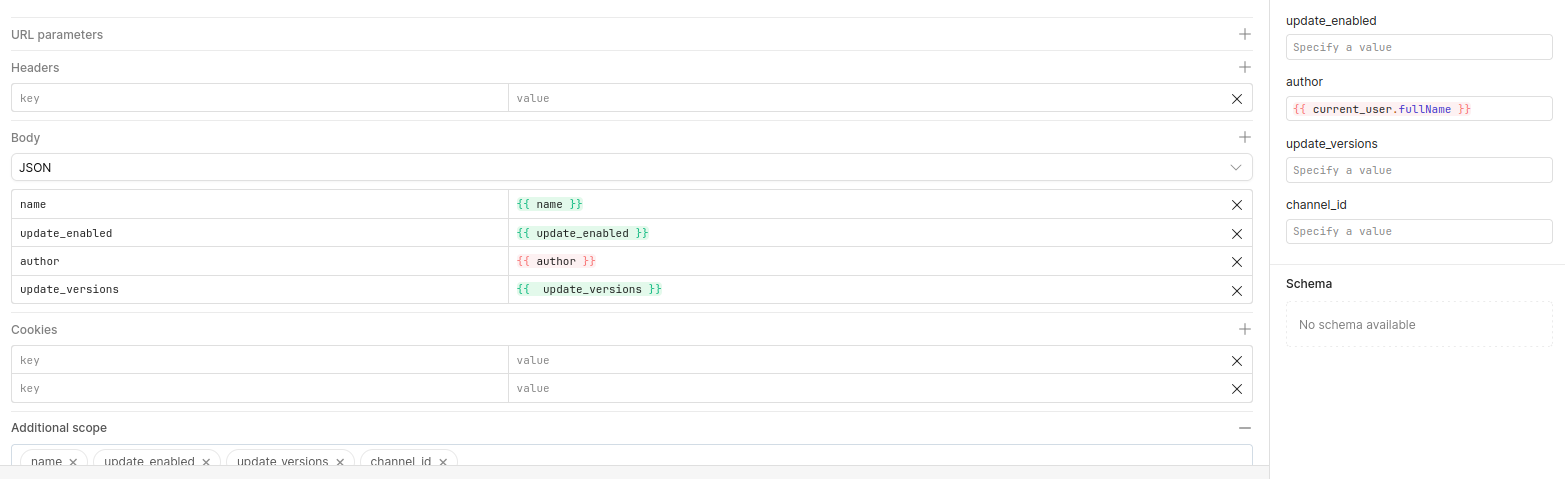
The variables are shown as “just a variable” and came with the expectation like with other tools to be able to test the query. This felt very right as normal queries can’t be tested without making some shenanigans.
It happened to be the default value of the variable.
The values used in the query are meaningless as they have to be replicated in the client query; Maybe set the “default” to be the value set in the query on the left and leave “variables” to be the test variables?
It proposes but shows an error when using sensible defaults like {{ current_user.fullName }}
Hi @AlexisP, this is all helpful feedback, so thank you. I am in the process of encapsulating these concerns into some feature requests, but I'll also address a few of your points.
Accessibility:
I agree it is inconvenient that you can't use a query library request after you've already clicked to create a resource query. Adding this to the FR.
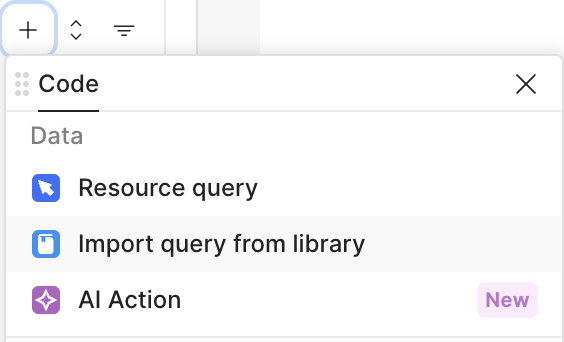
It's worth mentioning there is also an option to directly "Import query from library" when you click the plus sign under a page in the code sidebar.
There is an existing FR for folders that I have added a +1 for you
What do you mean by queries being below resources?
You can use a preconfigured OpenAPI resource in the query library
Variables:
The example value of "{{ current_user }}" in the JSON body is incorrect. You can either hard code a value to be used for all queries, or set a variable name to be called elsewhere. Putting something like {{ current_user }} would create a variable named current_user which you would still need to pass a value into on the right. I have put a FR in to fix this
The example value of "{{ current_user }}" on the right is also incorrect. The query library can't call current_user from that context. You can hardcode values in here to test out the query, but otherwise there is no reason to enter values here as they will be overridden when the query is called.
Additional Data:
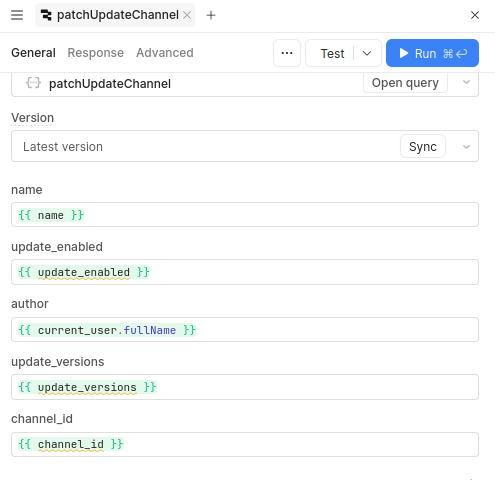
When calling the query from your app, you should be inputting the actual values that you want to update at this point (maybe something like form1.name or checkbox2.value), not the variable names (unless those variable names represent the data you want to pass in, but it looks like those variables are not definied in that context based on the yellow lines).
In our case, we have multiple resources. I expect queries to be linked to a specific resource (and folders below).
That way when we select “we want to query resource A”, we are prompted with custom by default but can select one of the existing queries.
For example:
cloud_api resource
users folder
get_users
update_user
second_site_api resource
users folder
get_users
update_user
In this example we have two resources with similar API endpoints but different arguments. With the current query library, we have resource1_get_users and resource2_get_users;
For additional data, those variable do exist, they are the additional data of the shared query. If we do not input it, then the additional data is not used in the query.
This works and makes perfect sense for the local queries, where we define our additional data according to the caller’s need.
Thanks for sharingthese issues as its a relevant platform to share these kinds of problems conveniently— I faced similar problems while organizing my query library, especially with variables and additional data behaving unexpectedly. Clearer defaults and better structure would really help.