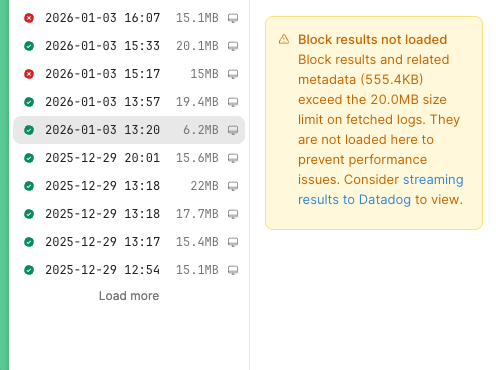
I get this error message when selecting a workflow run:
Block results not loaded

Block results and related metadata (11.0MB) exceed the 20.0MB size limit on fetched logs. They are not loaded here to prevent performance issues. Consider streaming results to Datadog to view.
While i understand the intention, first 11MB is not larger than the limit of 20MB.
Second: At least it would we valuable to know the startTrigger values, so that we can debug / rerun the workflow with same data again.
Possible to at least show the startTrigger data even if the rest exceeds the limit?
In my own testing today on the latest Cloud release ( v3.320.0 ) I generated a Workflow that has some basic JavaScript in it to create an object. For this object I was able to tweak it so the object could be over or under 20Mb pretty easily.
I just wanted to check in today and see how things are going and see if this is something you can still reproduce. If so, let me know if there is maybe something unique with yours.
This happens to me also. Started no more than one month ago. Seeing the start trigger no matter what would be really helpful to initiate a debug routine. Or, if only the link that is provided to the page describing how to setup datadogs wasn’t broken…
Can you please confirm if this is still happening? If so, can you help me by providing some steps to reproduce it outside of your existing Workflows?
I am not able to reproduce this on my own without exceeding the 20mb threshold. Anything that might be unique to your instance or Workflow would be useful in narrowing down the root cause here.
@John_V I am still seeing this. I'm really not certain if my workflow has anything happening that is really unique. I am using loops. I do use a multi step function in these loops. The function would usually also use another multi step function. ATM it's a bit hard for me to troubleshoot simply because I am currently cleaning up the main workflow where the issue is most problematic to try and possibly have it less nested, and also make use of one or two new workflows to handle some heaver lifting. But, my gut feeling is telling me the issue is in some way connected to loop instances which contain multistep functions which also make use of another loop or multistep function. I have a feeling this layering of data accumulation is somehow confusing something under the hood. This feeling is connected to another issue I started noticing around the same time as this one popped up. This other issue involves file create and content upload queries to our Google drive sudden failing often but not always. The method being using in a workflow to export and upload cad files from our Onshape account has been in use for months without any issue. Suddenly, along with this issue, I'm getting workflow failures on file uploads. But, when using a test app and the same library queries, the same file data uploads without a hitch. In fact I can upload the same file data in a test work flow which has no function nesting. I seems to me something about loop instances are exaggerating the accumulated data size of the loop block when the loops function has other nested functions.
On another note, regardless of if this is a bug or not, how do we stream or get access to the workflows logs? If my workflow run is actually over 20mb sometimes, I still want to call the log to something. Can you link to a doc that explains this?
@Shawn_Crocker - I’m also of the opinion that this behavior - i.e. not showing block-level details even if the log size is less than 20Mb - is related to the nested workflows and multi-step functions. One of my workflows starts a subordinate workflow, which in turn uses two multi-step functions, which in turn use a multi-step function each. As of a few weeks ago, I cannot see the block-level details for this workflow, even for the small runs.
Conversely, my other workflow has only one level of nestedness, and for that workflow I can see the block details up to the 20mb, as expected.
@John_V - could we escalate this please? This is not just about debugging block-level details. Without access to logs, the Workflow is out of compliance for many use cases. People in this and similar chains asked numerously how can we externalize access to logs for small and large runs, pointing that the provided link is broken. Please give us some options here. The tool is great otherwise and it would be a real shame having to migrate out because of the technicality...
I am now able to reproduce this behavior. This does appear to be a regression in the code and a bug we are currently working on. It is set to high priority for us internally at this time. Our Workflow team is aware of it and handling it from here.
I can reach back here when I hear anything more from our side on the matter as I will get notified of any changes to the bug report.
Thanks for confirming this is a known issue. Bummer on not being able to download workflow logs . I was really hoping for something like agents where you can make a call to download the agents process logs. I think it would sort follow the pattern really nice to be able to do that .
Hey @Shawn_Crocker I put in a feature request to get this sort of behavior removed from the gate of needing a Business license. I agree, this is important to all customers using the Workflows and should be easier to access. I will add your comment as well on the FR so our team can help understand the impact even more.
I just spot checked the bug report and it is still marked as high and being worked on at the moment. Some other good news is I saw that they took my FR for removing the gate for these logs to be readable in Datadog.
So a fix and hopefully that new feature of Retool no longer requiring the higher license will be in some future releases sooner rather than later.


 . I was really hoping for something like agents where you can make a call to download the agents process logs. I think it would sort follow the pattern really nice to be able to do that
  .
.