Interesting; i just ran into something but not sure if it's 1:1 with your example.
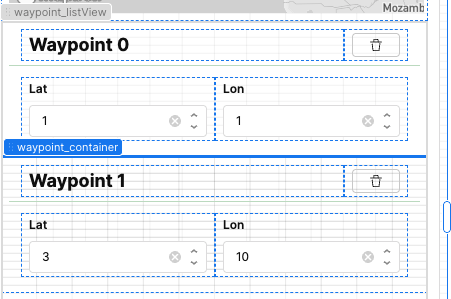
For mine, I'm trying to conditionally set the background on a container which acts as the main repeatable element in my list view. I.e. it contains all the other repeatables.
If i set a color straight up, it works on all items. But I only want at most one to be styled; i do this by matching the underlying repeatable item's id to something external based on user input.
The logic is right; i can see the ternary conditional working properly on input focus preview, but it only renders on the page on hover of the singled out item, and only in Edit mode. Bizarre!
Hey @vonhatphuong thank you so much for patiently waiting! Can you share your code in a screenshot or a loom video so I can better understand what you’re trying to achieve?
My initial thought is that it might be easier to use the Table component, since it supports writing JavaScript for changing row colors. If you can describe your use case a bit more, that would be amazing!
i'm putting the logic for conditionally choosing a color string in the right Inspector pane where one inputs a dynamic style for the list-item container's background color. (you can sorta see it in sandwiched between my first screenshot and video)
hopefully that clears it up but otherwise i can try to get a better screenshot when i have more time
From your description, it sounds like you want the selected container in your ListView to be highlighted with a green background. Here’s how you can achieve this:
Create a temporary variable – use it to store the index (or ID) of the selected container.
Add an event handler – on the container’s click event, set this variable to the index value ({{ i }}).
Apply conditional styling – use the variable to compare with the current container’s index and update the background color. For example:
{{ i === listviewIndex.value ? '#008000' : '#FFF' }}
This way, when you click a container, its index will be stored, and the corresponding container will display with the highlighted background.
Below attached is a reference video showing this behavior:
thanks for the potential workaround, Widle. however, my case doesn't involve clicking (as per your #2)—it's about providing logic to highlight the list item instance by index due to an external factor: which point is selected on a Mapbox component.
Appreciate you checking in, @ChiEn ! I haven’t looked into this further; I only had this set up in a one-off situation and it’s not critical to the single app where I use it. So I’m inclined to leave it be as-is.



 Sounds good, thanks for getting back to me! Feel free to start another topic if you have any other questions!