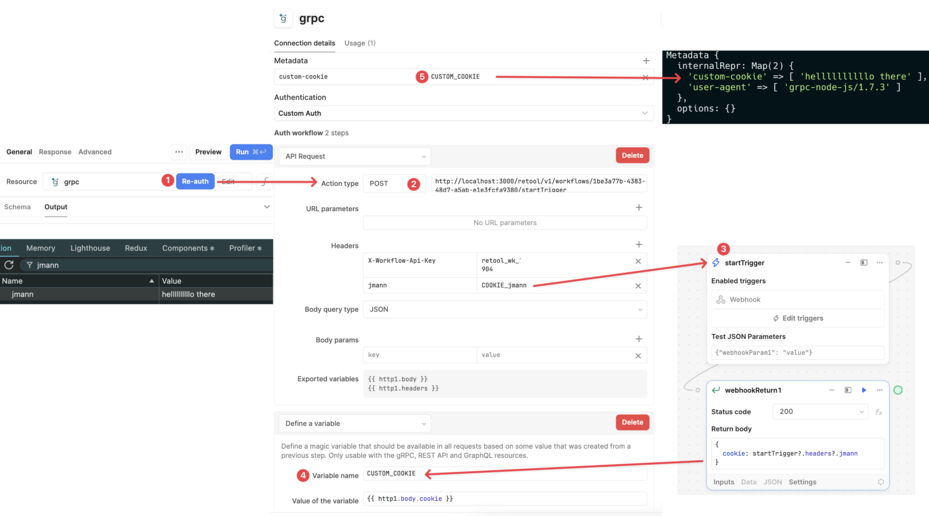
1) My goal: Configure Cookie based authentication using cookie forwarding through retool with gRPC backend. Backend authenticate endpoint responds with HTTP Response headers containing a Set-Cookie, HttpOnly, Secure auth cookie that should be forwarded to the user's browser and included in request headers for authentication in future api requests.
Though Retool proxies all HTTP requests through the backend, Retool supports forwarding the cookies set by the API to the user's browser. This includes attributes such as the expiration date. The cookies are then stored in a HTTPOnly cookie in the user's browser, which is tied to the lifecycle of the user's current session.
To configure this, tell Retool the name of the cookie that should be forwarded onto the user's browser. You can also specify a URL to check the user's authentication status.
However, in retool cloud I'm not seeing anywhere to " tell Retool the name of the cookie that should be forwarded onto the user's browser." (using Retool cloud and a gRPC resource for the backend api). I've looked under Resource Settings > Authentication and tried every version available including custom authentication. I've not been able to find any more detailed retool documentation on the setup process for this. Only this forum post from November saying it might be a deprecated feature of session based auth, which I don't see any option to configure for gRPC resource. The documentation page doesn't indicate this feature is limited to self hosted retool or a deprecated feature.
3) Troubleshooting - Created many different gRPC resources and tried every "authentication" config scheme. Searched all documentation and forum posts for answers. Tried custom authentication and manually getting the header cookie value without success.
4) Additional info: Retool - Cloud hosted.
Thanks in advance for any and all help/information you can assist with.
Great question. I am not super familiar with our gRPC auth options but I can do some digging for you to see if we do have the capabilities for your use case.
The docs you linked seem to be for setting up authentication with cookies for a REST API.
The only auth option for a gRPC resource that has an option for setting headers to include variables would be the 'Custom Auth' option. Could you share a screenshot of how you set up that options and if it gave you any error messages when trying to assign in a COOKIE_csrf_token variable?
-Also for added context, where does the server live that you are connecting to with this RPC resource? Why does it need authing into? I are any of the other options such as Bearer token, Auth0 or OAuth viable in case the gRPC resource does not have cookie setting capabilities?
The only auth option for a gRPC resource that has an option for setting headers to include variables would be the 'Custom Auth' option. Could you share a screenshot of how you set up that options and if it gave you any error messages when trying to assign in a COOKIE_csrf_token variable?
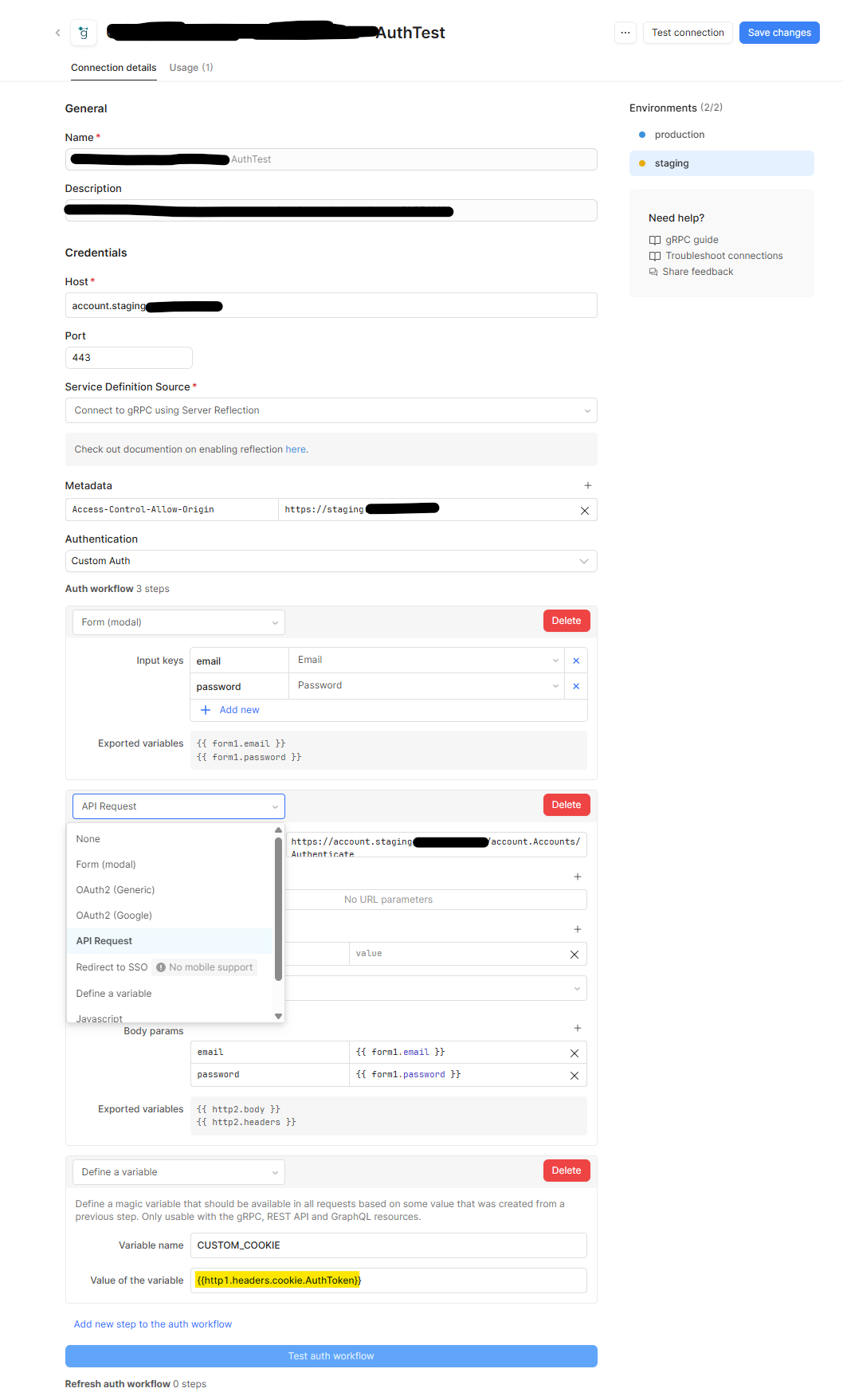
I haven't successfully gotten any cookie to forward and set or to the step in retool's Custom Auth workflow that would allow defining a variable. This issue I'm having is the custom auth does not support making a grpc request. Api Request is only for REST api's, our Authenticate endpoint is gprc and Retool's Custom Auth step does not have an option for gRPC request. Here's a screenshot of a non working attempt.
I don't even necessarily need custom auth flow in retool to work with gRPC. I can configure a regular gRPC resource query within our retool app instead of custom auth to hit the authenticate endpoint. However, I do need some way to forward or access the HttpOnly Cookies sent in the Set-Cookie headers of the response from our gRPC /Authenticate endpoint. Ideally this cookie would forward and be set in user's browser after hitting endpoint in retool and be automatically included in further gRPC requests but even if I'm able to grab the value of the cookie I could work around it.
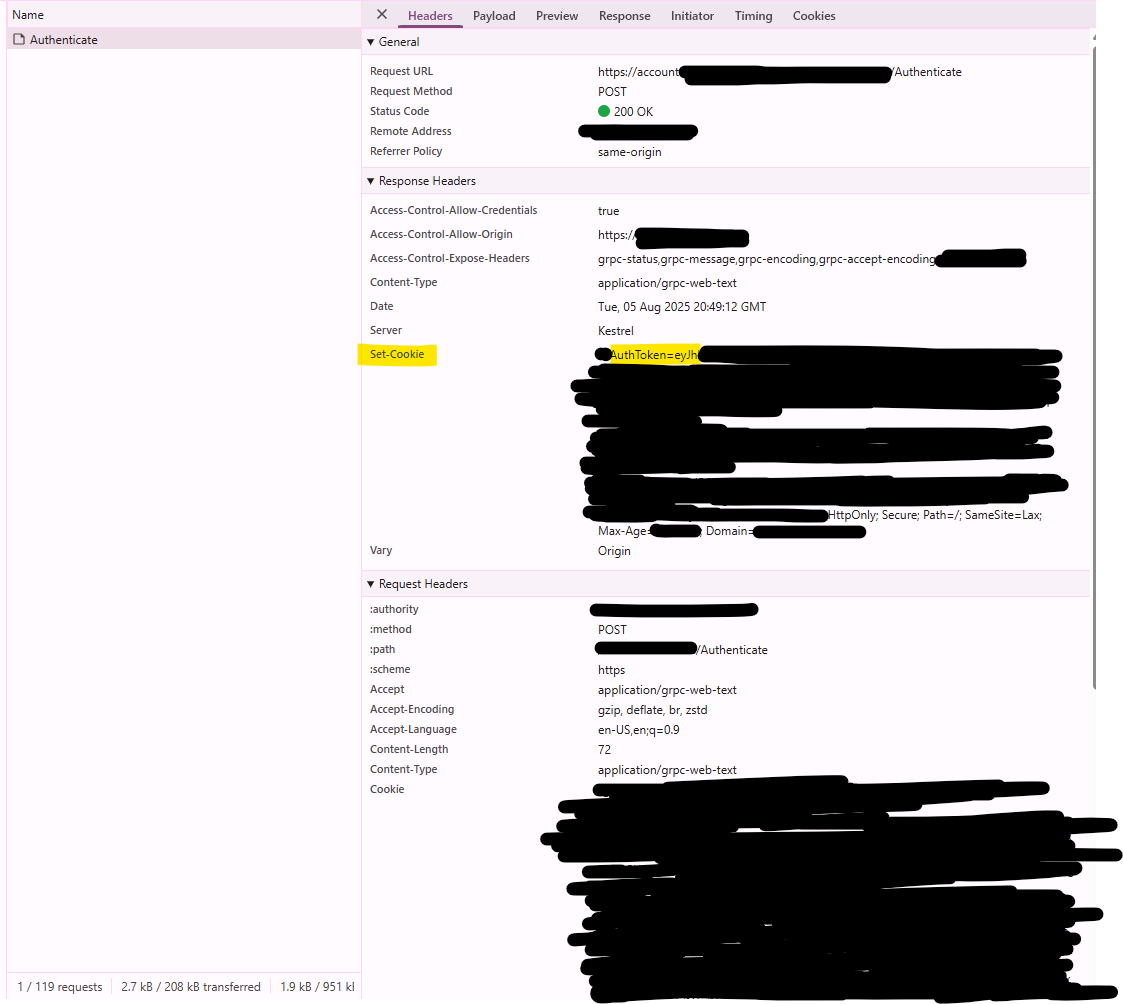
Screenshot of chrome dev tools on our gRPC Authenticate endpoint from browser and the HttpOnly AuthToken cookie set by response headers that I'm trying to access within retool.
Is that functionality currently supported in retool cloud hosted? The env var step you mentioned in the possible workaround seems to only be supported for on premise retool server.
Also for added context, where does the server live that you are connecting to with this RPC resource? Why does it need authing into? I are any of the other options such as Bearer token, Auth0 or OAuth viable in case the gRPC resource does not have cookie setting capabilities?
It's our web application's (stage/prod public facing servers) endpoints that are auth protected behind account login. I can potentially write some middleware to use Bearer Token headers (non ideal) in subsequent requests but our /Authenticate response sets JWT Auth Token with Set-Cookie HttpOnly response headers rather than insecurely in response body.
Thanks for adding +1 to the feature request ticket for me. Is that ticket public facing?
I solved the same problem by checking how cookies were handled in my proxy settings. I realized the browser was blocking third-party cookies, which broke the auth flow.
Also, depending on where you're sending requests from, using residential proxies helped me avoid rate limits and made the requests look more natural to the API I was hitting.
Unfortunately no updates on that ticket. @EvanDev Let us know if @Preyaa's suggestion helps to get the cookies unblocked if there is a proxy involved in your API calls.