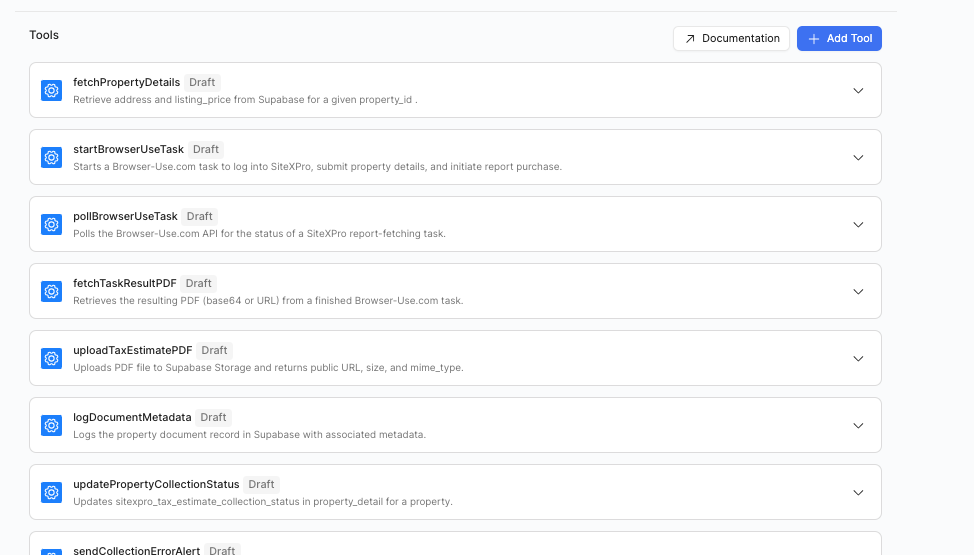
If you use configuration assistant to design custom tooling for an agent, it begins with the orange "finish up" tags. Once you go in and actually finish the code, then come back to the configuration tab, everything is in "draft" format
There is no option to hit "finish up" anymore, ability to publish the tool, deployment, or similar. Things are stuck in "draft" format
Either I'm totally missing something or there's a bug here!
That is odd that all the custom tools are in draft mode.
My guess is that you may need to test out running the tool or saving the tool inside the tool. Can you share a screen recording of all the events that led to this stage of the app?
Here is a simple example of me clicking on a custom tool that's status is draft and saving it.
And here is another video of me creating a new tool and editing it then saving and exiting. Is the issue that when the custom tools are generated by the Configuration Assistant that they are stuck in 'draft'?
If so, could you help me understand the steps I need to follow to reproduce this using the Configuration Assistant?
The agent may have entered into a corrupted state and need to be deleted. If you build without the Configuration Assistant this hopefully shouldn't be occuring.