Hey everyone,
I'm having a slight issue with a GraphQL Resource when being used in one of our workflows. The workflow is currently published and is being used in production with no issues. The issues only show when trying to edit the workflow through the GUI.
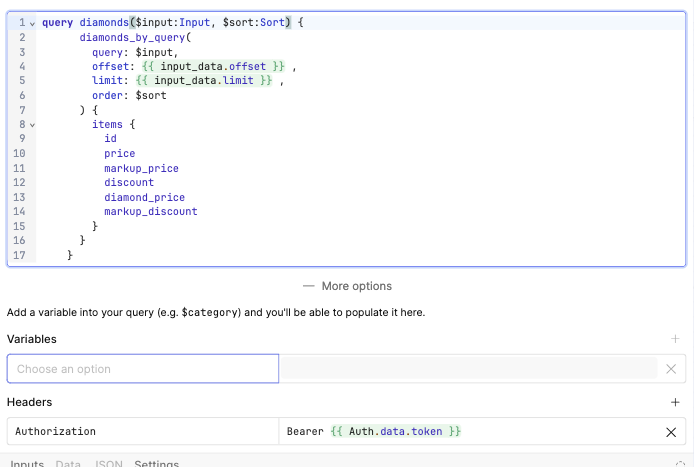
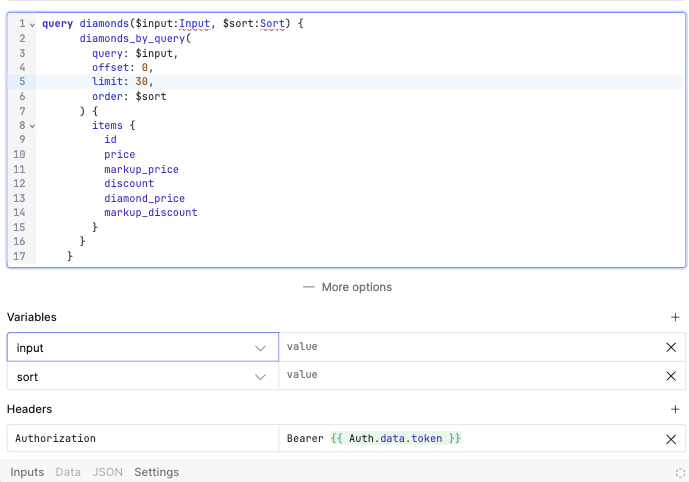
The $input and $sort variables that are being defined within the query are not able to be set.
When doing some testing I tried hardcoding the offset and limit values(previously being pulled from another connected workflow block).
When removing the references to the other block, the GQL variables are being added correctly.
Will this be fixed on Retool' s end, or should we start planning to update all of our workflows?
Many thanks,
Josh
Hey Josh,
What you’re running into is a quirk of how the Workflow GUI parses GraphQL queries. When you reference another block’s output directly inside the query body (e.g. {{ input_data.offset }}), the editor’s variable parser can’t resolve it, so $input and $sort don’t get detected and can’t be set in the Variables panel.
That’s why it works fine in production — the query still runs with the dynamic values — but in the editor you see them “missing” unless you hardcode numbers.
Workarounds:
- Keep
$input and $sort declared in the query signature, and pass their values via the Variables panel (mapping them from {{ input_data }} or another block).
- If needed, add a pre-processing block to assemble those values before feeding them into the GraphQL resource.
- Avoid putting block references directly inside the GraphQL query body if you want the editor to detect variables correctly.
This is more of a parsing limitation in the editor than a runtime bug, so it’s safe to keep your production workflow as-is — but for smoother editing, the above approach should help until Retool updates the parser.
Thanks very much for your response.
We've opted to update the query signature to include the $offset and $limit variables.