My goal: Custom chat agent that uses company information and policies to assist leaders in finding that information and manual or handbook location.
Issue: The manuals and handbooks are being ignored by the chat query and defaulting to the prompts "failure" state. This only happens after I add a third or more Retool Vector. If I only use two it works fine, but otherwise fails completely.
For example, If I have the Employee Handbook and the Manager Playbook loaded the chat system works perfectly fine. When I add a Procedure Manual or anything else that's when it stops working.
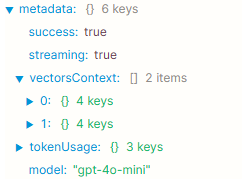
I noticed in the metadata from the output that the VectorContext only goes to 2 (0 and 1). Is there a way to change this?
Steps I've taken to troubleshoot: I have condensed the manuals into very small markdown formatted summaries of each chapter and section of each manual. Each manual is a vector with the documents being each chapter and section. I have tried changing the prompt to only allow it to "fail" after it has checked every manual thoroughly.
Additional info: One manual is made up of roughly 135 individual documents to spread out and keep token levels low per section. The other vectors have roughly 8 to 10 documents.
Please give me some insight or help me trouble shoot this problem. Picture for reference:
Apologies for the issue, that is very odd that the query is ignoring one of the vectors which you gave the agent access to. I haven't seen this bug before but I can try to help troubleshoot.
Just to confirm, are you using the LLM Chat component and the corresponding query that is created with it?
My first thought to solve your problem at the highest level would be to recommend using the brand new Agent Chat component instead of the LLM chat component
You can give it tools to thoroughly utilize all the vectors that exist on your org and it should be able to utilize all the manuals and handbooks as expected
I was just looking through our docs and notice we are a little light on how to use the chat component, but it is the same as the LLM chat in terms of drag/drop it into your app.
Then you will need to specify an agent and thus create an agent. We have some agent templates for fast set up. And then you can make a more custom agent as needed. I will be making a 'Tips and Tricks' post on this shortly.
In terms of triaging the issue with LLM chat+query:
Can you share a screenshot of the error message you get when you try to use three vectors?
What do you mean by "defaulting to the prompts 'failure' state"?
I tried to reproduce this but it looks like my LLM chat component+query gave a lot of context in the query's metadata, but also didn't answer my question of what vectors it has access to
So I will be honest in saying that I have since solved this problem, and do not recall explicitly what the solution was but I think I do and can provide context for anyone else dealing with this issue.
First in response to @Jack_T I can answer some of your clarifying questions, and I will definitely look into the Agent Chat component for my next iteration of my app.
What do you mean by "defaulting to the prompts 'failure' state"?
My custom models instructions may occasionally run across a user asking for information that it does not have access to or the user does not have access to. In that case it by default goes to failure instructions that say something like "I do not have that information available in my knowledge base. Please consult with the AI admin for assistance and bug reporting."
Can you share a screenshot of the error message you get when you try to use three vectors?
The error does not occur with any of the components itself but rather the logic that the model is trying to consult in it's instructions. This is only when referencing it's knowledge base.
My solution
For some reason when I use multiple vectors with a lot of text components in each the system only detects the first few text docs within the vector. This caused it to not find information and look through everything. For example if I have 21 chapters with each chapter having four sections that's 84 separate documents in a vector and that is mirrored in some other documents.
When the model searched the vectors (I assume and have very little evidence for, but to say my work around worked,) it only did the first few documents in the vector and did no search any other vector or even far into the knowledge base of information. So if key information that answers a question is in say chapter 9 of the third vector item it would not even go that far and say that it could not find the info.
I instead have combined the individual documents into one large vector of information. All of the manuals and handbooks now live in one vector and is the only vector referenced. Now when I run queries through it works flawlessly.
This might not be the most elegant solution and makes my 'folder' management within poor and bothersome but if it works I can't complain at this point.
Thank you for reaching out though, because I do want to check out that Agent Chat function for future app products that are in early forms of developement.
Thank you for the well written and thorough response!
I am glad to hear that your work around of having a single giant vector is working well for you. Also thank you for answering those questions I had asked for greater context on the situation.
I am still curious as to why the agent isn't able to continue crawling through a large number of documents and vectors to complete its search but this is good to know as a back up for anyone else encountering this issue that there is a work around.