Hi. I just tested the MCP Server for the first time, as well as the new React app (as opposed to classic Retool apps) and the agent was not able to give me the usual “Environment” toggle we usually get “for free” in the bottom left corner in the classic retool apps. We have defined a Production and Development environment for many of our REST API resources in Retool, so it would be nice to be able to use them, also when creating React apps (or having the agent create React apps).
Slightly different but related: when I go into the React app it’s built it’s as if I’m not even in Retool at all, there’s no button to go back to the menu of the other apps we have, and as I said there’s no “environment” button to switch between development and production versions of our endpoints. I ended up creating a new separate REST API resource to point only to our development endpoint, but maybe I’m missing something? Or is this not implemented yet?
When you mentioned wanting the agent to give you the usual environment toggle, could you clarify what you were expecting the agent to do/show?
In the new app builder, you can manually toggle between environments in the lower left corner of your app.
Since the new app builder is still in beta, there are still features that are not available yet but we are working on adding! One feature that may help you out here is shareable preview links, which will allow builders to try out the app ahead of publishing (more info here).
Hope this helps! If you have additional questions let me know!
When you mentioned wanting the agent to give you the usual environment toggle, could you clarify what you were expecting the agent to do/show?
In the new app builder, you can manually toggle between environments in the lower left corner of your app.
Yes, while I’m building/editing the app, I can see that toggle in the lower left corner, but once I’m inside the actual app itself, it’s no longer there. All I see on the bottom of the app is this:
and if I every press the X that seems to also be gone forever so there’s no way to get back to Retool from here. So I would like to have the environment toggle available also while using the app, like I have for classic Retool apps:
Just to clarify, once you click the "X" to close the menu bar, the environment toggle disappears as well, correct?
No, I only have the environment toggle in the classic (not React) Retool apps. In the classic Retool apps, the sticky footer on the bottom looks like this:
As you can see in the screenshot above, in the classic app I don’t have that “X” in the footer, but I do have the environment toggle and also some other stuff. In the classic apps I also have a header that looks like this:
and this header allows me to click my way back to my Retool home to see the rest of my apps.
But if I go into my React app, the footer looks like this:
As you can see in this screenshot above, all I have in the footer in the React app is the “X” and a “Edit app” button, and nothing else. So there is no environment toggle in the React app, and if I press the “X” there is no longer any way to get back to Retool from this app, except to use the address bar, because there is also no header when I go into the React app.
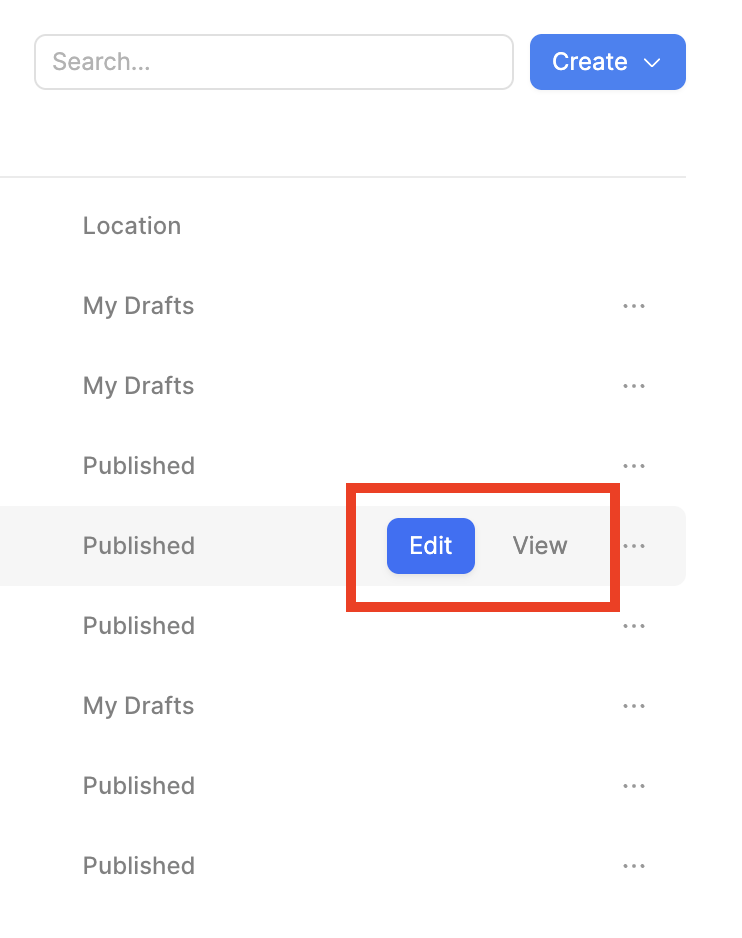
I checked in with our engineering team, and they confirmed that this UI is expected. In the new React app, you only have the environment toggle in Edit mode, and the "Edit app" footer is only seen when you are in Viewer mode.
In your Apps, you can hover over the new React app to see the two different modes:
To go back to your Retool Home after entering into one of these modes, unfortunately you'd have to use the Back button.
While it is not available at the moment, there is ongoing internal discussion about adding the environment toggle in Viewer mode. The new React builder is constantly evolving and the team will be adding/changing more features as they receive feedback from the public.
If this env toggle in Viewer mode is something you'd like, let me know your use case and I'll be happy to pass your comments along to our engineering team for consideration!
Okay, thanks. I hope you will add the same environment functionality for the React apps as exists for the classic apps. My use case is the same in the React apps as in the classical apps: we have development and production versions of our end-points, and we’d like to just define one resource in Retool (a REST API resource) and define a production and development environment on it, which point to the respective production and development endpoints of our back-end. That way we know that whenever we switch the Retool environment toggle to development, all the resources are pointing to the development endpoints, and vice versa. It’s makes it easy to test the Retool apps against our development environment to make sure everything is working correctly, before we start using it in production.
The way I had to work around it now was to create a separate resource pointing to the development endpoint, and ask the Agent to implement a toggle inside the React app, which would switch between using the two different endpoints. That will be a pain to have to implement every time. Especially when we’ve already defined all these resources with the two environments already, it would be nice to be able to use them going forward, instead of having to define a separate resource for Development and Production every time.
Hi @Joakim_Warholm ! Excellent, thank you for your detailed feedback!
I have shown your post to our engineering and product teams, and they are actively discussing now about this feature. I'll swing back here to give you an update as soon as I can.
I’m struggling with this as well. We have apps for setting up customers, etc that run against prod, stage and dev.
There seems to be no way to do this with React apps - or to reliably work out which environment they are pointing to.
For us, this makes React apps completely pointless. And we aren’t going to have classic for other environments and React for production. React apps are way less intensive to build but actually non-functional.
Do you have a solution coming soon, or should we stop all work on React apps?