Hi everyone,
I recently uploaded a video tutorial demonstrating how to integrate Logic.inc with Retool Workflows to handle complex AI tasks like Invoice OCR and categorization without managing your own AI infrastructure.
Watch the full tutorial here: https://youtu.be/-l4P74Vxegs
Note: This wasn't for a client; I was just testing out Logic.inc to see how it integrates with Retool and thought the results were worth sharing. I am not an affiliate, just exploring the tech stack.
Why Logic.inc?
If you have ever tried to build a robust AI feature, you know that calling the OpenAI API is the easy part. The hard part is managing Prompt Engineering, Testing, Versioning, and Evaluations.
Logic.inc solves this by acting as an "Agent as a Service" layer:
- SOP-to-API: You don't write complex prompt chains. You simply upload a "Standard Operating Procedure" (SOP) or describe your business rules in plain English. Logic converts this into a production-ready API endpoint in seconds.
- Built-in Evals: It includes an interface to run test cases against your logic. You can see exactly why an AI decision was made, tweak the instructions in plain English, and re-run tests to ensure reliability before deploying.
- Zero Infrastructure: It handles the heavy lifting—LLM orchestration, model routing, retries, and schema validation—so your Retool workflow stays clean and simple.
Here is a technical breakdown of how I used this stack.
The Stack
- Retool Workflows: Orchestration and Logic.
- Supabase: S3-compatible storage for holding the PDF files.
- Logic.inc: The AI layer handling OCR and financial categorization.
Step 1: Handling File Uploads (Loop Block)
The workflow starts with a Webhook trigger that receives an array of files (Base64 encoded) from a Retool App. Since the AI provider expects public URLs, I first upload these to Supabase.
I used a Loop Block (uploadImagesToS3) to iterate through the incoming files:
- Resource: Supabase Storage (S3) (see here a guide on how to connect Supabase S3 to Retool)
- Action: Upload
- File Content:
{{ value.base64Data }} - Content-Type:
{{ value.type }}
Step 2: Generating Public URLs (JavaScript)
Once uploaded, we need to generate direct links to pass to the AI. I used a JavaScript block to parse the signed URLs returned by Supabase and construct the public path.
Code Snippet (`generatePublicLinks`):
const publicLinks = uploadImagesToS3.data.map(file => {
  // Extract the instance ID from the signed URL provided by Supabase
  const instance = file.signedUrl.split(".")[0];

  // Construct the public URL string manually
  return `${instance}.supabase.co/storage/v1/object/public/other/${file.fileName}`;
});

return publicLinks;
Step 3: AI Analysis & Category Mapping
This is the most powerful part of the workflow. I send the URLs to the Logic.inc API (POST /executions).
Instead of sending a massive prompt text, I send a JSON object containing Invoices and Category Mappings. This allows domain experts (like a Finance Manager) to define strict categories without touching the code.
REST Query Body:
{
  "invoices": {{generatePublicLinks.data}},
  "category_mapping": {
    "office_supplies": {
      "keywords": ["paper", "pen", "notebook", "stapler", "toner", "ink"],
      "category": "Office Supplies"
    },
    "software_saas": {
      "keywords": ["license", "subscription", "SaaS", "cloud", "adobe", "slack"],
      "category": "Software Subscriptions"
    },
    "rent_occupancy": {
      "keywords": ["rent", "lease", "storage", "warehouse"],
      "category": "Rent and Occupancy"
    }
  }
}
Step 4: Bulk Insert to Retool Database
The API returns a structured JSON summary.
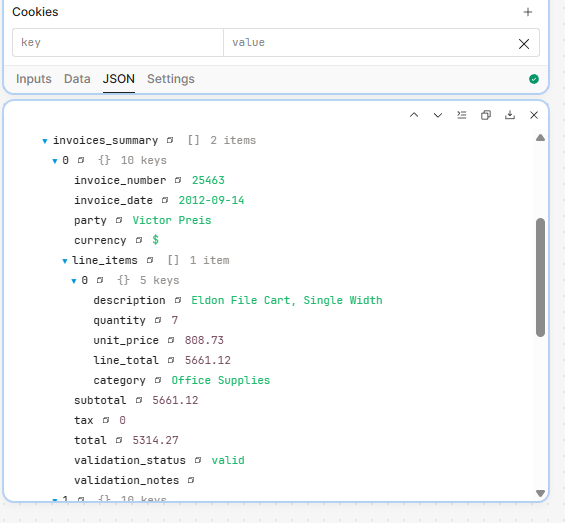
To save this to the database, I had to transform the data slightly—specifically, line_items is returned as a nested array, but my database column expects a JSON string.
I used map() inside the SQL resource to prepare the data for a bulk insert.
SQL Resource Input:
{{
  analyzeInvoices.data.output.json_summary.invoices_summary.map(
    ({ line_items, ...rest }) => ({
      ...rest,
      // Stringify the nested array so it fits into a JSONB or Text column
      line_items: JSON.stringify(line_items)
    })
  )
}}
Download the Workflow
I’ve attached the JSON export of this workflow below. You can import it directly into your Retool instance. You will just need to swap in your own Supabase and Logic.inc resources to get it running.
Let me know if you have any questions!
Cheers, Miguel