Toggle between app and web layout not found in navigation bar
My organization uses business premium. I can't find the web and mobile icon to toggle between when i create an app.
Any way to switch that on?
Toggle between app and web layout not found in navigation bar
My organization uses business premium. I can't find the web and mobile icon to toggle between when i create an app.
Any way to switch that on?
Are you working in a (native) Mobile app or a web app? In a mobile app this is not possible.
I am building in web layout, but I should be able also toggle to mobile and set the layout there, as in the image below. But those icons are not showing

Did you add components to the mobile layout? You first have to add components to the mobile layout, this is not done by default.
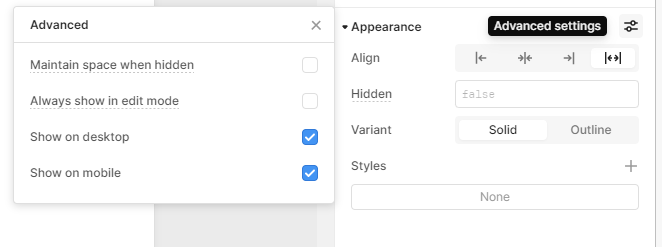
Select a component, click advanced settings and toggle the Show on mobile.
Once done, it will show you the buttons to switch between web and mobile.
Yeah, thanks. It worked