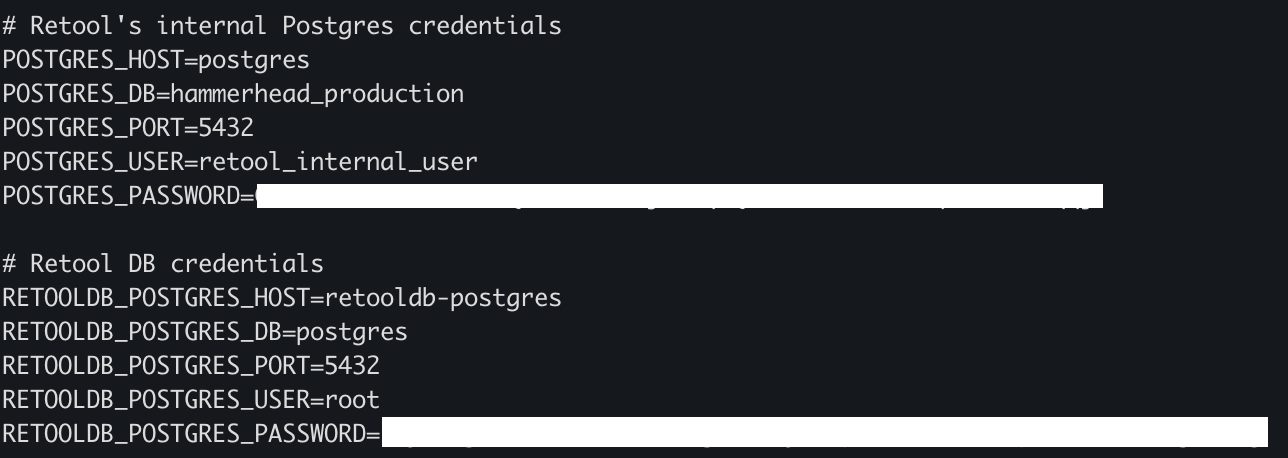
the current version of Postgres I’m running is reaching end of life at my cloud provider, they recommended to check that version bump will be seamless by creating a clone of the database and replace it. This is what I’ve done, changed the connection details in the docker.env and restarted the containers.
I can see in the Retool UI when browsing to settings >> On Prem Environments that it points to the correct Postgres instance, though when I check the Postgres “Resource” where all the user generated data of the Retool app is stored, it still points to the other Postgres DB without a way of editing and pointing it to the cloned db. Am I missing some setting to change the url there as well?
Welcome to the community, @lluft! Thanks for reaching out.
What you're describing is a pretty common point of confusion. There is a difference between the application database - which stores your underlying org data - and the Retool DB resource - which stores user generated data that is then accessed and manipulated by your apps.
Your docker.env might look a little different, but there are two sets of environment variables that you'll need to update - one for each database.
Never got notified about this, just saw your answer now whilst posting a different issue :). Will have a look and get back to you if there are follow up questions. Thanks @Darren!
 There is a difference between the application database - which stores your underlying org data - and the Retool DB resource - which stores user generated data that is then accessed and manipulated by your apps.