- My goal:
- to create a summary tab with the combined data from two tables on two other tabs.
- utilizing table search to filter the table to what we need without calling new queries every time with where clause
- Issue:
- when table is on a hidden tab or hidden in general, it doesn’t hold onto that data for me to use in JSON SQL Query
- Steps I've taken to troubleshoot:
- I’ve tried keeping space when hidden
- I’ve tried duplicating the tables to the tab I want the summary data in. (this sorta works but then I have 2 clunky tables just hanging out with my summary data)
- self hosted
1 Like
Summary
On a self-hosted instance, they want to build a summary tab that combines filtered data from two tables located on other tabs of a tabbed container, but table1.getDisplayedData() returns nothing when the source table sits on a hidden/inactive tab.
AI Response
This is expected/known behavior: table APIs such as getDisplayedData() only return values while the table is actually rendered and visible on the page, so they come back empty or undefined when the table lives on a hidden tab or an inactive tabbed-container view. Retool staff have confirmed this is a long-standing limitation and there is no way to read displayed data from an off-screen table directly. The supported approach is to capture the table's data into a variable, transformer, or query while the table is visible, then reference that stored value on the summary tab. Alternatively, apply the same filtering logic in a transformer/JSON SQL query against the underlying query data so the summary never depends on a rendered table component.
Sources
getDisplayedData only working when table on screen
Staff confirm getDisplayedData and other table APIs only work while the table is visible (not hidden or on another tab) and recommend storing the data in a variable/query/transformer while the table is on-screen.
Corroborates the same root cause, showing that table methods fail when the table is on a non-visible tab of a tabbed container.
The Community Team is testing out a new automation. Let us know if it's helpful (or not) by leaving a  ,
,  , or
, or  . Or by marking this post as the "Solution"! Let us know if you have any feedback here.
1 Like
Hi @Shegs,
I understand the issue you're facing. I tested a similar setup on my end and found an alternative approach that may solve the issue.
I used two sample tables:
Table 1:
[
  {
    "id": 1001,
    "customer": "Acme Corp",
    "status": "Completed",
    "amount": 1250,
    "region": "US"
  },
  {
    "id": 1002,
    "customer": "Beta Ltd",
    "status": "Pending",
    "amount": 850,
    "region": "UK"
  },
  {
    "id": 1003,
    "customer": "Gamma Inc",
    "status": "Completed",
    "amount": 2100,
    "region": "EU"
  },
  {
    "id": 1004,
    "customer": "Delta LLC",
    "status": "Failed",
    "amount": 450,
    "region": "US"
  },
  {
    "id": 1005,
    "customer": "Omega Ltd",
    "status": "Completed",
    "amount": 1750,
    "region": "UK"
  }
]
Table 2:
[
  {
    "id": 2001,
    "order_id": 1001,
    "payment_status": "Paid",
    "payment_method": "Card",
    "fee": 25
  },
  {
    "id": 2002,
    "order_id": 1002,
    "payment_status": "Pending",
    "payment_method": "Bank",
    "fee": 15
  },
  {
    "id": 2003,
    "order_id": 1003,
    "payment_status": "Paid",
    "payment_method": "Card",
    "fee": 42
  },
  {
    "id": 2004,
    "order_id": 1004,
    "payment_status": "Failed",
    "payment_method": "Card",
    "fee": 8
  },
  {
    "id": 2005,
    "order_id": 1005,
    "payment_status": "Paid",
    "payment_method": "Bank",
    "fee": 30
  }
]
I created two global state variables:
table1Datatable2Data
Then, in the Success event handler of each query, I stored the corresponding table data:
table1Data→{{ table1.data }}table2Data→{{ table2.data }}
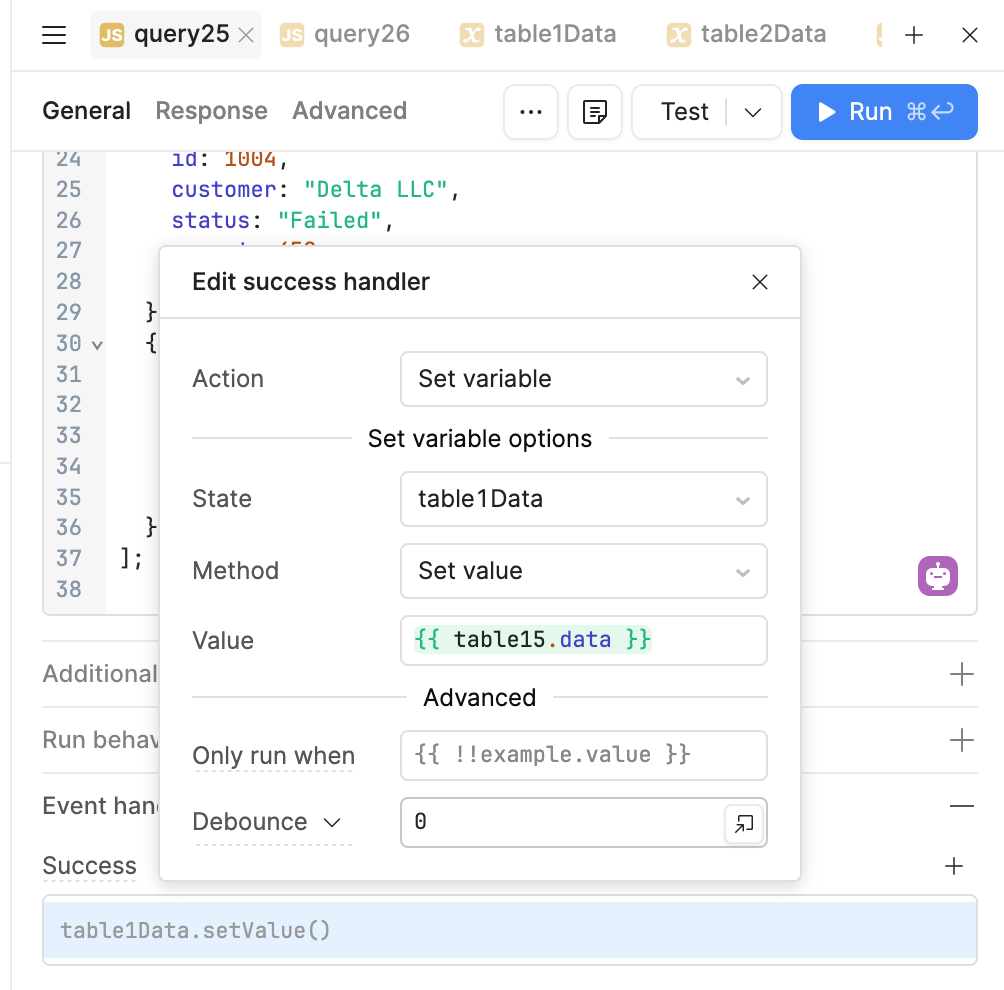
This way, the data is stored independently of whether the table is currently visible or hidden.
For the Summary tab, I used the following code:
const orders = table1Data.value || [];
const payments = table2Data.value || [];

return orders.map(order => {
  const payment = payments.find(
    p => p.order_id === order.id
  );

  return {
    order_id: order.id,
    customer: order.customer,
    region: order.region,
    order_status: order.status,
    amount: order.amount,
    payment_status: payment?.payment_status ?? null,
    payment_method: payment?.payment_method ?? null,
    fee: payment?.fee ?? 0
  };
});
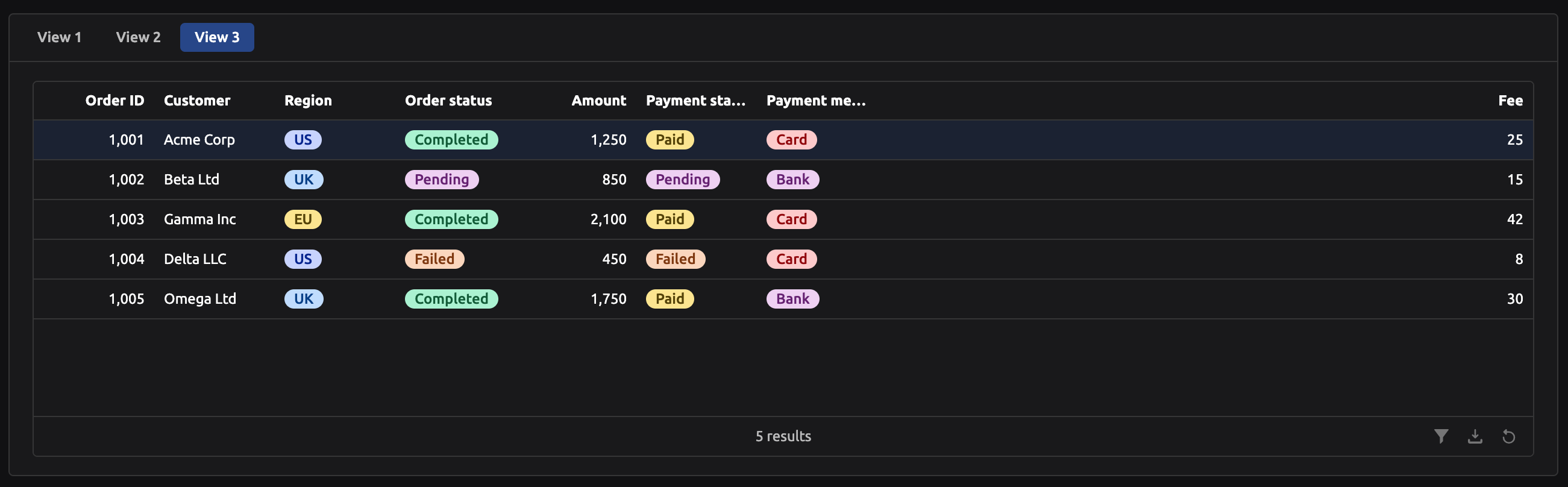
The main idea is to store the table data in variables when the queries finish successfully, rather than relying directly on {{ table1.data }} or {{ table2.data }} from components that may be hidden.
This also works when the tables have filters applied. The updated data is stored in the variables after the query/table updates, and the Summary tab can use those variables to combine the data.
If you're not using {{ table1.data }} and instead want to store the raw query results directly, you can also set the variable using:
{{ query1.data }}
Using this approach, the Summary tab can combine data from both tables regardless of whether the source table is currently visible or hidden.
I hope this helps. If you're still seeing an issue, please share a screenshot or screen recording of your current setup, and I can take a closer look.
Hi @Shegs! Just checking in to see if you were able to give @WidleStudioLLP's suggestion using state variables a try?
Unfortunately the limitation with using table.getDisplayedData() is that only the data from a currently displayed table is returned, and not the data from hidden tables or tables on another tab. More info about this table method here!
Since you have a hidden tab or hidden data in general, you can capture each of the two tables' data into global state or temporary state variables as soon as the query succeeds. This allows them to persist regardless of whether the table is currently rendered or not.
That being said, happy to take a look at your setup/screenshots/screen recording if you're still running into issues 
-Jen
1 Like
sorry I was going to respond earlier, but this doesn’t quite meet my needs.
I am using the search term feature on the table to filter down an existing dataset to keep it in memory rather than using a where clause against every field in the table and calling the database with every filter.
using the Javascript Resource I am able to create a data value of just the results after that search term has been applied:
const results = await table1.getDisplayedData();
return results;
but once the table is out of view, that javascript can’t return any results.
and I can’t use the code above to put that DisplayedData into a variable because there is no event trigger that is tied to the search term filter being applied.
I think I will attempt to use the filter component rather than the search bar I have standard in all other apps. at least I’ll supposedly be able to trigger with that event.
Let me know if there is some other way to use the Search Term feature on the table settings, or if using a filter is my only choice.
Thanks
1 Like
Hi @Shegs,
As you mentioned that there is no event trigger available, you can add the following code directly to the same JS query resource:
const data = await table15.getDisplayedData();

table1Data.setValue(data);

return data;
Then, store table1Data in Global State so you can access and use this data anywhere across the pages of the app.
Hope this helps! If you still face any issues after trying this approach, please share a screenshot or screen recording of your setup so we can take a closer look and resolve it.
I’m still lost on how to trigger that action when the Search Term updates the table’s DisplayedData.
1 Like
I think I found a workaround where I trigger the JS action when the search text input field changes, and when the tabbed container view changes.
it’s janky but it seems to be the best I can do.
1 Like
Thanks for your patience @Shegs!
I have double-checked internally and tested around, but at this time there is no clean way to call component methods when the component/table is not rendered in view.
If not using global/temporary state variables, it sounds like you were able to find a workaround with the filter component to trigger the state update directly.
There is an internal feature request so I can circle back here as soon as I get an update!
-Jen
1 Like