-
Let me preface this with, I am extremely new to app building and coding. I started with the free account and with the help of ChatGPT.
-
I am building an app in Retool’s new App Builder and am running into what appears to be a file persistence / synchronization issue with backend functions and some frontend code changes.
The app is currently functional, but changes I make to backend function files are not consistently persisting after I close and reopen the app.
Reproduction steps:
- I created a simple backend function named
testPersistence.tswith:
type Params = {} export default async function testPersistence({ params }: { params: Params }) { return { message: 'PERSISTENCE_TEST_0914' } }-
I closed Retool, reopened the app, and confirmed that this original code persisted.
-
I then replaced the entire contents of
testPersistence.tswith a larger backend function. -
The new code initially appeared correctly in the editor.
-
After closing and reopening Retool,
testPersistence.tsreverted back to the originalPERSISTENCE_TEST_0914code.
I have also seen the following behavior in the same app:
-
Newly created backend functions sometimes reopen completely blank.
-
A newly created
getSowActivitiesV2.tsfunction lost all of its contents. -
Another newly created backend function also reopened blank.
-
Changes made to
frontend/pages/ProductionDashboard.tsxhave reverted after reopening the app. -
The Timeline continues to execute older backend functions even after the frontend was changed to point to a new backend function.
-
The app appears to be loading an older registered/synchronized version of some files instead of the latest editor contents.
One important detail: I also created a simple frontend test file, and that file did persist correctly after closing and reopening. The problem appears to be more specific to backend functions and/or App Builder synchronization.
This is preventing me from safely continuing development because I cannot trust that code changes will persist or that Preview/Timeline is executing the latest version.
Could you please investigate whether this app has a backend-function synchronization, sandbox, or file persistence issue?
I can provide screenshots, the affected app, exact file names, and additional reproduction steps if needed.
- I created a simple backend function named
Summary
While building in Retool's new App Builder (Cloud), manual edits to backend function
.tsfiles are not reliably persisting — files revert to older versions or reopen blank after closing/reopening, and the Timeline/Preview keeps running an older synchronized version, even though a frontend test file persisted correctly.AI Response
In the new App Builder, manual code changes are made in the Code tab and are tracked alongside the agent's changes in Change History (agent edits are prefixed with
(Agent)), so an agent regenerating files can overwrite hand-written backend function code. Editing is also locked while critical operations are running and certain platform/agent files are view-only, both of which can cause manual edits to appear not to save. To keep changes durable, make edits in the Code tab only when no agent operation is in progress, confirm the change is recorded in Change History, and avoid editing view-only files. Since manual file management from the Code tab is a recent addition to the new App Builder, reviewing how file creation/editing and change tracking are intended to work is the best way to reconcile this behavior.Sources
Manually edit app code | Retool Docs
Explains manually editing app code in the new App Builder's Code tab, including Change History (agent vs. user edits), view-only files, and edit-locking during critical operations — the mechanisms most likely behind backend function edits reverting or reopening blank.
Retool Team announcement introducing manual file management for the new App Builder's Code tab, confirming this is newly available and pointing to the file-management guidance relevant to persisting backend function changes.
The Community Team is testing out a new automation. Let us know if it's helpful (or not) by leaving a  ,
,  , or
, or  . Or by marking this post as the "Solution"! Let us know if you have any feedback here.
Welcome to the community, @J_T! Thanks for reaching out.
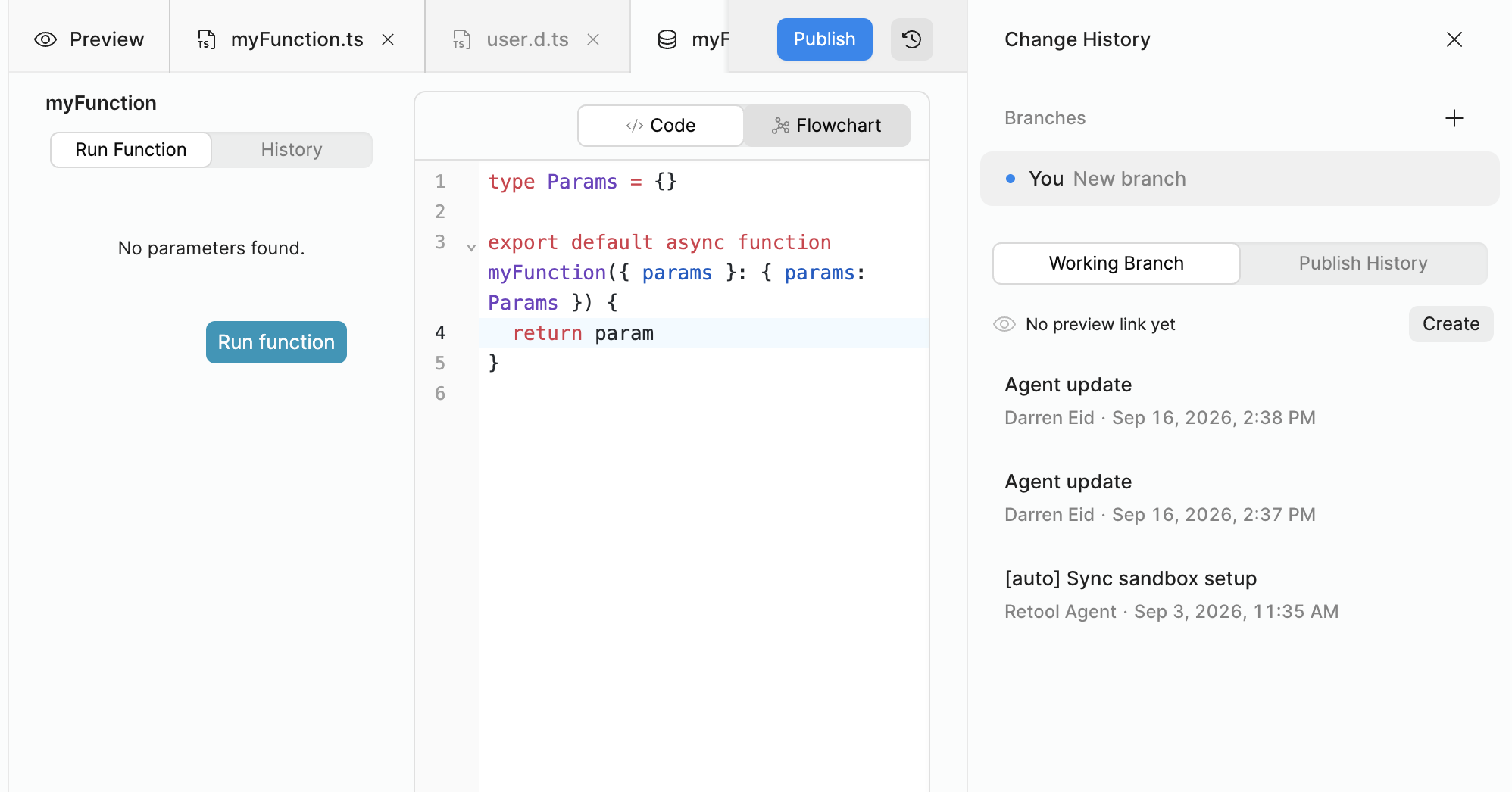
Our team here will do some additional investigation, but I might be able to shed light on parts of what you're describing. In particular, there can definitely be a delay between making manual edits and having them persisted via a commit. You can clearly see this when looking at the Change History drawer:
In general, though, are you having issues with one app but not another? Feel free to share it's name or UUID, if so.
Hello @J_T! Just following up from Darren's last message to you!
Were you able to check out the Change History to find your commits? Are you still seeing this sync issue in any specific app or more than 1 app?
Let me know if you still need assistance 
-Jen