Hi @Darren,
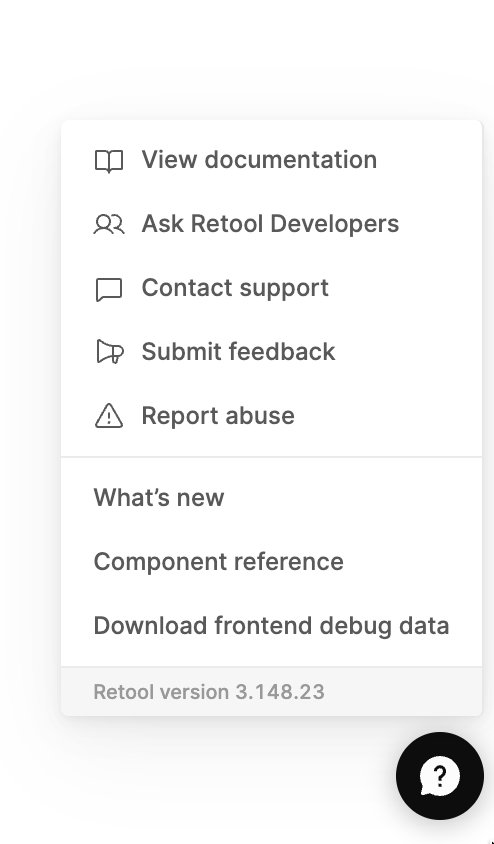
I upgraded from 3.75.3 to 3.148.23 worked, and then to 3.148.32 and 3.196.23, following the documentation. The containers are running successfully; however, the Retool version still shows 3.148.23.
Below are the versions specified in the required files, along with a screenshot from the running Retool instance. Do you have any idea what else I should check or test?
Hosting setup: Docker
What I’ve tried so far: Cycled container , restarted docker
CodeExecutor.DockerFile: FROM tryretool/code-executor-service:3.196.23-stable DockerFile: FROM tryretool/backend:3.196.23-stable Screenshot:
I haven’t tried using the build command yet. However, I just did update to version 3.148.32 with build, and now I’m getting the following error. The status for retool-onpremise_code-executor_1 container shows as restarting.
{"dd":{"env":"production","service":"code_executor_service","span_id":"6934663805844439689","trace_id":"6934663805844439689"},"level":"error","message":"[E][2025-09-24T22:23:04+0000][1] initCloneNs():382 mount('/', '/', NULL, MS_REC|MS_PRIVATE, NULL): Permission denied\n[E][2025-09-24T22:23:04+0000][23] standaloneMode():275 Couldn't launch the child process\n[F][2025-09-24T22:23:04+0000][1] runChild():483 Launching child process failed","timestamp":"2025-09-24T22:23:05.010Z"}
{"level":"info","message":"can use nsjail: false","timestamp":"2025-09-24T22:23:05.013Z"}
{"level":"error","message":"Error when executing code in sandbox. Is the container configured with privileged and cloneUserNs permissions? If you do not need code sandboxing, set CONTAINER_UNPRIVILEGED_MODE='true' environment variable.","timestamp":"2025-09-24T22:23:05.014Z"}
Are you hosting on Fargate? If you don't need secure sandboxing, you can set the CONTAINER_UNPRIVILEGED_MODE environment variable on the code-executor service to true.
Thank you for the help! Adding the environment variable with user in code-executor service resolved the issue. However, performance was degraded with version 3.148.32, but it was restored once upgraded to versions 3.196.23 and 3.253.2.