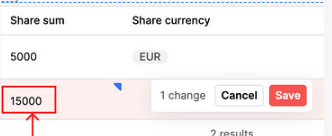
I added a new table cell value for an empty cell (I did that by making the column editable), and the value I provided is not reachable using selectedRow. I need that to get the value in order to configure the save and update function.
Thanks for sharing the screenshot—got it. The core issue is that your UPDATE query is using hard-coded/input values. When you edit directly in a Retool Table, you should read the edits from the table’s change set and pass those into your query instead: table1.changesetArray (array of changed rows) or table1.changesetObject (object keyed by primary key).
What to do
1) Make sure the table has a primary key set
In the Table settings, set Primary key to the unique ID column. Without this, the change set won’t map rows correctly.
2) Use the change set in your update flow
Option A — Row-by-row updates (simple & reliable)
// JS query to run on "Save changes" or a button click
const updates = table1.changesetArray;  // [{ id: 123, status: 'Paid', amount: 99.5 }, ...]
if (!updates.length) return utils.showNotification({ title: 'No changes to save.' });

for (const row of updates) {
  await updateRow.trigger({
    additionalScope: { row }  // pass the whole row to the SQL query
  });
}

table1.clearChangeset();
utils.showNotification({ title: 'Updates saved successfully.' });
SQL for updateRow (example Postgres)
UPDATE orders
SET
  status = {{ row.status }},
  amount = {{ row.amount }}
WHERE id = {{ row.id }};
Option B — Iterate over changesetObject (when you prefer keyed access)