Select component fuzzy search does not match hyphenated values when typing with spaces

Description:
I noticed an inconsistent behavior in the Select component’s fuzzy search.
When the value stored in the database contains a hyphen (-), the Select does not return results if the user types the name with spaces, even though it should match.

Example value in the database:
Mahoney-Buffalo

Expected behavior:
The Select should return the option when typing:

  • Mahoney Buffalo (with space)

  • Mahoney-Buffalo (exact match)

  • Mahoney (partial match)

Actual behavior:
It only returns the value when typing:
MahoneyBuffalo (no spaces, no hyphen)

Typing Mahoney Buffalo returns no matches, even though the record exists.

Notes:
It looks like the fuzzy search may be stripping special characters, but it does not treat a space as equivalent to a hyphen or a natural word boundary.

Video reference:

The video shows the behavior and why it seems unintended.

1 Like

Hello @Jose_Aranda, welcome to the Retool Community!

I totally understand the issue you're facing. I tested a similar scenario using mock data, and one simple improvement that worked really well was normalizing both the search input and dataset values.

This ensures that hyphens (-) and spaces ( ) are treated the same, which makes the search feel much more natural and user-friendly.

For example, users will get the right results whether they type:

  • Mahoney Buffalo
  • Mahoney-Buffalo
  • or even just Mahoney

Here’s a working JS query you can use in Retool:

const list = getLocations.data;  // 👈 Replace with your actual query name
const searchText = textInput1.value || "";
const query = searchText.toLowerCase().replace(/[-\s]+/g, "");

return list.filter(item =>
  item.name.toLowerCase().replace(/[-\s]+/g, "").includes(query)
);

What this solves:

User Input Matches
Mahoney Buffalo Mahoney-Buffalo
Mahoney-Buffalo Mahoney-Buffalo
Mahoney Mahoney-Buffalo

This approach greatly improves search usability without needing additional libraries.

Hope this helps!

1 Like

Thanks for reaching out, @Jose_Aranda!

It does feel like a space should be more or less ignored when performing a fuzzy search like this. :thinking: I can do some additional research and potentially reach out internally to get some clarification.

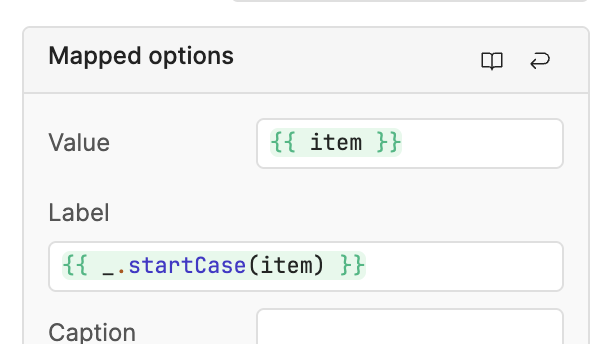
To @WidleStudioLLP's point, though, one workaround is to normalize your mapped options - their labels, specifically, as that is the attribute used for the search functionality.

2 Likes

(post deleted by author)

1 Like

Hello @Jose_Aranda ,

_.startCase is a Lodash function that automatically formats a string into readable title-case words.
To do this, it splits the text wherever it finds spaces, hyphens (-), underscores (_), or other word boundaries, and then capitalizes each separated word.

For example:

  • "hello-world""Hello World"
  • "site_location-name""Site Location Name"
  • "myValueTest""My Value Test"

Because startCase breaks words at hyphens, it no longer matches the original hyphenated form, which is why fuzzy search fails in your case.

That’s why I suggested using the custom transformer above — it removes spaces and hyphens on both sides before comparing, so the fuzzy search works exactly as you need.

1 Like

Thanks for the explanation!

I understand what _.startCase does, but I'm still not sure where I should apply the custom transformer in Retool. Since I'm using a Select component (not a Text Input), I don't know where this normalization code is supposed to go.

Could you provide a step-by-step guide for Retool specifically?
For example:

  • Where exactly do I place the transformer?
  • Do I apply it to the Select’s “Mapped options”, to the “Values”, or to another property?
2 Likes

@Jose_Aranda ,

To help demonstrate how your search behaves with names that contain hyphens, slashes, underscores, dashes, and other special characters, I created a mock dataset that closely matches the pattern in your original data.


Transformer 24 – Mock Client Data

return [
  {
    id: 1,
    client_name: "MAHONEY-BUFFALO WINGS #442",
    client_address: "4821 LAKE RIDGE RD",
    client_phone: "414-883-1299"
  },
  {
    id: 2,
    client_name: "MAHONEY PIZZA-HUT / MADISON",
    client_address: "712 VERONA AVE",
    client_phone: "608-443-9071"
  },
  {
    id: 3,
    client_name: "MAHONEY KFC – STORE-071229",
    client_address: "1973 EASTWOOD DR",
    client_phone: "262-674-3322"
  },
  {
    id: 4,
    client_name: "MAHONEY TACO-BELL (WEST)",
    client_address: "900 RIVERSIDE DR",
    client_phone: "920-335-2990"
  },
  {
    id: 5,
    client_name: "MAHONEY BURGER_KING — GREENFIELD",
    client_address: "2314 S 27TH ST",
    client_phone: "414-762-1288"
  },
  {
    id: 6,
    client_name: "MAHONEY CHICK-FIL-A: NORTHSIDE",
    client_address: "1991 N LOOP RD",
    client_phone: "920-389-6022"
  },
  {
    id: 7,
    client_name: "MAHONEY—WENDY'S_RACINE 77",
    client_address: "7038 WASHINGTON AVE",
    client_phone: "262-639-8172"
  },
  {
    id: 8,
    client_name: "MAHONEY / DAIRY-QUEEN (D.Q.)",
    client_address: "1818 MAIN ST",
    client_phone: "414-932-2890"
  },
  {
    id: 9,
    client_name: "MAHONEY*SUBWAY*SHOP_14",
    client_address: "1622 CARROLL ST",
    client_phone: "262-373-6604"
  },
  {
    id: 10,
    client_name: "MAHONEY BIG-BEAR BURGER / UNIT–4",
    client_address: "3290 HARBOR VIEW DR",
    client_phone: "920-228-5588"
  }
]


Transformer 25 – Normalized Search Filter

const list = {{transformer24.value}};  // mock data above
const searchText = {{select6.value || ""}};

const query = searchText.toLowerCase().replace(/[-\s]+/g, "");

return list.filter(item =>
  item.client_name.toLowerCase().replace(/[-\s]+/g, "").includes(query)
);

Live Example

Here’s the working demo:

1 Like

The issue isn't with the data displayed in the table. The problem is in the search inside the select input: when you try to search, the option doesn't appear in the list. Here's a video showing the issue: https://drive.google.com/file/d/1KdXFr-KGhikilNhRZ-T6ZTfe1Om3os5h/view?usp=sharing

1 Like

@Jose_Aranda,
The Select component currently supports only three search modes: Fuzzy Match, Case Insensitive, and Case Sensitive. There are no additional options to modify the search behavior beyond these.
If you need more customized search logic, using a custom component would be the alternative solution.

1 Like