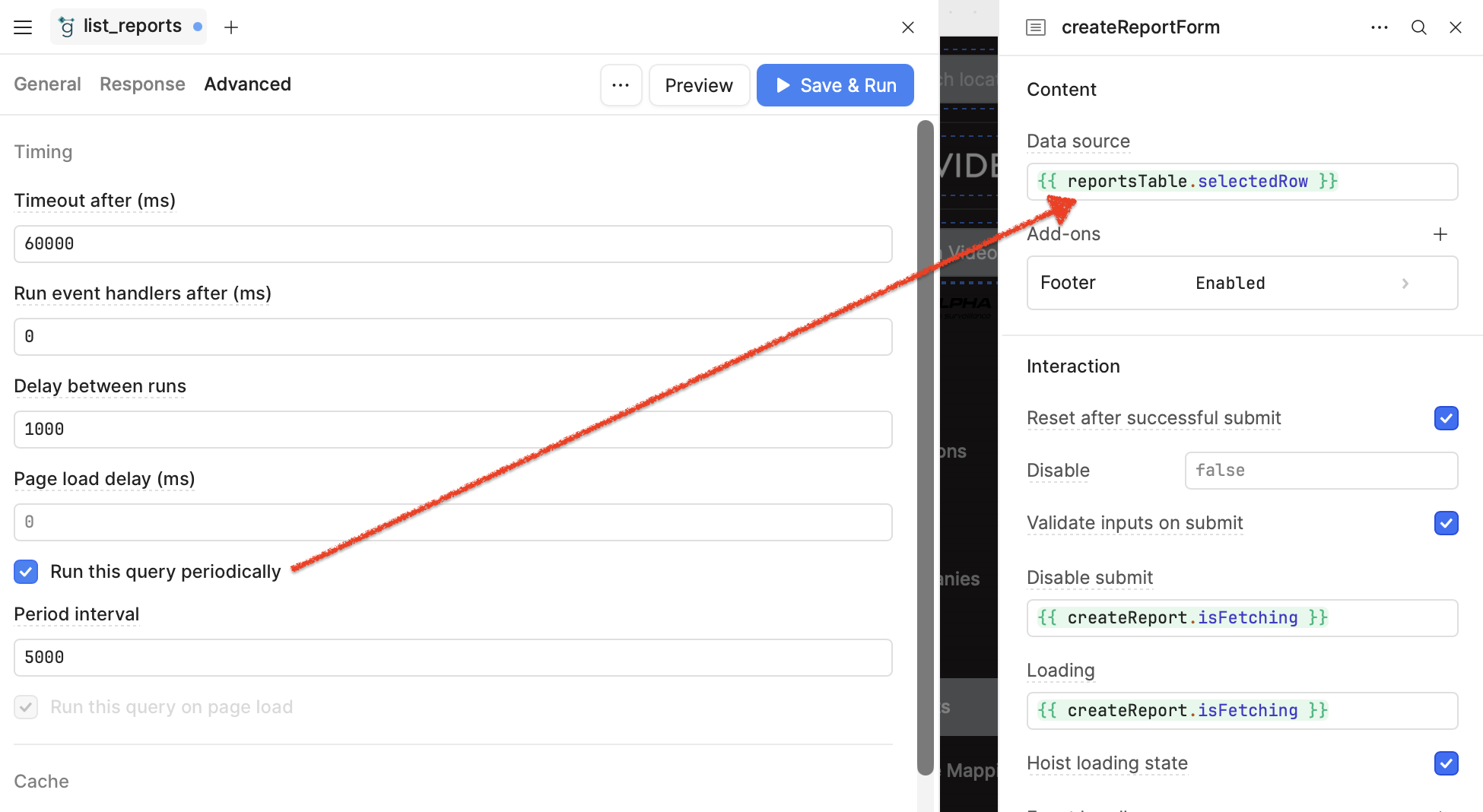
In advanced settings of my grpc query, there's a checkbox "Run this query periodically". On the same page, I have a form in a modal window which is submitted later. The automatic background run of grpc query messes up the currently opened form, and changes the content randomly.
Try it, perfect reproducibility.
1 Like
Hi @pavelgur,
Can you share some screen shots of how you set up the query and the form?
These two should not effect each other  if I can reproduce this then I can file a bug report for engineering to address
1 Like
I have a hypothesis that "Data source", which supposedly fills the data from the current table (but never actually does it), on table refresh populates data from random row in the updated table
1 Like
Hey @pavelgur ,
I understand your issue. When using gRPC queries in Retool, sometimes the returned records can appear in a random order, especially if the backend doesn't enforce a specific sort sequence.
To fix this, you can try modifying your query to include an explicit ordering, such as using a field like created_at, id, or any other column that ensures a consistent sequence of records. This way, when the form or table loads, it doesn't pick a random row during selection or refresh.
For example, if your proto service supports it, you could pass a sorting parameter in your gRPC request like:
{
  "sortBy": "created_at",
  "sortDirection": "DESC"
}
If sorting isn’t directly supported in the service definition, consider adding ordering logic on the backend side or requesting an enhancement to the gRPC service to include that capability.
Also, if your goal is to keep the same row selected after updating or refreshing, you might want to store the selected row’s unique ID in a temporary state and reapply it after refresh — especially if the sort order ensures that the row still appears in the visible result set.
Let me know if your gRPC method has support for sorting parameters, or if you're working around that using transformers or custom logic in Retool. Happy to assist further!
4 Likes
Hi @pavelgur,
Thank you for the screen shot and added details!
I think that hypothesis is definitely possible, as the table's rows could change their order when the page reloads/refreshes and the query to fetch the table data is re-run 
Are you using the form component to update row data based on which row it is being populated with data?
My thoughts are to potentially not run the gRPC query periodically unless you are ok with table refreshes occurring.
You could try following @WidleStudioLLP's suggestion of sorting the table and then having the Table's default row be set to consistently grab the right row's data for the form component.
Or protect the form's data source until it can be determined to be the data the user wants to populate the form with and use.
This could be done by not have a row in the table selected on page load, setting the form's source to be a variable, who's data you set based on user action or any series of events to be the row data or any data that the user specifies.
2 Likes
I do not need to populate the current row of the table into the form, actually, so now I left the "Data source" field empty. I want the form to have absolutely nothing to do with the current contents of the table, as I'm trying to create a new record, not edit the existing one.
The reason for confusion was that when I open the form, it does not populate the contents (form is empty), that's why I didn't realize it has anything to do with the table in the first place. It only takes the data and overwrites user's input on refresh.
Nevermind -- I have solved the problem by triggering Reset of the form when I open it and clearing the "Data source" field of the form.
1 Like