I would like to have my users click a log out button to log out of my program.
It would be equivalent to clicking on the "X" at the right end of the address tab at the top of the screen.
Is there a way of doing that?
Mike
I would like to have my users click a log out button to log out of my program.
It would be equivalent to clicking on the "X" at the right end of the address tab at the top of the screen.
Is there a way of doing that?
Mike
Summary
A log out button is wanted inside a Retool app so that clicking it signs the current user out, equivalent to closing the browser tab and returning them to the login page.
AI Response
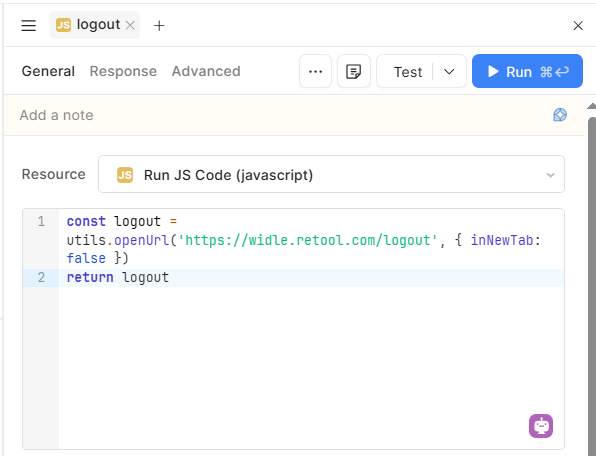
This is achievable in a classic Retool app without any special component. Add a Button, then configure a click event handler that runs the utils.openUrl() action pointing to your org's logout URL (https://YOURORG.retool.com/logout). Opening that URL ends the session and returns the user to the login screen. Substitute your actual subdomain in place of YOURORG.
Sources
How do I get my operator to Exit from my App
Solved topic covering the same request, with the exact workaround: a button that calls utils.openUrl() to the org's /logout URL to sign the user out and return them to the login page.
Solved topic confirming that navigating to the /logout URL is the supported way to log a user out from within an app.
The Community Team is testing out a new automation. Let us know if it's helpful (or not) by leaving a  ,
,  , or
, or  . Or by marking this post as the "Solution"! Let us know if you have any feedback here.
Hi @mdsmith1 ,
Yes, you can trigger a logout directly via JavaScript using Retool's built-in utils.openUrl() function.
logout.utils.openUrl('https://<your-workspace>.retool.com/logout', { inNewTab: false })
Note: Replace
<your-workspace>with your actual Retool domain. SettinginNewTab: falseensures the user is redirected away from the current app directly to the logout page, ending their session.
logoutHere is what worked for me:
await utils.openUrl("Your request has been blocked. This could be due to several reasons.", { newTab: true });
This routes control out of Retool to the Microsoft web site.
Mike