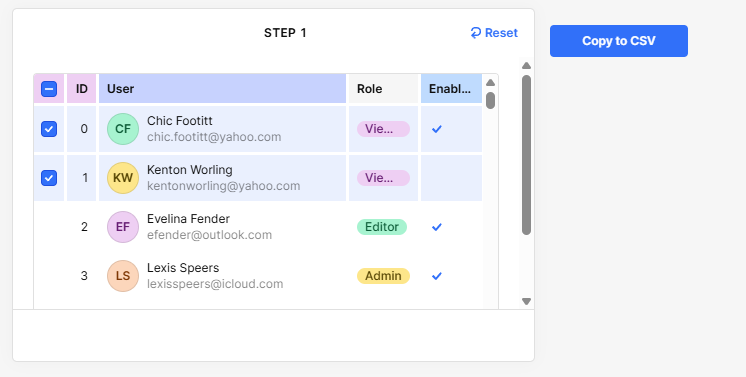
Is it possible to copy and paste specific columns from the table?

Is there an option to select specific columns from the table? I want to copy data from a selected area.

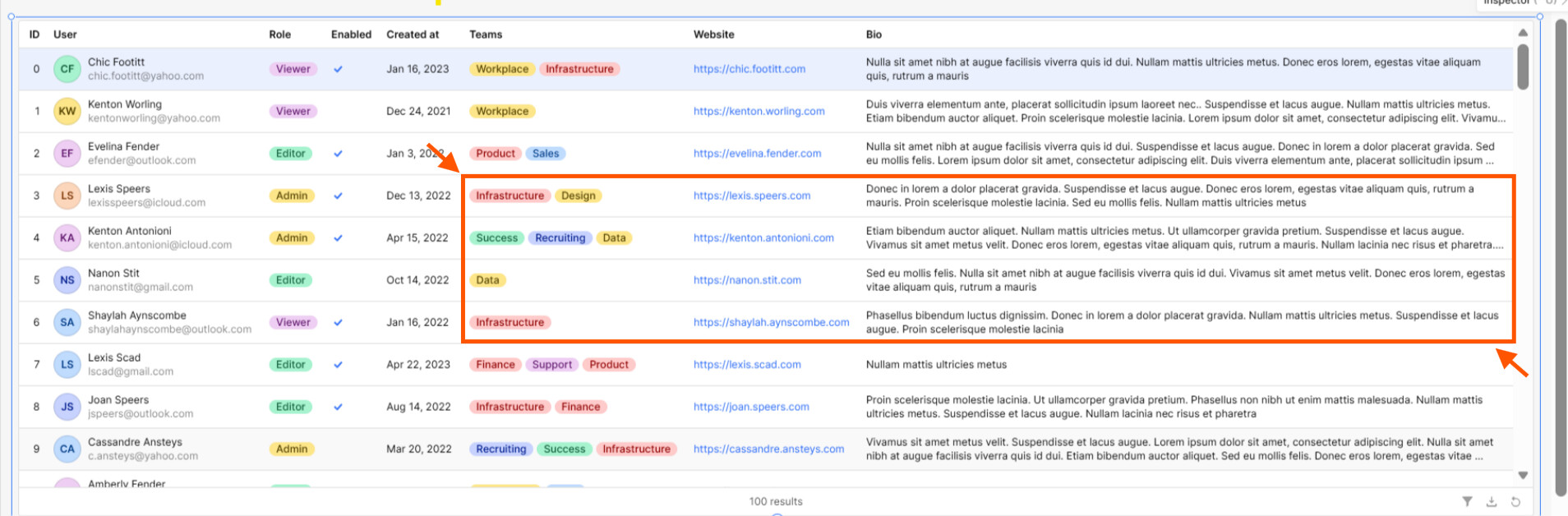
For example, table has columns A, B, and C. I want to select and copy data only from columns B and C.

Let's say I want to select the red area rows and columns as a random selection. After selecting it I want to copy the selected area content and want to paste directly to me excel/sheets.

How to approach this as no solution is found in retool community.

Thanks

1 Like

Hello @shubham_soni,

Yes, this is possible! Follow these steps:

  1. Go to your table settings
  2. Set Row Selection β†’ Multiple
  3. Add a Row Action and name it: Copy
  4. In the Row Action, paste the JS below

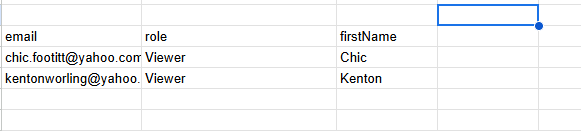
This script copies only the selected rows and keeps the columns in tab-separated (Excel/Sheets-friendly) format, including headers.

// Get selected rows safely
const rows = table10.selectedSourceRows || [];
if (rows.length === 0) {
  utils.showNotification({
    title: "No data selected",
    description: "Please select at least one record",
    notificationType: "warning"
  });
  return;
}

// Convert data & ensure string values
const selectedData = rows.map(row => ({
  email: row.email?.toString() || "",
  role: row.role?.toString() || "",
  firstName: row.firstName?.toString() || ""
}));

// Explicit header order
const headers = ["email", "role", "firstName"];

// Calculate column widths (for aligned text)
const colWidths = headers.map((header) =>
  Math.max(
    header.length,
    ...selectedData.map(row => (row[header] || "").length)
  )
);

// Build aligned text (optional if you want aligned copy)
const formatRow = (row) =>
  headers
    .map((header, i) => (row[header] || "").padEnd(colWidths[i]))
    .join(" | ");

const alignedText = [
  headers.map((h, i) => h.padEnd(colWidths[i])).join(" | "),
  headers.map((_, i) => "-".repeat(colWidths[i])).join("-|-"),
  ...selectedData.map(formatRow)
].join("\n");

// Build TSV (Tab Separated) for Excel/Sheets paste
const tsv = [
  headers.join("\t"),
  ...selectedData.map(row => headers.map(h => row[h]).join("\t"))
].join("\n");

// Copy TSV to clipboard (Excel/Sheets friendly)
utils.copyToClipboard(tsv);

// Optional: Log aligned version in console for debugging
console.log("Aligned copy preview:\n", alignedText);

// Notify user
utils.showNotification({
  title: "Copied!",
  description: "Data copied in column format. Paste in Excel or Sheets.",
  notificationType: "success"
});

Result

  • Only selected rows are copied
  • Only the defined columns are included (B & C equivalent)
  • Works when pasted into Google Sheets / Excel
  • Includes headers automatically
  • No UI breaking if nothing is selected

Demo (attached):

1 Like

Hello there @shubham_soni Our Table component isn’t really meant to behave like a Google Sheet, so what you’re trying to do isn’t natively supported right now. :astonished_face:

If you really want to do it, it might be a bit complicated and a little fragile, but there are some workarounds like what @WidleStudioLLP suggested. You would just need to swap out the hardcoded rows in that snippet and update them to the specific column names you want instead.

Another potential workaround is to work with the data directly using queries. At the end of the day, the table is just a frontend view of your underlying data, so instead of trying to force this behavior in the Table itself, you could create a separate filtering or selection flow, then display the exact subset you want in the UI for someone to copy.

What do you think, would a separate copy friendly view work for your use case?
1 Like