- My goal: Set up some Tag columns in a table mapped to a postgres datasource
- Issue:
Going back to yesterday, I had set up some Tag columns mapped to various postgres datasources that were working completely fine. Note that this whole app is copied from previous working version of an app. The issue I am describing inexplicably doesn’t exist in the old version of the app.
Today I am working on the table and discover that the dropdown menu for the columns has stopped showing results from the datasource. I click into the column and discover that the value, label, etc. are not mapping anymore (working yesterday and in previous app versions) →
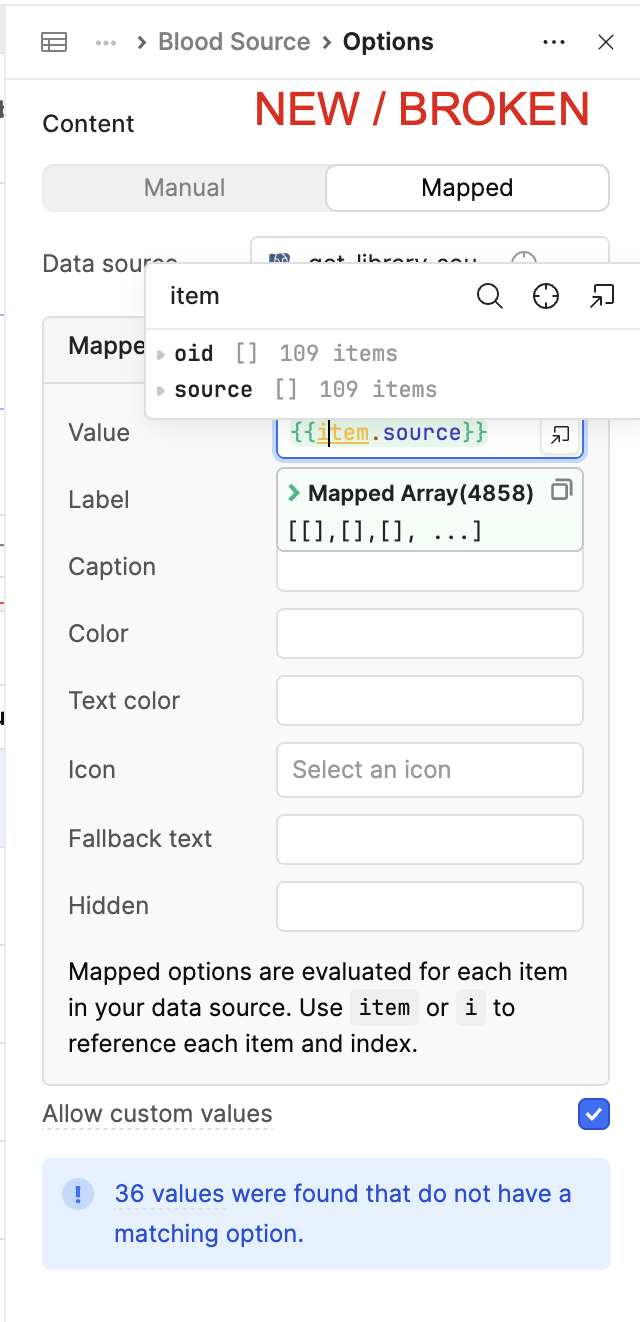

I even checked another table on a different page in the same app as the broken one, and it was working. The column references the same postgres query as a datasource. The Postgres Query is Global so not sure why it would behave separately on one page vs another.

Noticed that in this table in particular, all of the mapped columns just stopped working today. Some of the tag columns had global postgres datasources (that are referenced elsewhere in tag columns and working fine), and some local to the page. Same issues for both.
After asking the AI chatbot, it suggested that I use the Function option for the datasource:
{{ formatDataAsArray(get_library_source_provenance.data) }}
This fixed it, but leaves me more concerned than I was in the first place…
Why is it seemingly impacting only this table?
Why did it randomly start happening today? I built a new mapped column yesterday and it was working fine, and now it is broken?
Why would Retool stop autotransforming mapped postgres datasources into arrays?
When will my other tables break, that use the exact same mapping functionality that was previously working?
Do I need to go through every table and every mapped column in my app and change the data source to say formatDataAsArray(…)? This would be a big bummer.
Additional info: Cloud
AI Chat added below - I asked why one table was working and another not. It said something about transformer settings? The library query seems identical across both apps. It seemed to be bouncing around between ideas a fair bit, unsure what is legit and what is just the analysis/thought process.


Thank you for the help! Hoping it is just some table configuration that I messed with and can adjust and fix!
