i just want app to recording and send the file to google drive
Hey @kkey
The errors you’re seeing are happening for two separate reasons:

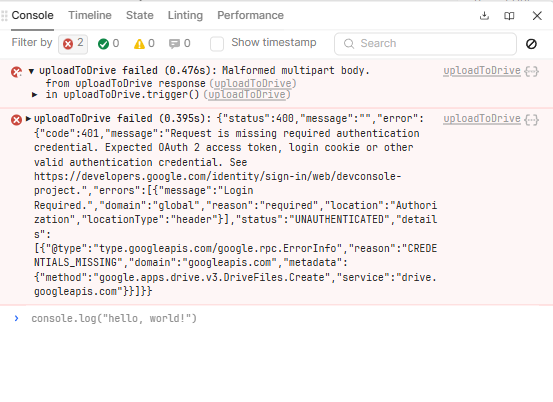
401 Login Required / CREDENTIALS_MISSING
This means your Google OAuth access token is not being attached to the request.
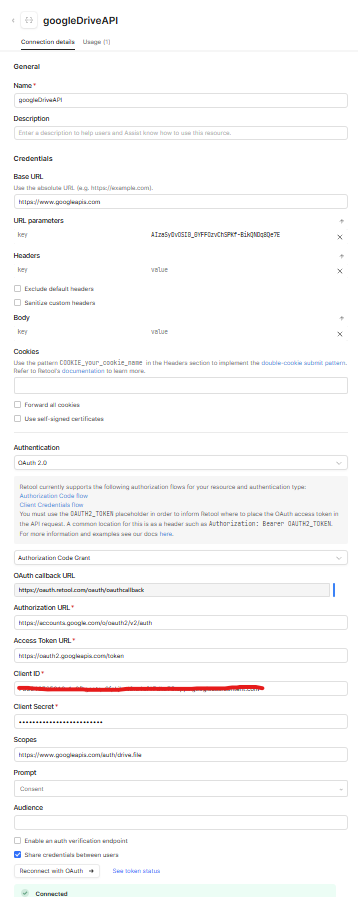
Even though OAuth is configured, the Drive API only works if:
-
Auth type = OAuth 2.0
-
Grant type = Authorization Code
-
Auth URL =
https://accounts.google.com/o/oauth2/v2/auth -
Access Token URL =
https://oauth2.googleapis.com/token -
Scope =
https://www.googleapis.com/auth/drive.file
After setting this, click “Reconnect with OAuth” and confirm the resource shows Connected.
If OAuth is correct, Retool will automatically send:
Authorization: Bearer <access_token>
Without that header, Drive will always return 401.

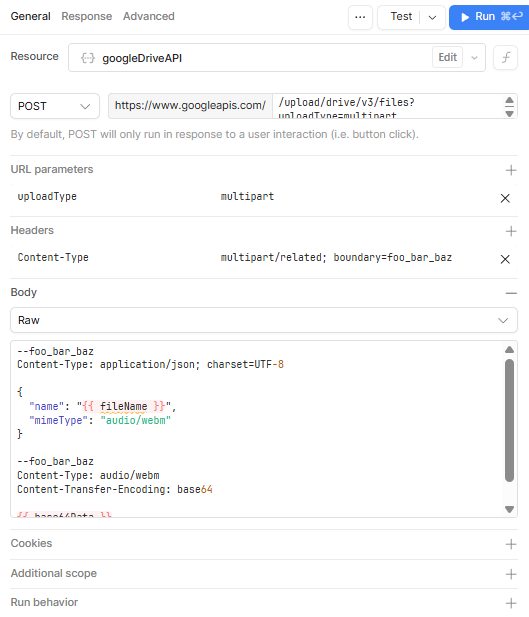
Malformed multipart body
This is because you’re manually building a multipart request (boundary=foo_bar_baz) and also base64-encoding the file. That’s very easy to break.
You actually don’t need multipart at all for this use case.
 Recommended (simplest + works)
Use Google Drive’s simple upload endpoint and send the file directly.
POST
https://www.googleapis.com/upload/drive/v3/files?uploadType=media
Headers
Content-Type: audio/webm (or whatever your recorder outputs)
Body
-
Send the File object from your recorder / file input
-
Do NOT send base64
-
Do NOT manually define multipart boundaries
This will upload the audio and return a fileId.
(Optional) You can then rename it with:
PATCH https://www.googleapis.com/drive/v3/files/{{fileId}}
{ "name": "recording.webm" }
Important note on recording
Make sure your recorder returns a File / Blob, not a base64 string.
Google Drive expects raw bytes — base64 inside a handcrafted multipart body will fail.
TL;DR
-
401 = OAuth token not attached → reconnect OAuth
-
Multipart error = handcrafted body → don’t do that
-
Use
uploadType=mediaand send the file binary directly
Once OAuth is attached correctly, this works reliably 
Hey @kkey and @Saurabh_Panja
Thanks for reaching out to Retool community!
 Saurabh is pretty spot on for the next steps and how this all works from the Retool side. Thanks for all the help here!
 It appears there are a few issues going on here that their recommendations should be helpful in getting resolved. It might be worth trying to use something like Postman to work through the POST requests as those should be working the same outside of Retool and in an app like that.
Let me know if you have any further questions or concerns on the topic.
Regards,
John | Retool Support
1 Like