How to Set search_path for a Postgres Resource in Retool

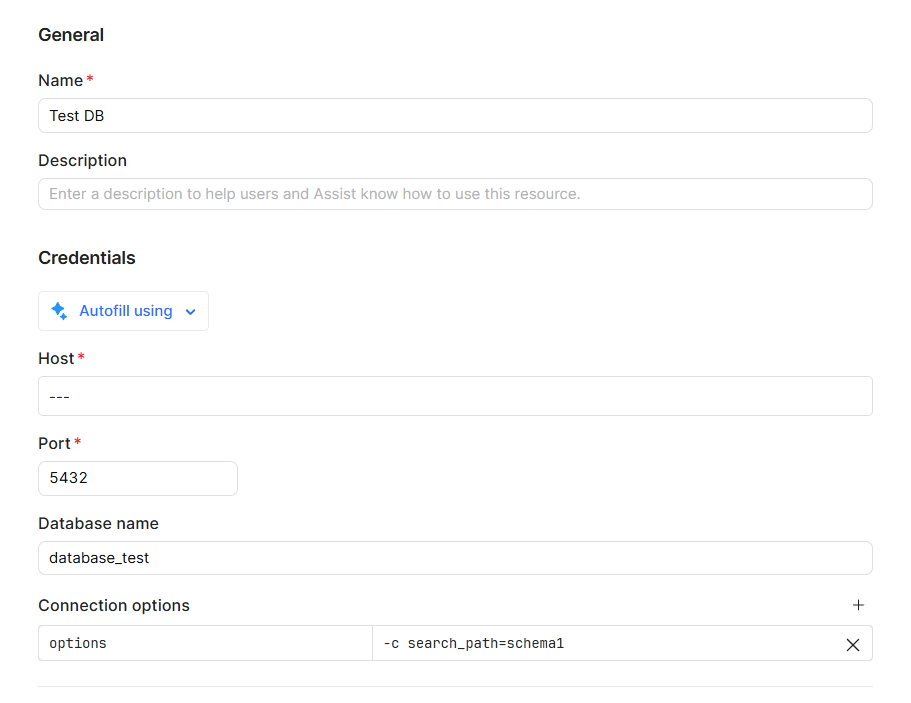
I recently found a workaround for setting the search_path in a Postgres resource when configuring connection options in Retool. By default, simply specifying a key - value pair like search_path and schema1 doesn't work because Retool overrides these settings.

Instead, you can use a different structure where the key is options and the value is -c search_path=schema1. This works seamlessly, even though I’m not entirely sure why it behaves this way. :upside_down_face:

What I’m really curious about is whether there are other non-standard connection options that can be applied in a similar manner. Does anyone have any insights on other options that Retool may not expose directly in the UI, but which can be set via this trick?

Looking forward to hearing your thoughts)
1 Like

Great find @AndrewS — your workaround is 100% valid, and it’s actually how Postgres expects session-level parameters to be passed.

:white_check_mark: Why this works in Retool

Retool builds the Postgres connection string internally, and it overrides simple key–value session params like:

search_path = schema1

However, when you use:

key: options
value: -c search_path=schema1

you’re passing a Postgres startup parameter, which Postgres applies before Retool’s overrides take effect. That’s why this approach works reliably.

:white_check_mark: Other non-standard Postgres options you can pass this same way

You can use the same options: -c pattern to set any runtime Postgres parameter that Retool doesn’t expose in the UI, for example:

1. Statement timeout

options: -c statement_timeout=30000

2. Lock timeout

options: -c lock_timeout=5000

3. Idle in transaction timeout

options: -c idle_in_transaction_session_timeout=60000

4. Application name (useful for DB monitoring)

options: -c application_name=retool_app

5. Default transaction isolation level

options: -c default_transaction_isolation=read_committed

:white_check_mark: Combining multiple options

You can also stack multiple settings in one line:

options: -c search_path=schema1 -c statement_timeout=30000 -c application_name=retool

:warning: Limitation to be aware of

Retool does not offer first-class UI controls for most of these settings today — so this options trick is currently the best supported approach.

Suggestion for Retool team

It would be great if Retool could officially document or expose:

  • Session-level Postgres parameters

  • Support for multiple startup flags in the UI

2 Likes