Hi there!
We are using Retool to upload to S3 some images.
Our issue is that we did not find a way to set up the Cache Control metadata on file upload.
Is that possible with Retool ?
Cheers,
Thomas
Hi there!
We are using Retool to upload to S3 some images.
Our issue is that we did not find a way to set up the Cache Control metadata on file upload.
Is that possible with Retool ?
Cheers,
Thomas
Hi @Thomas_Pucci,
Welcome to the Retool community!
Yes , this should be possible, but not directly from the standard Retool S3 “Upload file” GUI action. When uploading to Amazon S3, Cache-Control is part of the object’s metadata. Retool’s built-in S3 resource upload does not currently expose a field for setting Cache-Control headers during upload. @Tess confirmed this a while ago here. Please do give this a +1 and I will do the same.
You could do this with a REST Query:
PUT ``https://your-bucket.s3.amazonaws.com/your-key
With headers like:
Content-Type: image/webp
Cache-Control: public, max-age=31536000, immutable
I hope this helps.
Thanks!
I am not sure to understand how to pass the credential in that put request.
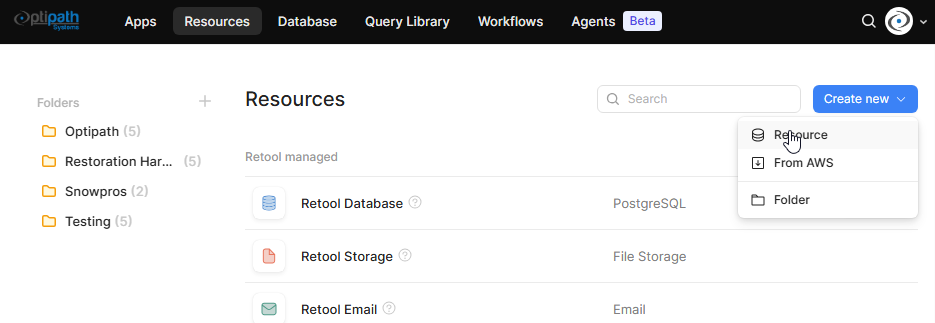
You would need to set up a resource first:
Pick your REST API:
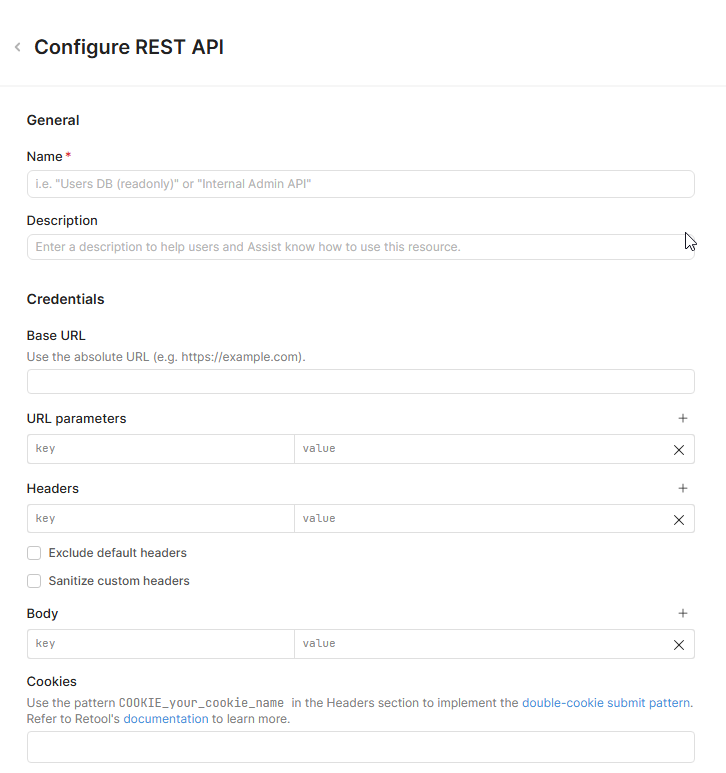
Then add your details here:
Once your resource is set up you can reference it either in an app or a worfkflow.
Thanks ! I’ll have a look
UPDATE: I've marked @Shawn_Optipath's recommendation as a "Solution" in the sense that it's a functional workaround but will keep this topic open. 
Have you had a chance to revisit this, @Thomas_Pucci? Let us know if you have any questions!