want to send custom headers to MCP server tool with dynamic values
Hi @Priyansh_Shah, we don't currently have a way to send custom headers to MCP servers. There is an existing internal feature request for this however, and I've added this thread to it and will post here if there are any updates!
Can I ask what your use case is for using custom headers? That could help us pushing this request forward. Thanks!
Hi @Mike_M , thanks for the update — appreciate you adding this to the feature request.
Our use case is to pass dynamic user context (such as user email, user ID, or workspace/tenant ID) to our MCP server via request headers, rather than inside the tool call body. This allows us to perform authentication, authorization, and access checks at the MCP server level before any tool logic runs.
Using headers lets us safely cross-check the calling user and enforce governance or multi-tenant policies centrally, without relying on the model to pass identity data correctly in tool arguments.
Happy to share more details if helpful — thanks again!
1 Like
Thanks for the additional info! At the moment, you can still perform authentication with the MCP server, but it is something that has to be done when you're configuring your server rather than from the tool call. From my understanding, it might not be as dynamic as you'd like it to be, but it's worth checking out if you haven't already. Depending on your organization, you could use service account credentials, rather than authenticating individual users.
Regardless, I've updated our internal ticket accordingly with your request!
1 Like
Hi @Mike_M, was there an update for this?
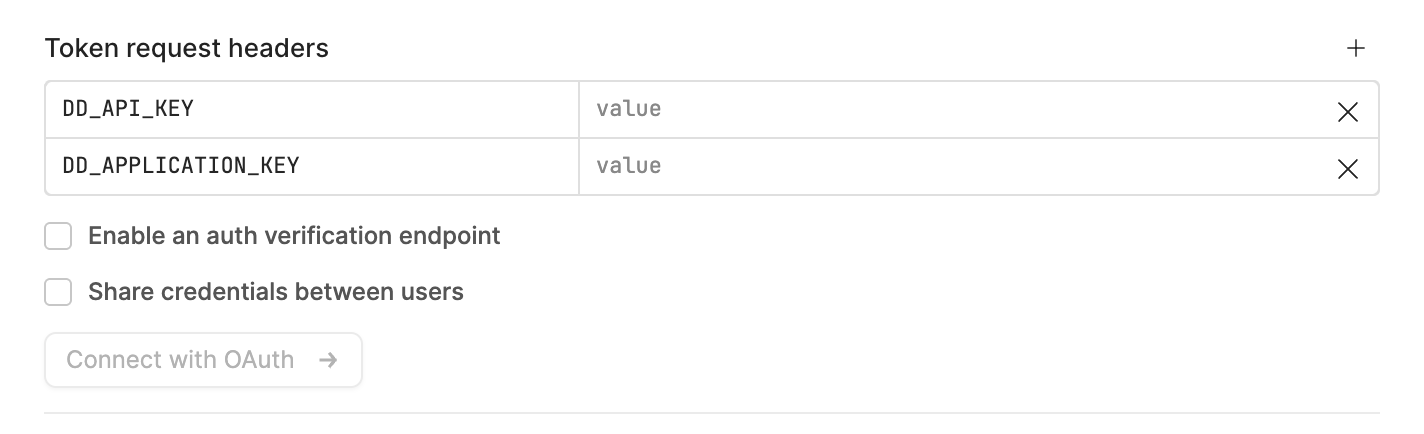
Would be great to use auth via multiple headers. My particular use case is authenticating to the Datadog MCP, where I use a service account’s Application Key/Api Key pair passed in as headers (ref docs).
Hi @janella, the feature to use dynamic values for headers is still in the backlog, but I believe your use case should be feasible.
When configuring your MCP server, you can select OAuth2, under Authentication, and then there are token request headers you can add, like the API key and Application key.
1 Like
Hi @Mike_M thanks for the response! These aren’t headers for the token request, they’re just regular HTTP headers sent with the request to the MCP as per the docs.
In this particular instance we do not have a OAuth2 Client ID so using the OAuth2 authentication doesn’t work.
Thanks for sharing that additional context, @janella! I'll make sure it gets added to the internal ticket that Mike mentioned. 
1 Like
Hi, we also need this. Adobe’s Marketo Engage public MCP server requires credentials and instance ID set in custom headers.
Any update on the backlog progress?
Welcome to the community, @Jay_Jiang1! It doesn't look like the ticket has been picked up, but I'll add your context and flag it to the team.
We also need this to connect retool to MCP servers through Composio. They do auth with a header API key.
Hey @dchimento-bw, thanks for adding your use case!  I've logged the Composio header-based API key request on our internal ticket alongside the others in this thread.
It's still in our backlog, so I don't have a timeline to share, but the added context helps us build the case for it. I'll post back here if there's any movement. Thanks!