I'm having issues automatically selecting the first row of a table when I'm searching (via an attached searchbox that updates the query) and when it's first loaded. The problem happens only when I have the Primary key set. I looks at some solutions but couldn't find anything that worked except for removing the primary key (which I prefer not to do).
Hi @nagar ,
I understand the issue you're facing. I have encountered and resolved a similar scenario in one of my Retool applications, and the following approach worked well for me.
Solution
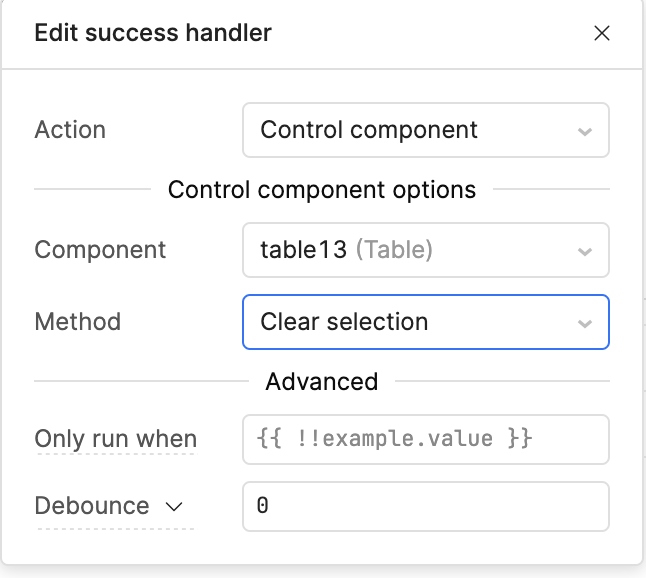
1. Clear the table selection when the query succeeds
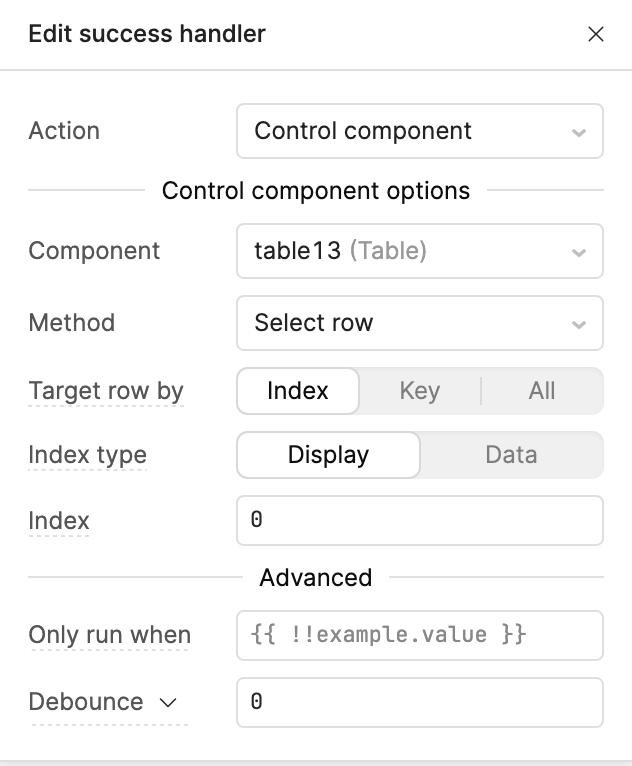
In your query's Success Event Handler , add a Clear Selection action for the table first, as shown below:
With these two actions in place, whenever the query is triggered (whether by search, filter changes, or a manual refresh), the table selection will be reset first and then automatically select the first row in the refreshed dataset.
This should ensure that the first row remains selected consistently after every query execution.
Hope this helps! Let me know if you need any additional assistance or if your setup behaves differently.
Hi @nagar, just checking in, were you able to try the solution from @WidleStudioLLP? Did it work for your use case? Let us know if you're still running into issues!
Were you able to try the solution I suggested, or did you end up resolving it using a different approach?
If you're still experiencing issues or have run into a different problem, please feel free to share the details here. I'd be happy to take another look and help find the best solution.