Hello!
I’m having issues with errors related to non-existant components. Yeah, sounds weird. So I’ll try to explain the best I can 
-
My goal:
I have a module that displays a table with information based on its input data. This module (called FileListModule) is itself inside another module (called FileInfoModule). In FileListModule, I have a table element that displays properties about files. The structure is therefore like this:
FileInfoModule
└───FileListModule
└───InfoTableBecause of some system that I’m using, some of the inputs are never null but are instead given a value that means they are empty (e.g. the input ‘MyInput’ will sometimes get the value ‘MyInputEmpty’ instead of null).
-
Issue:
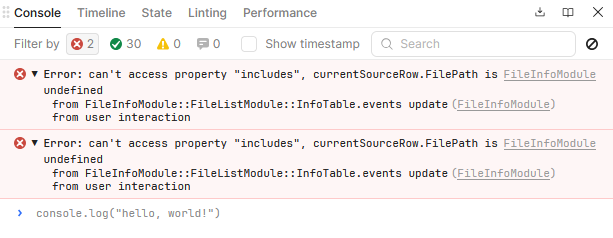
When I have this empty value, FileInfoModule throws an error (it throws it twice as the issue is apprently there twice):Error: can’t access property “includes”, currentSourceRow.FilePath is undefined
from FileInfoModule::FileListModule::InfoTable.events update
from user interactionSo I checked inside of FileListModule to see where the issue was coming from. That’s where it gets funny (or not).
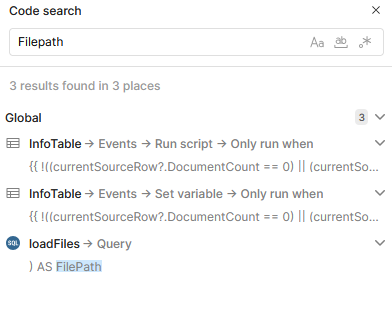
When I go into FileListModule and I use the Code Search (and I search for FilePath), I get three results. One isn’t really related, and the two other results match what I see in the error (InfoTable → Events → Run script → Only run when).
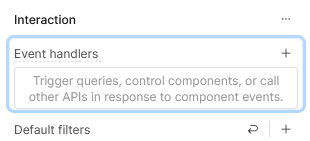
The catch is that I have no even handlers in that table. I clicked on the results in the Code Search, but it only highlights an empty Event Handlers section (see bellow).How can I fix this? How can I remove these ghost handlers to get rid of that error?
-
Additional info: (Cloud or Self-hosted, Screenshots)
My Retool is self-hosted on v3.300.7

That’s about it.
So, there you are. Thank you for taking the time to read this far.
Have a nice day
Cheers
