I have a Menu Nav bar, for jumping between apps within my “mega app”.
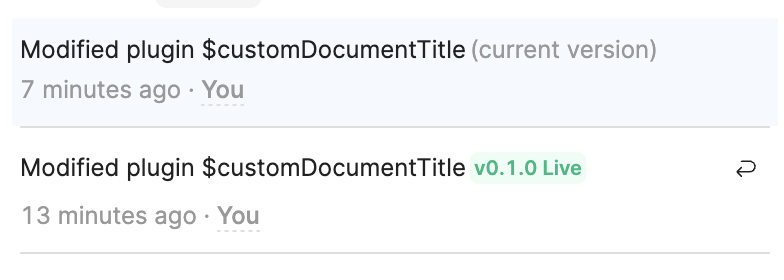
If I’m on an app , then navigate to another app, the app I just navigated to is being replaced by the app I was last on! The change history shows a single entry:
This is happening across every app in my account. Seriously concerning.
I have cleared cache and browsing data, logged out, done all the things.
As an example, this app: 458a1016-199b-11ef-8ada-93d789daab4c
has now been replaced with the contents of this app: 3185aa94-14ea-11f0-8306-c3cff5bb6f92
My apps have releases, so the live versions are unaffected, but it’s crazy in my editor. And these apps are constantly reloading in the editor - it’s chaos! HELP
Hey @hansontools - there is definitely something weird here. I'm trying to narrow down the exact replication conditions, as it seems inconsistent in my own testing. It's mostly an illusion, though - until you interact with the page. The app should go back to normal if you immediately refresh after navigation.
Can you double check that you are specifying a particular landing page in the relevant navigation items?
Hi, for me one time three weeks ago even that did not work. I had “Tours” & “Cockpit” apps with their own pages and one time while I was changing the background of a button, suddenly pages of Tours app showed as Cockpit pages and I could not get them back, not even with refreshing, not even reverting to a previous release. Thank god I had an earlier version of an app to replace it and work from there. Now it sometimes does the same with other apps but a revert usually solves the problem. But now suddenly it constantly refreshes the table every 30 seconds. I feel like Retool is getting buggier and buggier.
Hey everyone, we're aware of the issue and our team is already on it. Really sorry for the trouble this is causing, we know it's not ideal and we're working as fast as we can to get things back to normal.
We'll keep the Retool status page updated as things progress, so that's your best place to track what's going on. Thanks for bearing with us!
Hello all, I want to sincerely apologize for the disruption this incident caused, I know how frustrating that can be. The good news: our engineering team has resolved the app navigation issue, and things should be back to normal. If any of your apps ended up in a bad state, the app history feature is the quickest way to roll back to your last good state.
If you're still running into trouble, don't hesitate to post here with the affected app IDs and a description of the issue. You're also welcome to DM me if that's more comfortable. I'm happy to help get things sorted out, thank you!
P.S. @pyrrho thanks for keeping us accountable and always speaking up on behalf of the community! There absolutely will be a postmortem. In the meantime, please let us know if there is anything we can do to improve comms during an incident such as this. Is there anything that would have been helpful to hear?
I think more-so than knowing what the technical snafu was this time it might be a good idea to put together a high-level example of how your team performs unit and regression testing for deployments. While I don’t expect QA to catch every single bug, I find it hard to believe that an app redirect is something that would have slipped through the cracks.
The Retool community seems notoriously eager to use new products and features but that appetite is going to dwindle if the new shiny things cause the core product to degrade. I feel like the community might also be able to spot gaps and loose ends in your process the same way that sometimes we are able to find nuance in some of the many features and components we have available.
I also want to say that I am very not much at all trying to finger-wag here. As always, Retool has been on top of putting back what went wrong and making sure affected parties have recovered.
That could be an interesting case study, even outside the context of doing a retro for a breaking change like this. My initial reaction is that it might end up being too high level to be particularly useful, but I'm certainly willing to poke around internally and see what I come up with.
As always, thanks for the feedback and community advocacy!


 There absolutely will be a postmortem. In the meantime, please let us know if there is anything we can do to improve comms during an incident such as this. Is there anything that would have been helpful to hear?
 My initial reaction is that it might end up being too high level to be particularly useful, but I'm certainly willing to poke around internally and see what I come up with.