Can date components be configured to disable / dim out dates which should not be available for selection? e.g: A booking system where no slots are available on certain dates. If not, this would be useful to add.
Hi @AlexC Thanks for reaching out!
I agree this would be useful, and I'll make sure we have a feature request for this internally
Currently, it doesn't look like we have support for this. You can set up validation in the meantime:

1 Like
Hello. Is there any progress on this feature?
2 Likes
Hi there! Unfortunately, this hasn't been picked up yet  I'll add your +1 to the internal ticket where we're tracking requests
2 Likes
Hello, has this been picked up yet? It's a useful feature
1 Like
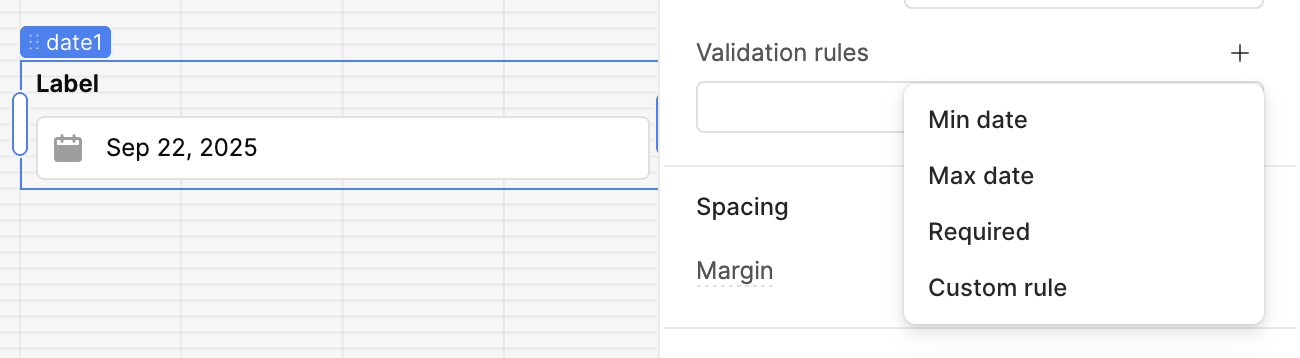
Hey @idrp,
From your screenshot, it looks like this doesn’t fully address @AlexC’s question. Using Min Date and Max Date only blocks a continuous range (before or after), but it doesn’t allow selectively disabling scattered dates (e.g. holidays, fully booked days, etc.).
As @Tess suggested, you could add validation for now. Otherwise, the better approach would be to build a custom component (e.g. React + a date picker library such as react-datepicker or FullCalendar) that lets you visually dim out unavailable dates in the calendar rather than just preventing selection after click.
1 Like
Hi @qinfeng,
Unfortunately no update, I will add a +1 to the ticket for you 
2 Likes
Also, it looks like another forum user has built out a custom calendar component to achieve this functionality.
1 Like