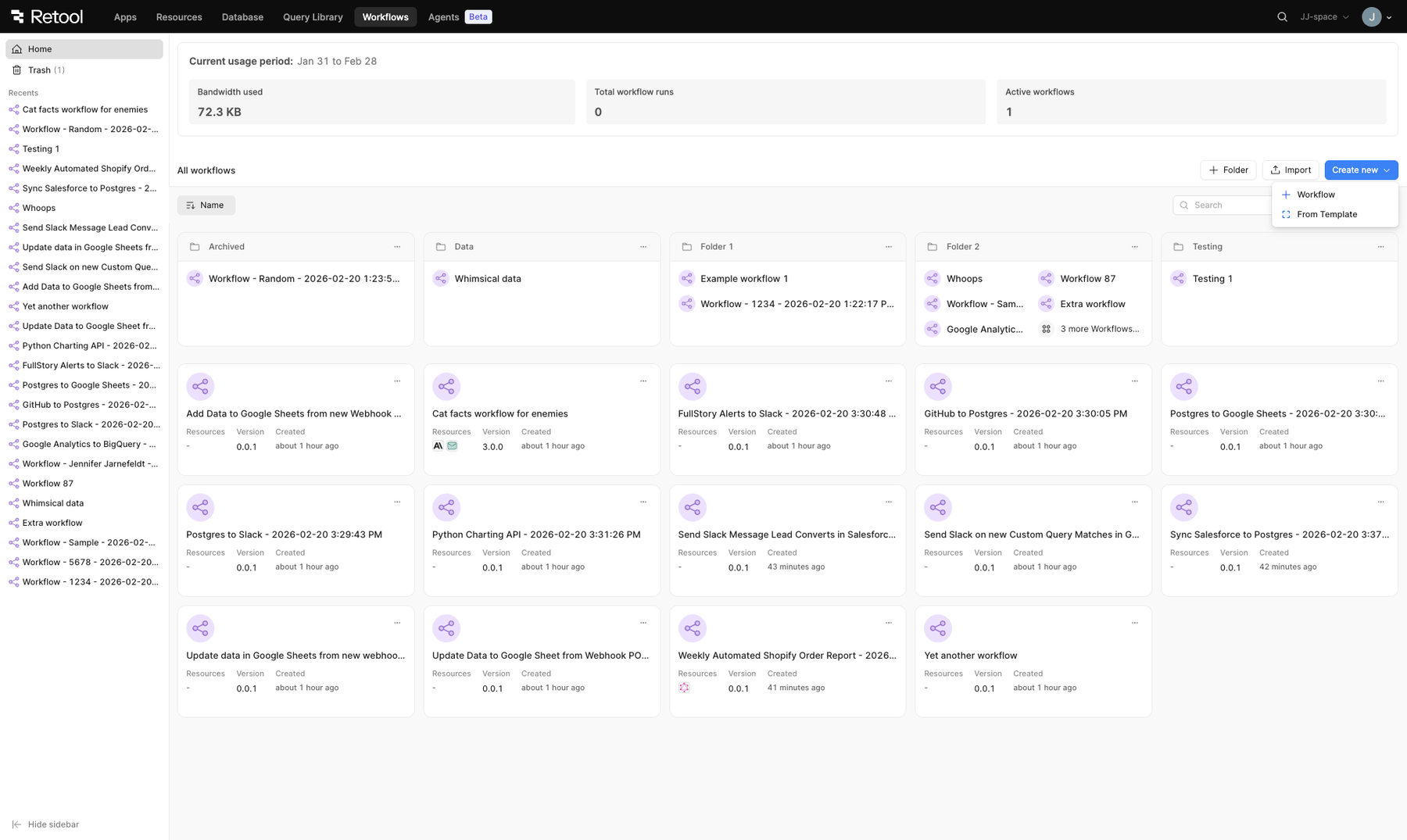
Retool made significant design updates to the workflows landing page to improve user experience and align more closely with the agents landing page.
The workflows landing page was updated for cloud instances. It will be available in an upcoming edge release, and is expected in the Q2 stable release for self-hosted instances. To revert to the previous landing page experience, toggle off the Reskin workflow index page to render agents home page UI feature flag in Settings > Beta.
The landing page displays all workflows, and folders containing workflows, for your Retool organization. You can perform the following actions from the landing page:
Sort workflows by Name, Last Updated date, or Created date.
Hey - looks like the count of workflow runs in the current time period has been removed, I kinda need that to see what workflow runs are too hungry and what share of the budget is being used by what. Where has that been moved to? Unless you are about to start billing workflows differently?
The ability to see if any recent runs had failed on a workflow from the main view would be nice to have in this layout as well, unless that’s still there and I’m missing it!
Looking good overall, the refresh is appreciated. A few points:
Agreed with @Matthew_Carter and want to emphasise the importance of seeing workflow runs per period. We have a client who is over 14 000 workflow runs in a busy month, and we use those counts to understand which workflows might benefit from refactoring or need maintenance.
@ctannlund also makes a good point — we can no longer see if a workflow has failed in its last runs at a glance. That was extremely helpful when managing a large number of automations.
When we have workflows in folders, the new layout only shows truncated names and the first few workflows, then a “x more workflows” count. It does not show a total workflow count for folders outright, which makes folder dashboards less immediately informative.
For workflows in folders there is also no longer a per-column sort in the table itself. You can sort via a dropdown, but it feels less intuitive and slower than clicking column headers when triaging many workflows.
The left-hand bar shows recent workflows. This could be a great place to also show folders (with workflow counts) instead of only recently touched items.
Wishlist: it would be fantastic to have a history of workflow runs available. Right now, after the end of the billing cycle, counters reset to 0 and the data is gone. I have to manually record this information because clients often ask for trends and historical reporting months later. Since billing is tied to workflow run volume (per 5,000 runs), having access to historical usage data directly in Retool would make those conversations much clearer and more transparent.
The new dashboard is visually cleaner and more modern, and I appreciate the effort to refresh the experience. I’d love to see future iterations combine that updated design with the operational visibility that power users rely on day to day.
I’m not sure if this falls within the scope of the workflow dashboard changes, but one related issue we’ve run into is that workflows triggered by apps can appear as “disabled” in the dashboard, which is misleading.
If a workflow is actively being triggered by one or more apps, it would be helpful if that relationship were reflected in the status — either by showing it as enabled, or by indicating that it’s currently referenced by an app. Alternatively, having the ability to explicitly enable/disable a workflow for app triggers would provide clearer control and visibility.
To add to @Shawn_Optipath’s enabled/disabled identifiers, it may help to also show scheduling/trigger data when within the folder views. Being able to quickly see each flow’s schedule and if a webhook has been enabled (and possibly a count for how many times the hook has triggered?) would be very helpful top level data.
I am no longer able to open it in another tab. It helped a lot because I work with many different workflows that I need to open and edit. Now I have to open Retool in different tabs. I hope this gets fixed soon.
To revert to the previous landing page experience, toggle off the Reskin workflow index page to render agents home page UI feature flag in Settings > Beta.
Hey @Yuri_Rocha, welcome! You should be able to undo the layout using the above Beta setting.
Thanks, everyone, for the feedback! I'll review it all and make sure it gets to the right team members And thank you, @pyrrho for the workaround for any blocking issues
Feel free to continue to share any feedback/ideas/questions!

 And thank you,