-
My goal: To set SQL expression for ID field in a table where the ID values are integers. I need this for setting up autoincrementing values for ID field
-
Issue: First of all this issue wouldn’t appear if there was a way to import DB tables from CSV with proper setup for ID field (autoincrementing values rather than plain integers)
-
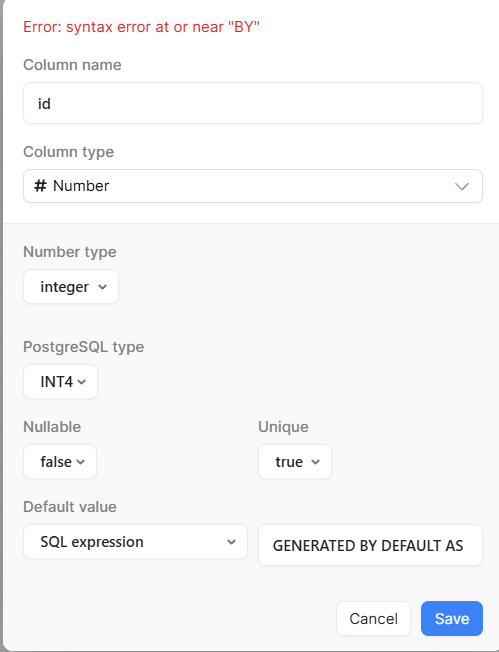
Steps I've taken to troubleshoot: None of the attempted ways of setting up an SQL expression for autoincrementing value worked. For example I tried “GENERATED BY DEFAULT AS IDENTITY“ and it gives me error “Error: syntax error at or near ‘BY’“
-
Additional info: Cloud
1 Like
Hey there @Trainer, and welcome to the forum!
So, if you're using the database UI, you can create a new column and select the Auto-Incrementing Integer ID Column Type:
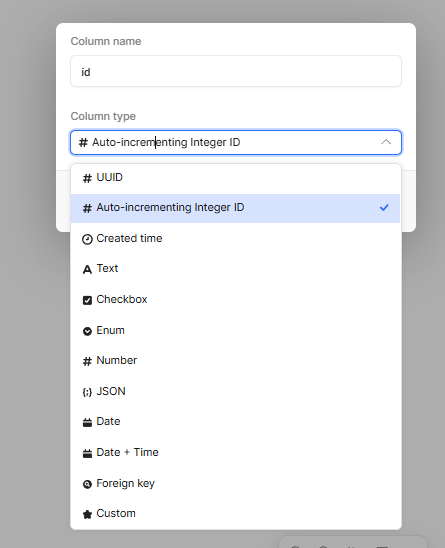
If you're applying this to an existing column and it doesn't let you select this column type, you can use Retool's query library to run a query lke the below (replacing {{table_name}} and {{column_name}} with respective values, and remove mustache :
-- ========================================
-- Convert an existing integer column to auto-incrementing
-- ========================================

-- 1. Create a sequence
CREATE SEQUENCE {{table_name}}_{{column_name}}_seq
    START WITH 1
    OWNED BY {{table_name}}.{{column_name}};

-- 2. Set the next value to start after the current max id
SELECT setval(
  '{{table_name}}_{{column_name}}_seq',
  COALESCE((SELECT MAX({{column_name}}) FROM {{table_name}}), 0) + 1,
  false
);

-- 3. Attach the sequence to the column
ALTER TABLE {{table_name}}
ALTER COLUMN {{column_name}} SET DEFAULT nextval('{{table_name}}_{{column_name}}_seq');

-- 4. Ensure it's still the primary key (optional if already exists)
ALTER TABLE {{table_name}}
ADD CONSTRAINT {{table_name}}_pkey PRIMARY KEY ({{column_name}});
Hope this helps!
Best,
Miguel
Ok, that really helped, thanks a lot!
1 Like