Hello!
I am currently trying to load data into a table from my database. As some columns contain JSON files I figured I would make subtables, that is expandables rows, for displaying specifically these two columns.
So now I tried to make a transformer and in my endeavor to make my life easier I used chatGPT whcih gave me the following code:
Hey there - loading a JSON column into a table component should be possible using a JSON.parse function inline, I'm not sure you'd need to use a transformer or that very complex code that chatGPT had given you.
Something similar to {{ [JSON.parse(currentRow.myjsoncolumn)] }} could be the data source of your expanded row table. Can you share a screenshot of your data source and table and maybe that would help find a solution.
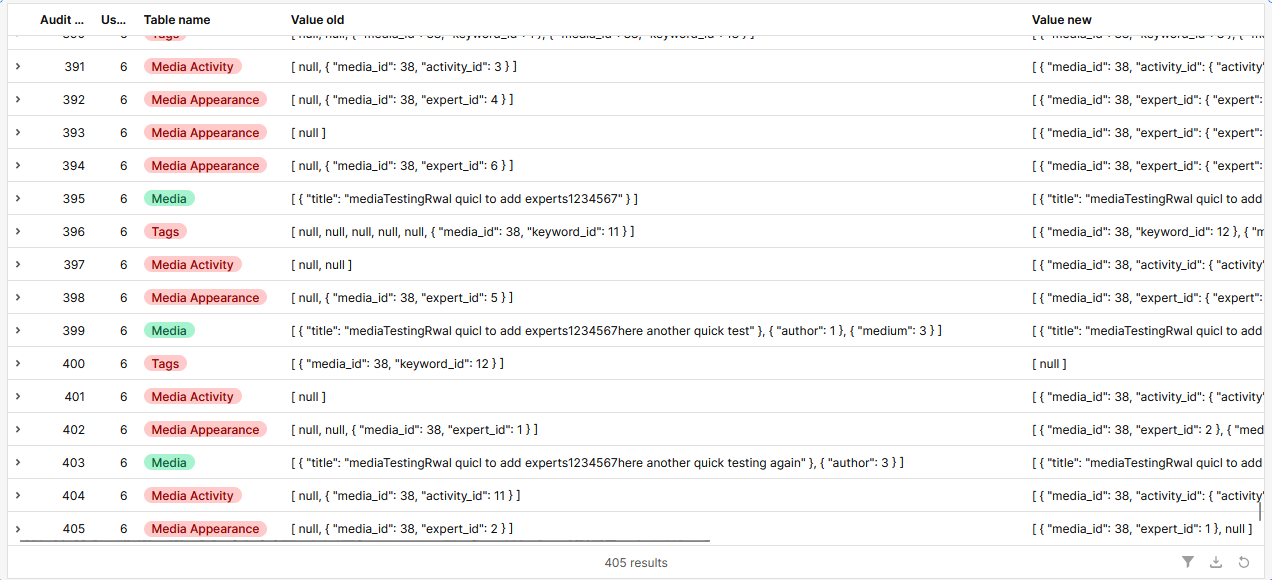
Okay so the idea waas to make an Audit trail on our App. That is, we wanted to track all changes that have been made in our database via our own table.
The table currently looks like this
My idea was to have subtables which display the key:value pairs for value_old as well as value_new.
This is my data source:
{audit_id: Array(405), user: Array(405), table_name: Array(405), value_old: Array(405), value_new: Array(405)…}
audit_id: Array(405)
user: Array(405)
table_name: Array(405)
value_old: Array(405)
value_new: Array(405)
timestamp: Array(405)
and value_old/new looks approximately like this:
384: "[{"media_id":38,"expert_id":2},{"media_id":38,"expert_id":4}]"
385: "[null,{"media_id":38,"keyword_id":9}]"
We have choosen null as our value_old when adding data and vice versa for value_new, for deleting.
Hey @Katunga - I think the primary issue with the initial code block that you shared is that it's not actually returning anything! Try throwing a return in front of the whole thing.
console.log() only prints a message or value to the console for debugging purposes, while a return statement actually sends a value back from a function. In short, console.log() helps you see what’s happening, but return is what your code uses to pass data around.