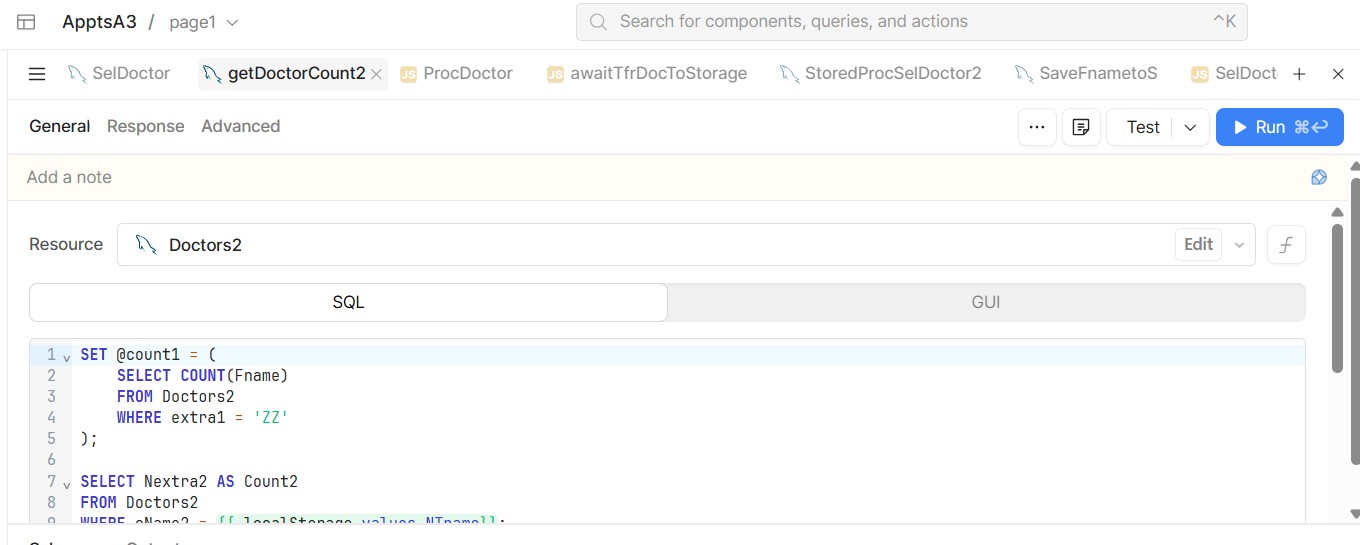
One of the things that effects my navigation is the back ground colors on selected tabs. I am showing a sample below.
You can tell the selected tab is "GetDoctorCount2" because the name is in a bolder black.
It would be so much easier to navigate if the selected tab had a green background.
Is there a way of changing the settings to accomplish this?
Mike
As far as I’m aware, there isn’t a whole lot of customization afforded to the developer experience unfortunately. These types of updates would be nice for dev QoL though
Hey @mdsmith1!
Retool keeps native styling capabilities within the confines of the canvas in which your app is contained. The only way you'd be able to do that is by applying custom CSS in your app settings, where you can target anything that exists in the Retool GUI.
@mdsmith1 you could use the following custom CSS to achieve this affect:
[data-testid="split-view-view"] [class="query-editor-content-wrapper"] [tabindex="-1"] [class*="tabControls"] [data-testid$="--selected"] {
  background: {{theme.success}}50 !important;
}
Thank you for your reply.
Where would I install this?
Mike
In your retool app editor, look to the left hand side where you see your vertical toolbar for looking at your component tree, queries, etc.
The bottom option is App Settings, go there, then click the Custom CSS tab and put it in that little text editor 
AJ
Yes, it worked, thank you do much.
I will mark your answer as a solution.
Thanks again.
Mike
1 Like
Any time!