Hello, i have a quite complex data set, so i'm going to simplify the case to the following structure:
People table:
Expenses table
- id
- Expense_name
- person_id (fk)
- amount
I want to display the people table, but adding a calculated column (let's name it "amount_spent" representing the sum of all the expenses for that person.
basically i would need to run a SUM query for each row of the employee table, but i cannot find a way to pass the current row id parameter to the query through the additionaScope.
what is the best solution in this case?
i'm running it in cloud
1 Like
Hey @Francesco_De_Santis , and welcome to the forum!
So, the approach I would like with this is the following:
- Create 2 queries, one for people and the other for expenses (for the expenses query, make sure you add
return formatDataAsArray (data) to your query's transformer so that then you can use the filter function as per below
- Add a table, using the people query as data source
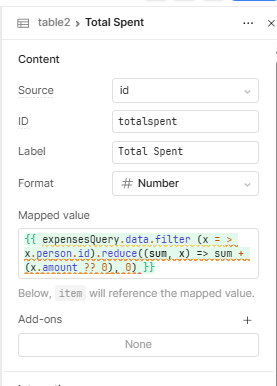
- Add a custom column, using id (as data source) and add something like the below to the Mapped value settings:
{{ expensesQuery.data.filter (x = > x.person.id).reduce((sum, x) => sum + (x.amount ?? 0), 0) }}
This will then do a look up for each row (assuming you have unique rows for your people's table) and then sum the amount property for each object found.
1 Like
thank you, for the solution.
I adapted the code to my case and it works fine ( actually changed the filter callback function to
...data.filter( (x) => x.person_id == currentSourceRow.Id)...
last question:
could I use this computed value for calculating another column? in the mapped value hints I can only see the currentSourceRow object, containing the DB recotd, but i need something like currentRow (the one that is supposed to contain my computed value too).
the goal is to calculate the residue budget = person.budget - person.spent (where person.spent is the previous calculated value) without having to re-perform the same calculation in the new computed column
thank you!
1 Like
Ah yes, my filter function was wrong, apologies for that!
Unfortunately currentRow/currentSourceRow have access only to data in your data source, as such it won't have access to any custom columns.
As such, the most straightforward solution (albeit not very pretty) is to make the whole calculation (thus calculating also the total sum of expenses for the person, again), and on top of that the residue budget.