I’d like to request a new customization feature for Table columns.
Currently, Retool allows us to set background color, text color, and header text color independently for each column. However, there is no option to customize font size or font family for the header and cell body separately.
It would be extremely helpful if Retool could provide:
Font size control (header and body independently)
Font family selection (header and body independently)
Consistency with the existing styling UI for colors (as shown in the current Appearance section in column settings)
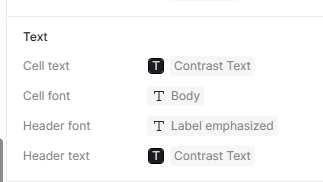
@WidleStudioLLP A good temporary workaround is setting this in the theme directly. This works well if you want all of your tables to have a specific header and cell font, but wouldn’t solve it for a single table.
@Mitchel_Smith,
I’m aware of the CSS styling that applies font size and family to the entire table, but my feature request is specifically for setting the font size and family for an individual cell, not the whole table.
Could you please consider adding this feature in an upcoming Retool update?
From both a UI/UX perspective and based on client requirements, this small enhancement would make a significant impact on how data is displayed on the screen. Improving font styling options for tables would help create a much cleaner and more professional look compared to the current limitations.
This addition would be extremely valuable for teams that rely heavily on data-heavy interfaces and want their applications to look more polished without needing workarounds.
Hey @Mitchel_Smith, thanks for chiming in with the suggestion, I really appreciate it!
@WidleStudioLLP, thanks for writing in about this request as well. I hear you, and it definitely makes sense that this feature is important based on your client’s requirements. I’ve gone ahead and submitted a ticket for you and will keep you posted as soon as there’s any update!
@WidleStudioLLP I know applying custom css isn't the ideal option, but have you already tried targeting the required row > column elements using attribute selectors and substring matching to hit and style the necessary columns to apply a custom font to only those specific columns in specific rows?
Yes, using custom CSS is definitely the best way to fulfill this requirement in a cloud-hosted environment. However, I’m concerned about how to maintain the same setup in a self-hosted environment with multiple spaces. Additionally, when embedding the app, managing custom CSS becomes even more challenging.
That’s why I’m submitting this as a feature request — so it can be handled more efficiently, match conditions more easily, and be simpler for new users to manage as well.
@WidleStudioLLP that actually does make a lot of sense I assumed with how active you are in the community and the code cognizance I've observed in the vast array of solutions you've provided, that you'd of already attempted what I suggested, and/or had a deeper pain point I wasn't fully comprehending (which I see now that was the case haha).
That is a very good point and I agree it would be a very useful feature not pragmatically solvable with custom CSS.
Just a quick reminder to check if there are any updates regarding this FR.
Please let me know if there is any progress or if you need anything from my side to move this forward.
Hey @WidleStudioLLP, thanks for reaching out! While this isn't on our roadmap right now, we appreciate your patience. No extra info needed from your end, but we're grateful for the offer!


 I assumed with how active you are in the community and the code cognizance I've observed in the vast array of solutions you've provided, that you'd of already attempted what I suggested, and/or had a deeper pain point I wasn't fully comprehending (which I see now that was the case haha).