Hey @AndrewH!
Just want to add a more complex version of the example given above to illustrate some of what might be possible in Retool. Again, there isn't a built-in way to generate a component that does exactly what you're looking for but, having done some experimenting, it seems there are certainly a few different approaches you might take. The following is just a start, but might give you some ideas as to what kind of customization is possible.
It uses a schema for each category that takes advantage looks something like the following:
{
    label: "Characteristics",
    dependencies: {
      breed: ["."],
    },
    specifications: [
      {
        label: "Legs",
        id: "legs",
        selections: [
          {
            value: 2,
            dependencies: {
              animal_type: ["Bird"],
            },
          },
          {
            value: 4,
            dependencies: {
              animal_type: ["Cat"],
            },
          },
        ],
      },
      {
        label: "Color",
        id: "color",
        selections: [
          {
            value: "Brown",
            dependencies: {
              animal_type: ["Cat"],
            },
          },
          {
            value: "Black",
            dependencies: {
              animal_type: ["Cat"],
            },
          },
        ],
      },
    ],
  },
Dependencies are arrays of strings to be matched on to check whether or not the user has selected the necessary values to enable either a category or particular option in a specification. The matching is done using some preloaded JavaScript:
window.checkDependencies = (dependencies, user_selections = {}) => {
  for(let key in dependencies){
    if(!dependencies[key].some(value => user_selections[key]?.match(value))){
      return false;
    }
  }
  return true;
}
Throughout, nested listview syntax is used to access different parts of the schema. The user selections themselves are stored in a temp state, so each select has a form data key pulled from the underlying schema:
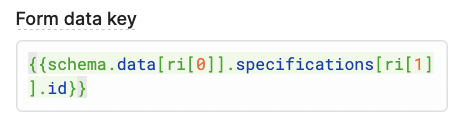
and an event handler to store the data:
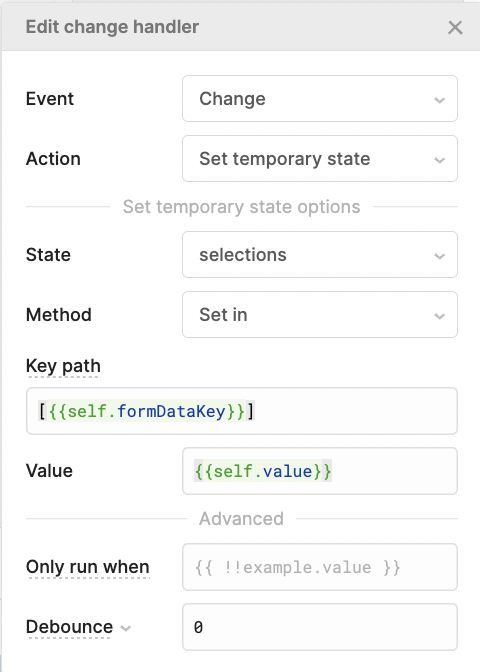
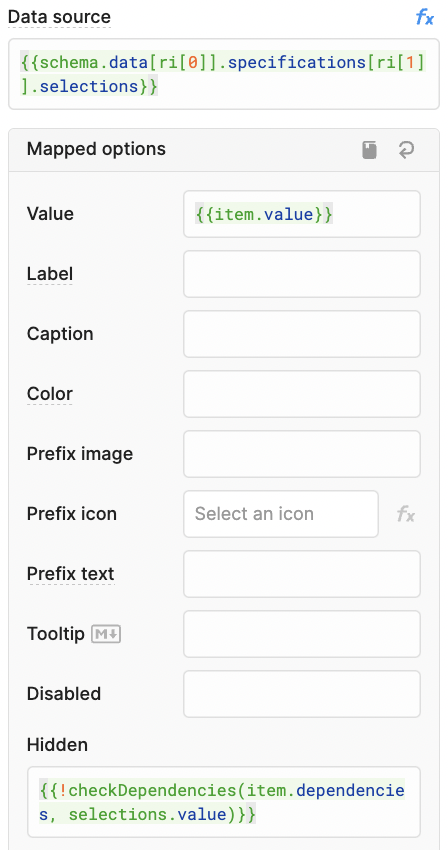
Then the visibility of certain options is done by checking the option's dependencies against the user selection:
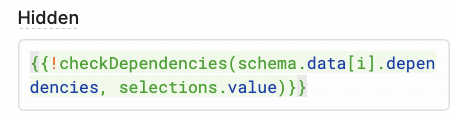
Something similar is done for the labels/listviews that comprise each category:
Feel free to play around with it yourself using the attached JSON! Hopefully, it gives you some ideas to try that fit your specific case a bit better 
dynamic_listview_selects (3).json