-
My goal: use the default filter tool to filter data in a table as it is displayed, not by the underlying value that users can not see
-
Issue: the default filter component and search capability only go off of the underlying value of columns in a table. This leads to needing cumbersome workarounds to have filters work properly on field types like avatars, dropdowns, or datetimes that are displaying in local time but have UTC values (screenshot of a case like this below. My local time is pacific time)
-
Steps I've taken to troubleshoot: in cases like this, I need to create a complicated workaround to have a hidden column that has the actual value to search on, but then does a swap if anything needs to be updated to the database to the correct value.
-
Additional info: Cloud

Hi @eman31,
Interesting use case. The default filter tool will filter data based on what data values are in the state on the table component.
My first idea was that you may need to mutate the table data so that what is being displayed is the same as the data in the table component's state. The biggest issue would be for datetime, where you want to keep a UTC value as a source of truth, but show users a more relevant value in local time.
If you do not want to display and filter by UTC, we may have to do a little more testing on where the displayed data lives if it is not in the table's state 
If you could share how you have the 'Updated At' column set, I can reproduce this and do some testing to see what might be possible and where that part of the component state lives.
I am not sure about avatar sorting, also I was not sure what Format type you meant by 'dropdown' 
Thanks for the response Jack! Long explanation incoming…
On the updated_at column, here’s my current set up:
- Table loads data from a query that outputs
updated_atin UTC - I manually added a new column that has the source as that
updated_atvalue, named the id asupdated_at_local, then manipulated the value to be{{ moment(item).tz(moment.tz.guess()) }}to show the end user’s local timezone - The original
updated_atcolumn is permanently hidden, and the user only sees and can filter on theupdated_at_localcolumn. All underlying updates still use theupdated_atcolumn so that UTC is still the single source of truth as far as the backend logic is concerned.
For the dropdowns, yes, I’m thinking of avatars and categories that use a dynamic option list that maps to a different table.
For example, in a creators table component sourced from a creator_statuses table in my schema, I have a status column that has an option list populated by a getStatuses query to find all available statuses for that particular user’s organization in a statuses database table.
The statuses in that table option list are referenced in the creator_statuses table by the statuses.id in its respective table (creator_statuses.status is a foreign key linked to statuses.id). So any updates made to the creator_statuses.status needs to be done by updating the status.id, which works fine with the option list. Using the item.name allows me to display the readable name of the status in the table. All seems well.
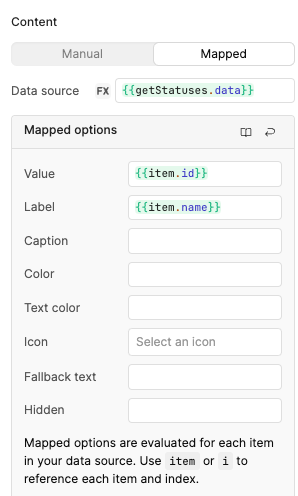
Where this breaks down is attempting to filter the table component by the displayed item.name. Since it’s referencing the underlying value (item.id), filters and sorting don’t work based off of the item.name as a user would reasonably expect it to.
The workaround I found here is listing item.name in both the value and label fields of the option list, then, when a changeset is created, I have a transformer to swap the status.name for the correct status.id so that the correct update can be made on the creator_statuses.status column in the database. Here’s the transformer code that also includes several other columns that have the same issue.
const changes = {{ creatorsTable.changesetArray }};
const contacts = {{ formatDataAsArray(getEntityContacts.data) }};
const contentCategories = {{ getCategories.data }}
const owners = {{ formatDataAsArray(getEntityMembers.data) }}

// Define the mapping of name fields → id fields
const fieldMappings = [
  {
    nameKey: "creator_contact_entity_name",
    idKey: "creator_contact_entity",
    reference: contacts,
    referenceKey: "id"
  },
  {
    nameKey: "category_name",
    idKey: "content_category",
    reference: contentCategories,
    referenceKey: "id"
  },
  {
    nameKey: "owner_name",
    idKey: "owner_email",
    reference: owners,
    referenceKey: "email"
  }
  // Add more mappings as needed
];

const updatedChangeset = changes.map(ch => {
  let updated = { ...ch };

  fieldMappings.forEach(({ nameKey, idKey, reference, referenceKey }) => {
    if (updated[nameKey]) {
      const match = reference.find(item => item.name === updated[nameKey]);

      if (match) {
        updated[idKey] = match[referenceKey];
      } else {
        delete updated[idKey];
      }

      delete updated[nameKey];
    }
  });

  updated.updated_at = new Date();
  return updated;
});

return updatedChangeset;
Anyway, I found this all pretty frustrating! I would expect the front end components to read and react to the displayed data that a user is seeing themselves, not to data that is invisible to the user.
Hi @eman31,
Thank you for the detailed explanation!
I agree, it can be frustrating when working with the table sort. The rule of thumb is that the data in the component's state is going to be what the sorting methods are applied to.
Very impressive workaround that you found using a transformer to swap the name and the id. I can definitely relay this feedback to our UI team that owns the table component. It would be interesting to see a future iteration of the table where the displayed state is accessible and can be selected for sorting.