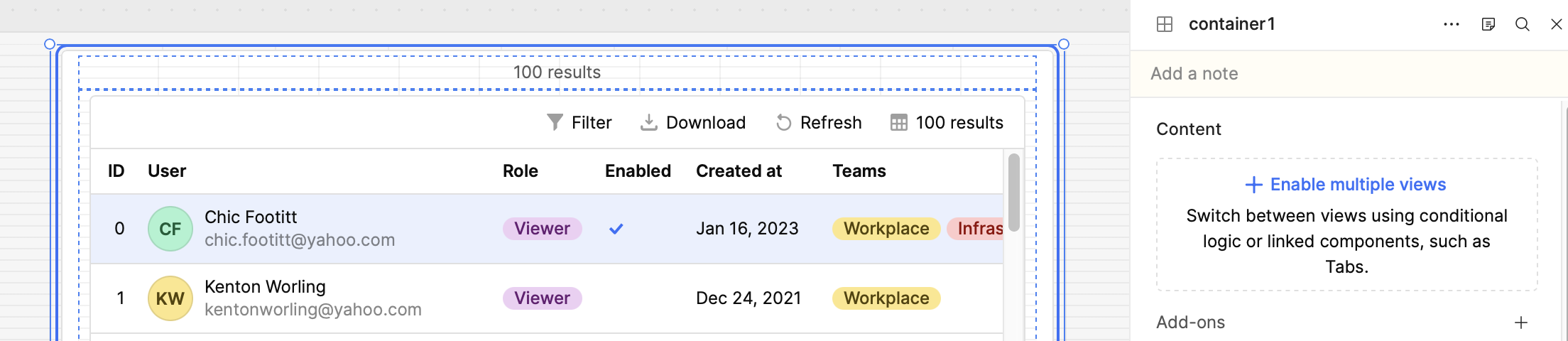
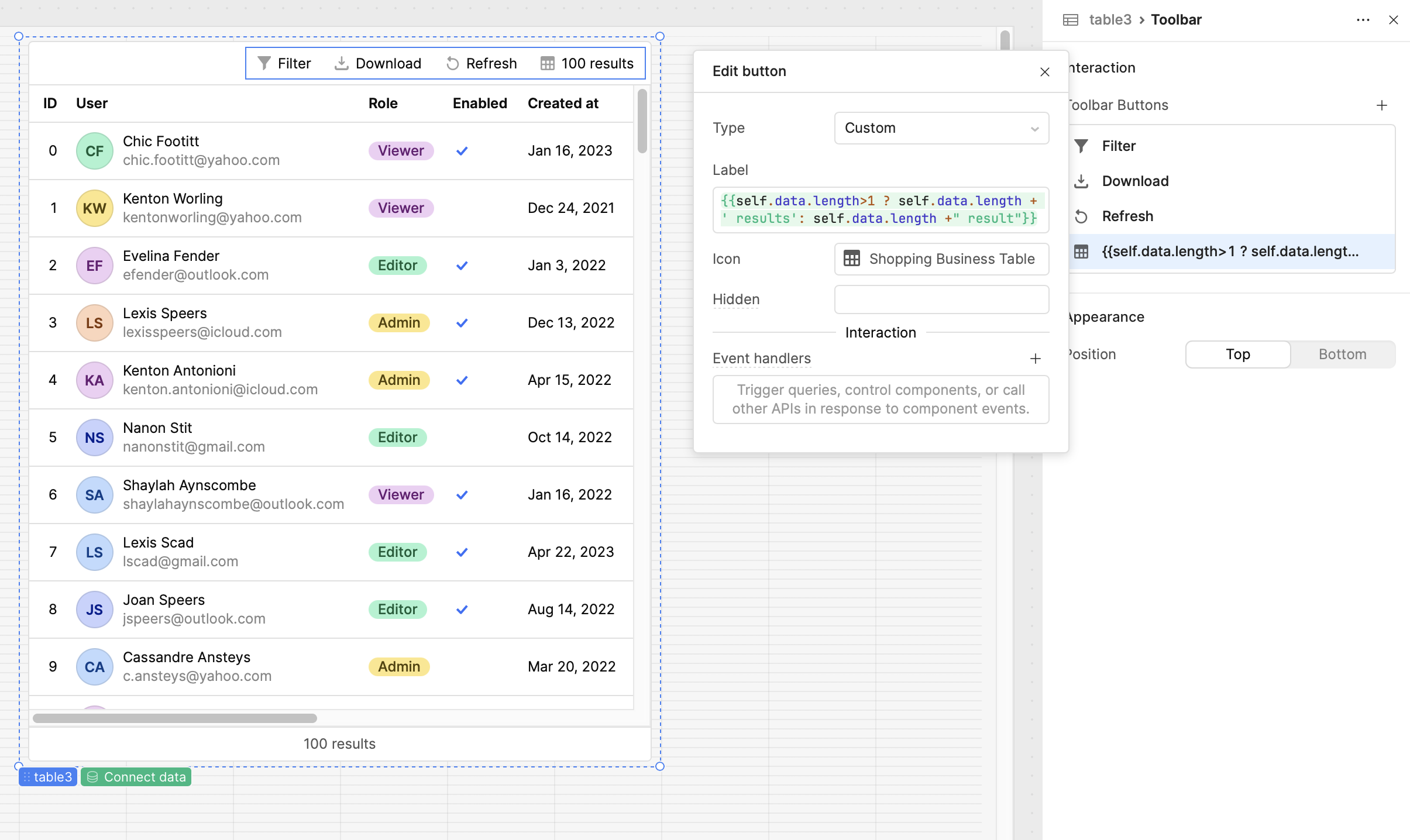
My goal: Display the total number of table records at the top of the table instead of only in the footer.
Issue: The total record count is currently visible only in the table footer. It’s not convenient because I have to scroll all the way down each time to see the total number of rows.
I’ll figure out how to handle it, but why don’t we have an option to display the row count at the top of the table? That would be much more useful than having to calculate the number of records manually.
Yes, it’s manageable. It’s still a bit complicated because you need to properly trigger it so the count always updates correctly — but it’s doable. Still, if I have to write custom code for such small tasks… you know what I mean.
I’m honestly starting to think about switching to a third-party table solution. Retool tables are not always that convenient — things like focus behavior and these small UX details make a difference.
I really wish I could talk directly to the team working on the tables. There are quite a few features and improvements we’re missing.
Thank you so much for your help, I really appreciate it @Tess
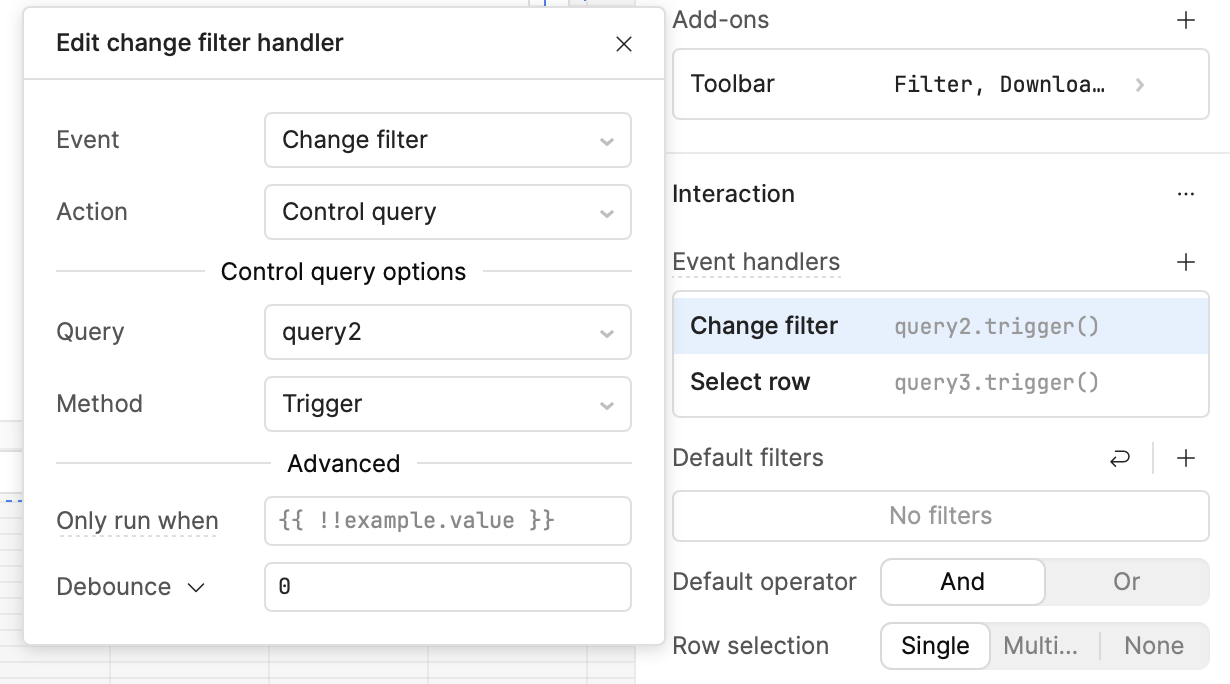
You’re triggering the JS on the Filter Change action, so it won’t recalculate when the DB query runs. It should be triggered on the main query’s success event instead, probably….
Thank you for the feedback! I completely agree; this request is among many of the small improvements we hope to make to the table. We are tracking this behavior as a feature request, but it isn't on the component team's near term roadmap, so workarounds are the way to go for now I will certainly add your feedback to that internal feature request though! If you want to share any other feature requests, I can make sure to send to the component team
Yes, I would trigger the JS query both on the main query's success and on filter change.
I know this isn't what you're looking for, but another workaround could be a custom React component. This would be 100% custom code, so it does require maintenance on your side, but you'd have more flexibility and you could still connect it to your Retool app data.
Let me explain — we sometimes run into inconvenient situations here.
I have around 10 pages, and each page contains several tabs, with one table per tab. How can I centralize the table record counting without creating a separate JS query for each table where I call table.getDisplayedData()?
I’d like to avoid defining table names manually, because otherwise I would need to create separate JS queries for each table. Using self doesn’t work in this case if the action isn’t triggered directly from the table itself.
Thank you! Yes, I see what you mean I don't have a great solution for consolidating the number of queries. If this feature request gets moved to our roadmap, I will follow up here!
If it's any consolation, you can easily count the number of records that exist on a table by accessing your source query that populates it and using formatDataAsArray(query.data).length.
There are also, to be fair, multiple ways this could be handled with just a bit of custom logic applied. You could, for one example, create a global variable that stores the current pages source query results on success after a page loads, along with a single js query that utilizes the triggeredById method to dynamically access your tables data that is returned from your source query. One of the biggest reasons why retool can be an advantageous low code platform is it's flexibility with applying custom logic where other platforms can fall short. Yet, on the flip side of that coin, that also comes with more of a learning curve with some concepts that aren't offered natively.
Or, if you have the capacity to do so and there aren't any other solutions that fit the bill, @Tess suggestion to create a custom component is always something that is almost sure to provide what is needed. Although their learning curve can be steep, they offer what most typical low or no code platforms can't when you hit an inevitable road block.
formatDataAsArray(query.data).length doesn’t respect table filters, so we can’t consider it a valid solution. 2. Custom components could solve this, I know. But the reason people use low-code tools is simple, we don’t want to spend time coding features like this — especially just to display the number of filtered records in a table for customers.
Understandable when it comes to the custom component pain point for something that seems to be a simple add. If you're wanting only the number of filtered records in your table, why not just count total records that exist in the table component itself using yourTable.data.length?
Also, you could create a simple transformer that uses your main query as it's source, applying any filter logic using the .filter() method or a for/of loop to return your filtered data, along with a count of total filtered records.
Then, you could point your table to that transformer for its data source passing something like {{yourTransformer.value.data}} and your record count to {{yourTransformer.value.count}}?
I see you already marked @Tess suggestion as a working solution. That's great! Yet if you were still on the hunt for a different option that suits your use case more, I'd be happy to provide an example of how I've done this in previous retool apps where similar functionality needed to be implemented.

 I will certainly add your feedback to that internal feature request though! If you want to share any other feature requests, I can make sure to send to the component team