I kept running into this error too! error TypeError: unhashable type: 'set' (line 8) -brutal. Let me know if that helped!
2 Likes
Hi,
Thanks for sharing this; I'm going to give this a shot. One other difference that might be important - in your workflow you're parsing a specific file from retool storage and I'm passing it in via the ID (using the function):
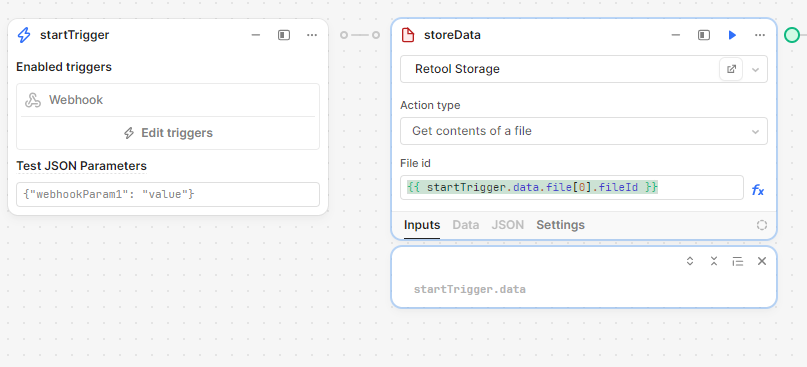
Maybe that won't matter but thought I'd mention it. 
1 Like
Great point! It could be a defining factor.  hopefully not! If it is, I'll refactor and share
2 Likes
Success! It is working now, but I'm going to add some quick notes here for anyone else's future reference:
- Passing in the fileID from the Retool storage step worked just fine but I did have to add a very small debounce on the button upload event handler that calls the workflow otherwise I got a file not found error. Right now it's at 2s, I might try to dial that back but it's working so

- The first time I ran this after updating the code to @AbbeyHernandez's solution, I got an error about a missing dependency: xlrd. I added the base 2.0.1 version to the libraries in the workflow and waited for it to say the environment was ready before I tried again.
- I did NOT add an import line for xlrd as it's a dependency of pandas, it would seem. I read through their documentation about dependencies but maybe I missed that?
- What's interesting (to me at least) is that this is virtually the same code she originally suggested. I've no idea why this is working now when it wasn't before

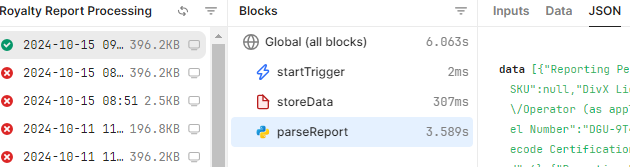
I am now getting json data back from the parsed file in Retool Storage. Now I'll see if I can get some of the other "clean up" steps from my original post to work and then pass the data back into the table in my app. 
2 Likes
I am so glad you got it working! Thank you for sharing the additional steps you took to pay it forward! Good luck on the data cleaning. Feel free to reach out if you hid any road bumps 
3 Likes
I'm back with some more updates because I got into the actual data cleaning part of my needs, I ran into a couple other things that might trip other people up too. I might just write all this up when I'm done as a separate post, but for now here are a few more things I learned:
- You're going to need more than just the pandas library added to your project. Here are the python libraries I have in order for things like structure (columns / rows) and data manipulation to work correctly:
- pandas (min 2.2.3)
- openpyxl (min 3.1.5)
- xlrd (min 2.0.1)
- In the flagged solution, we convert the dataframe from pandas to JSON. That worked great! Until I got to try and loading it into a table....
- If you want to use JSON data, you'll have to format it as an array (duh) for the table. I did this a couple different ways - both in the workflow using JavaScript and in the table datasource itself using handlebars (eg.
{{ formatdataasarray(myworfklow.data) }}) - The JSON data came back as an array but every single character was it's own column
 . Obviously, this was problematic. I imagine there is a way around this with the JSON data or maybe it was just the way my data comes in but this had me stumped for a minute.
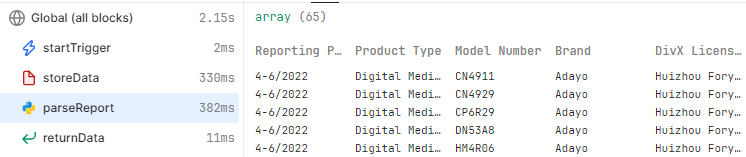
 - The solution I ended up using for this was to just return the raw pandas data - it's already formatted as an array and you get nice columns and rows! Here's a look at how the data comes back natively from pandas:
- If you want to use JSON data, you'll have to format it as an array (duh) for the table. I did this a couple different ways - both in the workflow using JavaScript and in the table datasource itself using handlebars (eg.
- There are still the odd linting "errors" that can be misleading
- It doesn't like the base64Data option sometimes on the inbound file stream

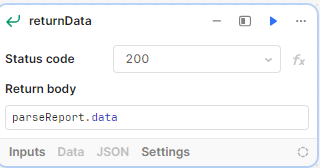
- On the return step of the workflow, you will sometimes get Invalid JSON messages when it's not...invalid JSON. This is what worked for me
- It doesn't like the base64Data option sometimes on the inbound file stream
Here is my current workflow code that takes the report uploaded to Retool Storage, converts it, runs it through pandas, and then manipulates it to do some basic cleanup. YMMV, of course, depending on how your file is structured:
import io
import pandas as pd
import base64

# File decode and parse
base64_data = storeData.data.base64Data
decoded_data = base64.b64decode(base64_data)
excel_data = pd.read_excel(io.BytesIO(decoded_data), sheet_name=0, header=None)

# File cleanup and prep:
# - Eliminate lines with no value in some column
# - Drop blank columns
# - Get the right headers based on the submitted report
if excel_data.columns[0] != "someCol":
  excel_data = excel_data[excel_data[1].notna()]
  excel_data.dropna(axis=1, how='all', inplace=True)
  first_col = excel_data[excel_data.columns[0]]
  header_row_index = first_col.loc[first_col == "someCol"].index[0]
  column_names = excel_data.loc[header_row_index]
  excel_data = excel_data.loc[header_row_index+1:, :]
  excel_data.columns = column_names
  return excel_data
My thanks again to @pyrrho and @AbbeyHernandez for their assistance sorting this out.
3 Likes
Thanks so much for sharing how it all ending up coming together 
2 Likes