Im looking for a bit of advice on the below. Any smart ideas?
My goal: send an api call to anthropic/claude api for research
Issue: the block is timing out at 120s
Steps I've taken to troubleshoot: Not sure how to go about troubleshooting as i cant reduce the data in the payload. The request contains scraped website data, an initial prompt and an attached pdf url being loaded by the anthropic server from an external resource (s3 in this case).
Additional info: (Cloud or Self-hosted, Screenshots) cloud hosted. works fine with smaller payloads. some of the calls being made will have more complex payloads/output requirements than this. i have 3 async calls with the same payload, one to openai, one to gemini and another to anthropic. the openai and gemini calls complete in just under 120s (approx 110s)
Hi - the AI Action block maxes out at 120 seconds. So for it to run longer you need to create a normal REST Resource and call the AI provider directly (with a longer timeout set on the REST Resource).
Details of the OpenAI API can be found here:
Alternatively you could use a Retool AI Agent - they run in the background and can have a 10 minute timeout from a Result (sync) Workflow block (I ran into problems with async - so avoid that).
Another problem with long-running tasks in Workflows is that you often want to move that task into its own Workflow so it is self-contained. In that instance you have another problem of the 3 minute Workflow → Workflow timeout problem. You may not want to do that though, but if you did you would need to Queue the workflow and then have it store its result in the Retool Database (or similar), then poll for the result using Javascript. If you need details on that I can provide it.
Thanks
EDIT:
Something like this for a REST Resource to OpenAI:
Apologies, i should have mentioned I am already using a REST API block to do the calls to openai/anthropic/google - they have the same timeout issue.
I have managed to make a temporary resolution by adding a request in the prompt to keep responses under 90 seconds (to be safe), turning the ‘effort’ down to low on anthropic and splitting up the prompts to process the file separately, the website scrape results separately and then using a third rest api block to analyse the two and action the original prompt. It works, most of the time, but its far from ideal. With the nature of calls to LLM providers, the timeout on workflow blocks needs to be greater than 120s. End of.
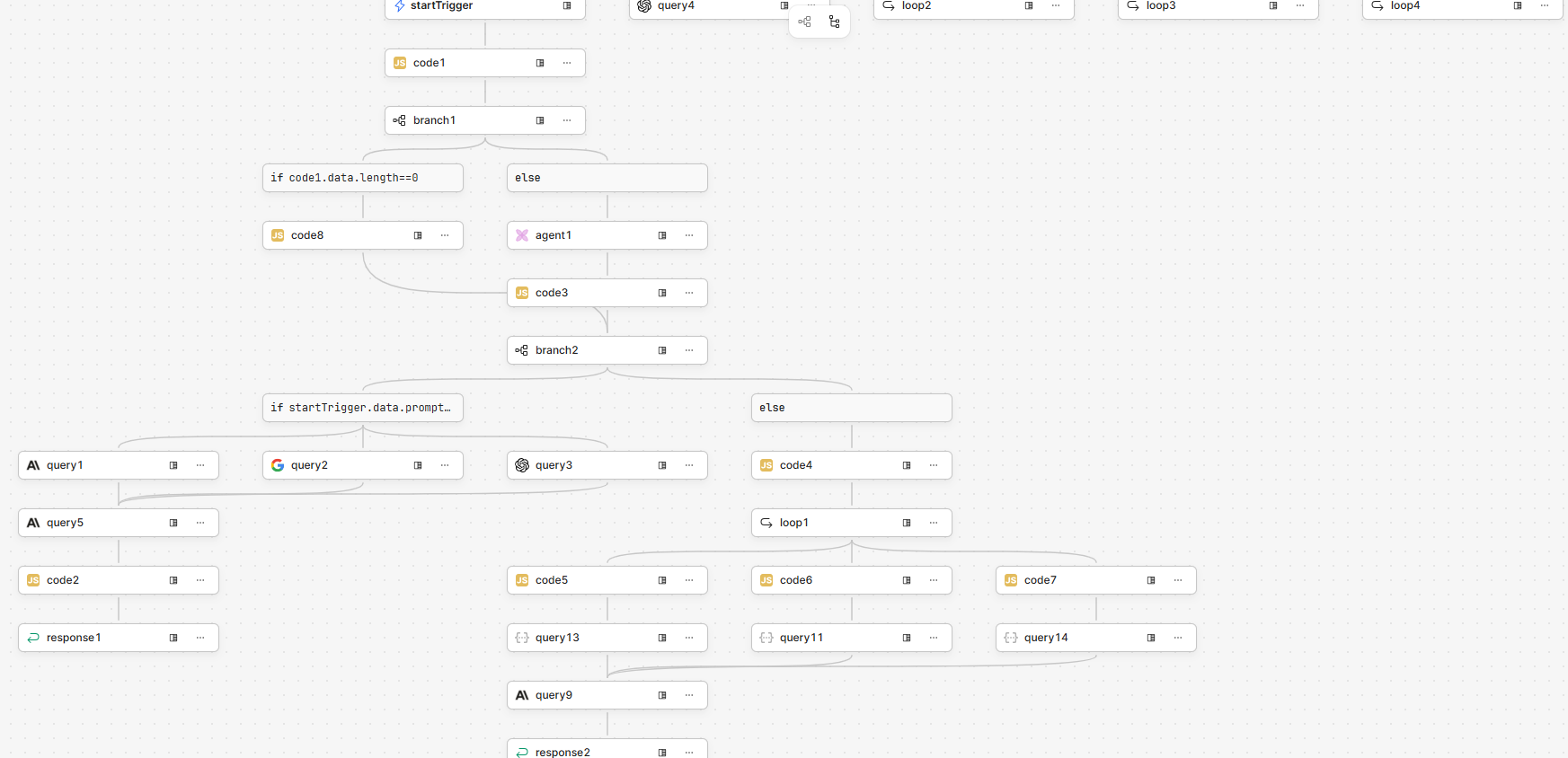
Thanks for your reply. I have two workflows that handle different prompt types. I have attached the simpler workflow screenshot. The retool AI blocks are only used if there are NOT file/s attached to the prompt. These work fine. It is the more complex prompts that are causing issue, namely if there are attached file/s AND a website to scrape. Sometimes a content heavy PDF will cause a timeout too.
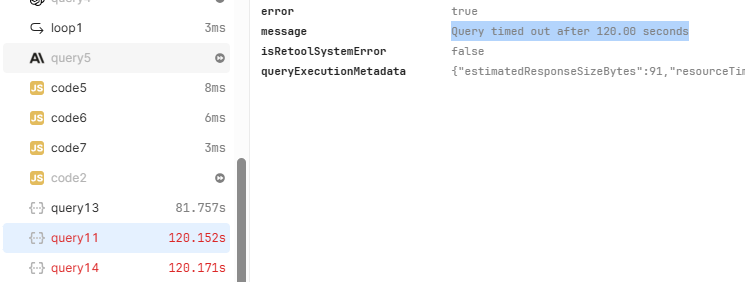
In the below workflow, it is usually query11 that causes the timeout (apologies for naming conventions, or lack thereof!) which is a REST API block containing the anthropic call. This workflow is called directly when the prompt is submitted by the user.
Hi - I have had problems with the Loop block if it contains long-running tasks - I completely avoid it now unless for trivial loops. There is a maximum timeout for each iteration of a Loop which is 120 seconds. This is very likely to be the timeout you are hitting.
You said “usually” it is this block that causes it which also makes me think it is a problem with Loop, it’s not one of the blocks inside the Loop, it is the Loop itself (and the iteration timeout limit).
I would consider converting that Loop into pure javascript, this will be allowed to have a maximum of 10 minutes timeout and no specific Loop iteration limit. You could convert those blocks below “loop1” to be a Multi-Step function or a Workflow. If you choose a Workflow you will have a 3 minute maximum timeout unless you Queue the Workflow and store the result somewhere (then poll to retrieve it).
I have literally had all these same problems you are facing as well and had to jump through a lot of hoops to get long-running AI processes to complete reliably!
Thanks again. In this case, all the loop is doing is building a structured array of the uploaded file/s info to pass to the payload constructor code block, normally it is finished in about 10-20ms - if im not wrong, that wouldnt have any effect on the consequent timeout issues?
Ok yes I am wrong - I was thinking you were calling a multi-step function from a Loop and I had problems with that. This isn’t that is it sigh - Sorry!
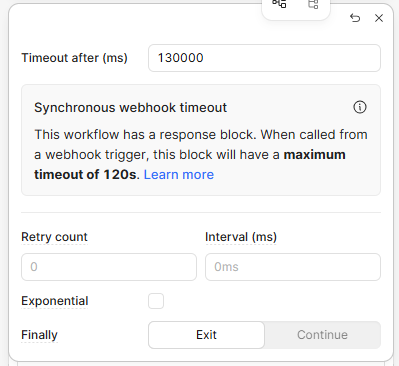
What’s the actual error message you are getting on that “query11” failure? What is the Timeout you put on “query11” in the block settings?
Ah, so are you saying if I trigger that workflow from another webhook triggered workflow who’s only job is to trigger the main workflow (using queue), I can get a 600000ms timeout?
You should be able to get 10 minute timeouts on those blocks if you don’t trigger via a webhook. i.e. if you make an http request to start the workflow - that http request will sit and wait for the result which must be returned in under 2 minutes.
If you run the Workflow via a CRON schedule or from another Workflow then those 2 minute timeouts are not in play.
If you are queuing Workflows (from another Workflow or App) then it is best to write the result to a database table using the workflow run id as the Primary Key. Then if you need the result in the calling Workflow or App, you can poll the table periodically until you get a result. I do this in my long-running Workflows that use AI Agents (some of which take over 5 minutes to return a result).
If you need an example of persisting Workflow results to the database, I can provide it.
Ok, this is really helpful. I’ll look into this. Thanks for your help, really appreciated. I may well be in touch if I hit another wall but fingers crossed that won’t be the case! All the best!