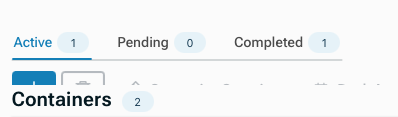
- My goal: I want the tabs to display badge numbers.
If I use the tabs component, badge numbers cannot be displayed. If I use a list view, I can barely achieve the goal.
Please refer to the image.


If I use the tabs component, badge numbers cannot be displayed. If I use a list view, I can barely achieve the goal.
Please refer to the image.
Can no one provide a solution? The navigation module does not allow HTML input, so it's impossible to have colored numbers.
Hello @Tiffany_Yu! Welcome to the Community! Thanks so much for your patience while we work through everyone's questions. We're happy to help! 
Actually, you can do this with the Tabs component. You can make the value for each tab dynamic (see the screenshot). I added mock data to show the length. Imagine if you were using these tab badge numbers to track notifications for each tab. Is this close to what you're looking for?
I am aware of these changes. However, what I need is for the numerical changes to have color so they are more eye-catching. Please refer to the image.
Hello @Tiffany_Yu , you can achieve this by using HTML component. It’s a bit of a hassle, but i think this is the easiest way without creating custom components.

This is the tab badge i usually use on my web app projects. Steps to create:
<div class="pill-tabs">
  <button
    class="pill-tab {{ variable.value === 'Unpaid' ? 'active' : '' }}"
    data-click-target="Unpaid"
  >
    <span class="tab-label">Unpaid</span>
    <span class="tab-badge">
      {{ /* replace with your code */ }}
    </span>
  </button>

  <button
    class="pill-tab {{ variable.value === 'Paid' ? 'active' : '' }}"
    data-click-target="Paid"
  >
    <span class="tab-label">Paid</span>
    <span class="tab-badge">
     {{ /* replace with your code */ }}
    </span>
  </button>

  <button
    class="pill-tab {{ variable.value === 'Completed' ? 'active' : '' }}"
    data-click-target="Completed"
  >
    <span class="tab-label">Completed</span>
    <span class="tab-badge">
      {{ /* replace with your code */ }}
    </span>
  </button>
</div>

.pill-tabs {
  display: flex;
  width: 100%;
  box-sizing: border-box;

  gap: 8px;
  padding: 6px;
  background: #EFF2F5;
  border-radius: 10px;
}

.pill-tab {
  appearance: none;
  border: 0;
  background: transparent;
  cursor: pointer;

  display: inline-flex;
  align-items: center;
  gap: 8px;

  padding: 6px 12px;
  border-radius: 10px;

  font: 600 14px/1 'Figtree';
  color: #475569;

  transition: background .15s ease,
              color .15s ease,
              transform .3s ease;
}

.pill-tab:hover {
  background: #E2E8F0;
}

.pill-tab.active {
  background: #D7E3EC;
  color: #1F4E79;
  animation: tabBounce .3s ease-out;
}

.tab-badge {
  min-width: 18px;
  height: 18px;
  padding: 0 7px;

  display: inline-flex;
  align-items: center;
  justify-content: center;

  font-size: 12px;
  border-radius: 6px;

  background: #205768;
  color: #fff;
}

@keyframes tabBounce {
  50% { transform: scale(1.05); }
}
class="pill-tab {{ variable.value === 'Unpaid' ? 'active' : '' }}" , is that line just checks which tab is currently selected and highlights it. When the value matches the tab (like “Unpaid”), it adds the active style so users can clearly see which tab they’re on. Make sure to create a Variable and replace the variable.value because this is just a placeholder.<span class="tab-label">Paid</span>, is the tab labeldata-click-target="Unpaid" will be used for identifying which tab button is clicked. You will reference this value in the Event Handler later.<span class="tab-badge"> {{ /* replace with your code */ }} </span> holds the number that will be displayed on the badge, you can replace it with JS to reference a query, etc.variable.setValue(target.type);. This will update the variable, to set the active, selected tab.Container1.setCurrentView(target.type). Make sure to set data-click-target in the HTML section, the same as your container view key name.
Example of the line tab badge. It will require different HTML & CSS settings.

Example for a filter button.
Message to Retool team:
Hey guys, i know you have a lot on your agenda right now, but please for the love of God and Retool Community, pay attention to the Editor and Components. Small things like this badge on tabs, matters a lot when building an app. I know the AI stuff is a huge boost to our productivity, but do you know what we use every single day? YES, the Editor and the components. So please help us, and thank you in advance.
Hey @Nick_117 - thanks for helping @Tiffany_Yu out with such a thorough explanation! 
Your feedback for the team is much appreciated, as well. We've certainly heard similar in the last ~6 months and are actively looking at ways to ensure that product-level decisions are more consistently informed by the builder experience. You might start to see more EMs and PMs here in the Community, for example, as we explore different feedback mechanisms.
Feel free to reach out with a more granular list of some smaller fixes that you'd like to see, as well. Just this morning I got a preview of two new components - one v2 and the other brand new, but oft requested - and I'd love to ship similar changes that move the needle for the average builder.
I would also like to thank Nick@Nick again for his detailed explanation.
Similarly, I have a suggestion for the Retool team regarding onboarding. If Retool's target entry-level customers are those with great interest but only preliminary coding skills, Retool should release videos structured like this: first, show an image of a finished product (featuring common functions from mainstream apps or websites), such as the navigation bar with badge numbers I mentioned. Then, follow that image with a video under five minutes explaining how to use Retool's tools to achieve that goal.
Once the volume of such videos increases, it could allow highly interested and intelligent people to quickly get started by combining AI-assisted questioning with these resources.
Hey there @Nick_117, thanks for chiming in with such detailed explanations!! That is amazing!
@Tiffany_Yu, I am so glad you are finding it helpful! Also seconding what @Darren mentioned, keep the feedback coming!
Not sure if you are aware, @Tiffany_Yu, we do have a lot of videos on our official Retool YouTube channel, definitely take a look. We have past webinars, how to videos, customer stories, and more.
There's also @MiguelOrtiz’s YouTube channel. Miguel should be a familiar profile you see all over the forum. He always shares up to date and friendly instructional videos on his channel too, definitely worth checking out! 
We also have more in depth instructional videos available on Retool University as well. 
Let me know if any of these are helpful! We love having new Retool users here, let’s learn and grow together!!