How to set default value for new Cascader component

Hi Jynnie,

How would we set the default value for the Cascader component? I tried putting in the value for the option, both with and without quotes, but it didn't trigger it. Should I be passing in an array instead? I couldn't find any documentation on this.

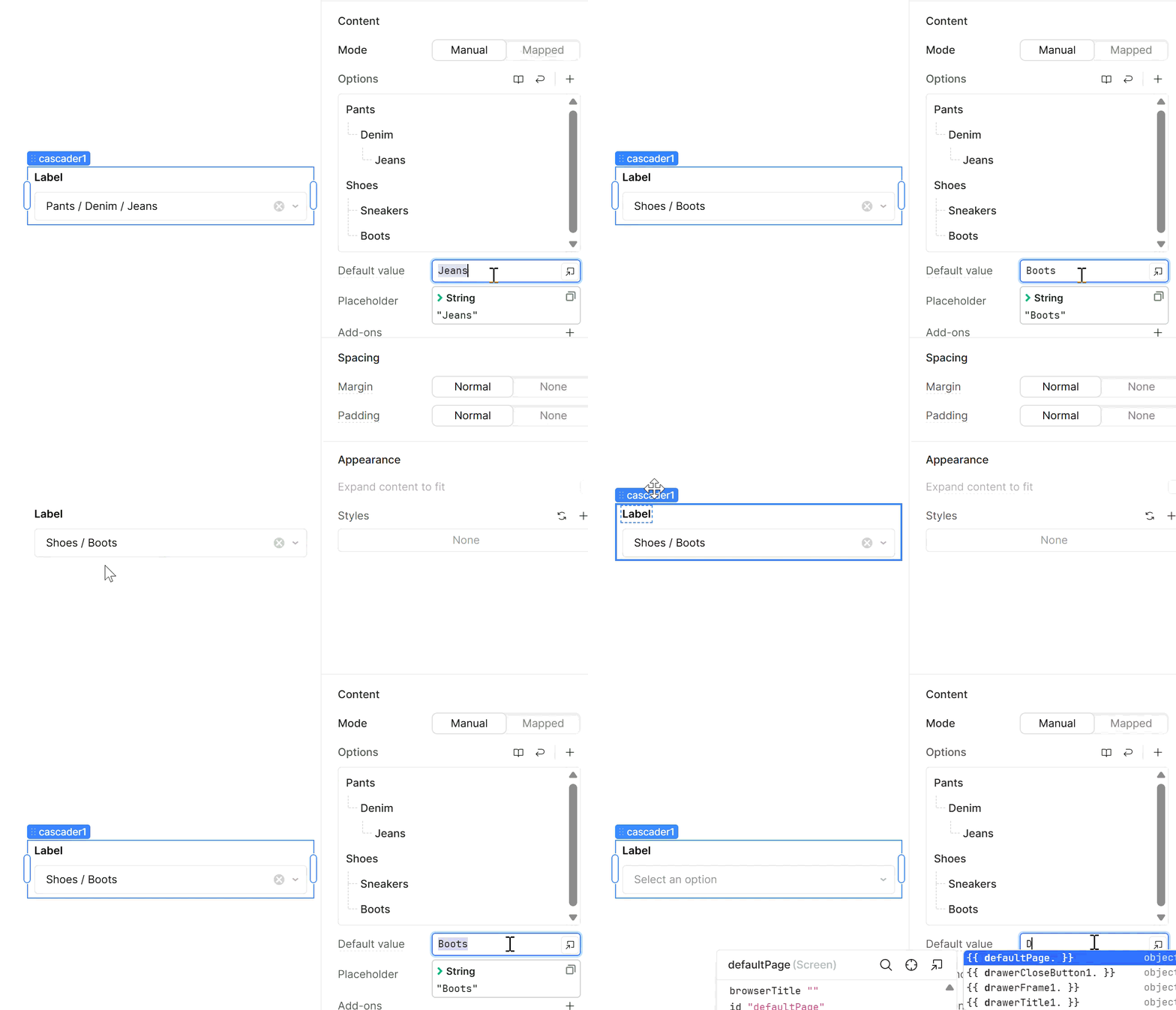
Here's what I put in for the default role:

But it doesn't work, despite it matching what the value is when I select it manually:

you use just a single value, not the full path. so try Creative Writing Tutor with no quotes
Recording

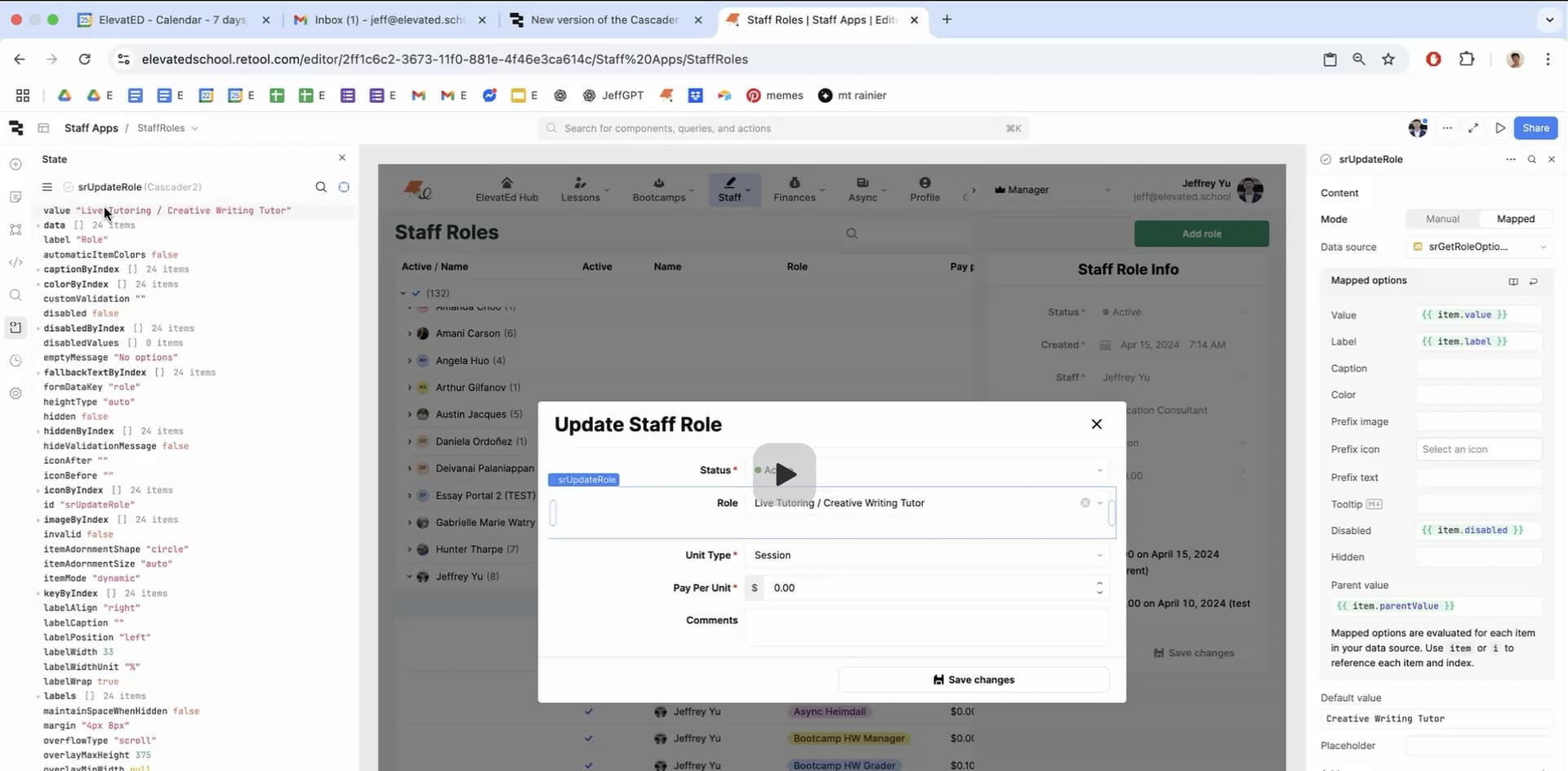
Thanks for the reply bobthebear! Unfortunately, that's didn't work. I wonder if it's because I'm using a mapped set of options? I recorded a clip showing you what I see on my screen:

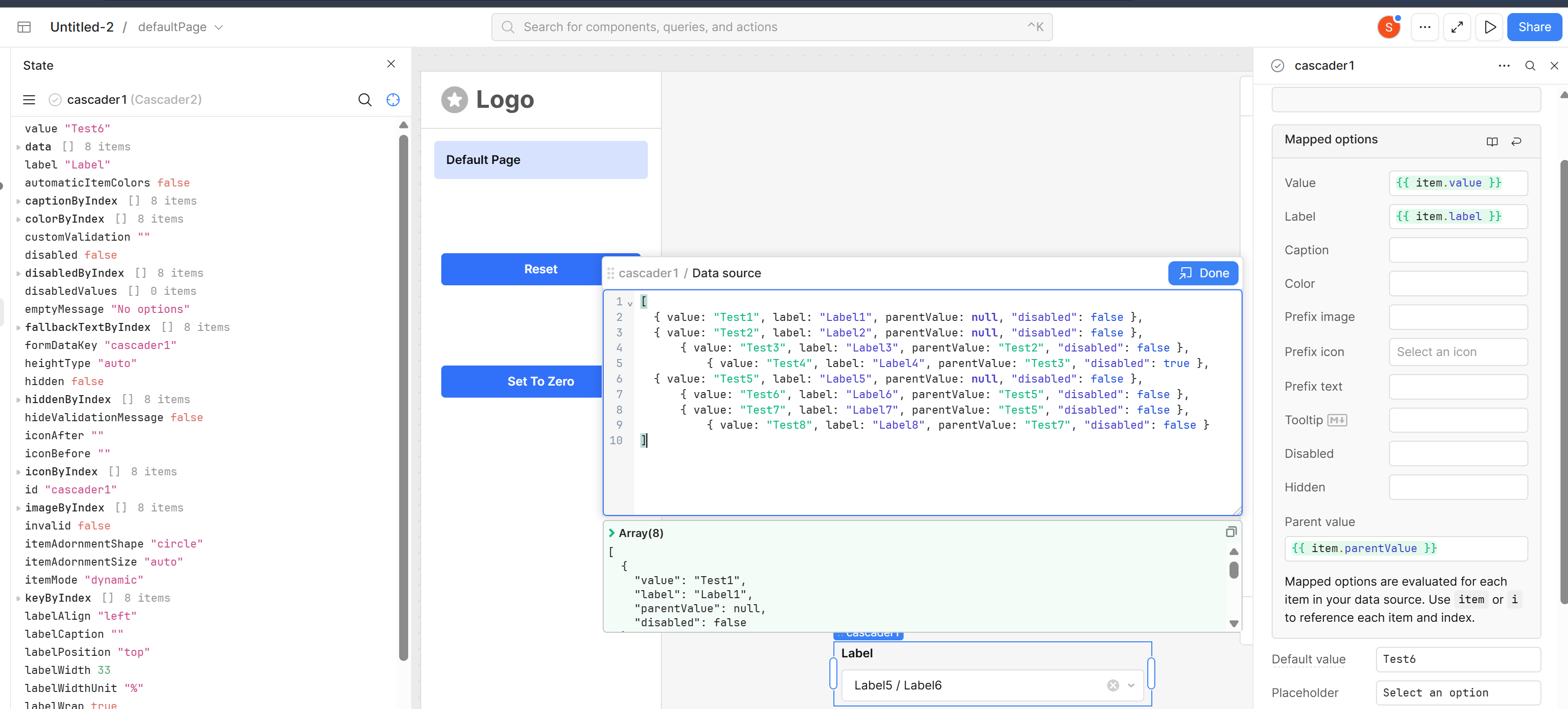
ah I starting to see whats going on:


ok so.... where's waldo? :rofl:

Joking, but I noticed a difference between ours.

  • For you, in the State window value is updated with the path (which is made up of your Labels under Mapped Options)
  • For me, value in the State window is updated with the Mapped Options value

If I type in any of label values (Label1, Label2...) it doesn't work, even if I try to include the path with ("Label1 / Label2") it still doesn't do anything. For me, this is the equivalent of you typing in "Live Tutoring / Creative Writing Tutor" which works for you but not me.

  • So we're at one possibility, where something in the backend got messed up and what should be pointing to casscader.selectedItem.value is actually pointing to casscader.selectedItem.label. Usually deleting the component and remaking it gets everything sorted out and good to go.

To try and narrow down some more possibilities as to what it's doing behind your back errm uhhh, I mean behind the scenes, I got a few questions:

  • Are you able to show me one of the objects you're using in your Data Source? or at least it's strucure (you can redact the values if you want... yay mspaint :joy:)
  • Do {{ item.value }} and {{ item.label }} have different values? are they missing values?
  • If you switch around {{ item.value }} and {{ item.label }} does it do the same thing?
  • Similar to the last one, if you set both value and label to {{ item.label }} does that force it to work?

Sure! Here are the answers to your questions bob. Thanks for helping again!

  1. Here is the entire data source code I am using in the update role cascader component.
[
  {
    "value": "Live Tutoring",
    "label": "Live Tutoring"
  },
  {
    "value": "Live Tutoring / Analytical Writing Tutor",
    "label": "Analytical Writing Tutor",
    "parentValue": "Live Tutoring",
    "disabled": true
  },
  {
    "value": "Live Tutoring / Creative Writing Tutor",
    "label": "Creative Writing Tutor",
    "parentValue": "Live Tutoring",
    "disabled": true
  },
  {
    "value": "Live Tutoring / Application Consultant",
    "label": "Application Consultant",
    "parentValue": "Live Tutoring",
    "disabled": true
  },
  {
    "value": "Live Bootcamps",
    "label": "Live Bootcamps"
  },
  {
    "value": "Live Bootcamps / Bootcamp Teacher",
    "label": "Teacher",
    "parentValue": "Live Bootcamps",
    "disabled": true
  },
  {
    "value": "Mock Interviews",
    "label": "Mock Interviews"
  },
  {
    "value": "Mock Interviews / College Consulting Interviewer",
    "label": "College Consulting Interviewer",
    "parentValue": "Mock Interviews"
  },
  {
    "value": "Async Editing",
    "label": "Async Editing"
  },
  {
    "value": "Async Editing / Async Trainee",
    "label": "Trainee",
    "parentValue": "Async Editing"
  },
  {
    "value": "Async Editing / Async Editor",
    "label": "Editor",
    "parentValue": "Async Editing"
  },
  {
    "value": "Async Editing / Async Heimdall",
    "label": "Heimdall",
    "parentValue": "Async Editing",
    "disabled": true
  },
  {
    "value": "Story Editing",
    "label": "Story Editing"
  },
  {
    "value": "Story Editing / Story Trainee",
    "label": "Trainee",
    "parentValue": "Story Editing"
  },
  {
    "value": "Story Editing / Story Editor",
    "label": "Editor",
    "parentValue": "Story Editing"
  },
  {
    "value": "Story Editing / Story Heimdall",
    "label": "Heimdall",
    "parentValue": "Story Editing"
  },
  {
    "value": "Bootcamp HW Grading",
    "label": "Bootcamp HW Grading"
  },
  {
    "value": "Bootcamp HW Grading / Bootcamp HW Trainee",
    "label": "Trainee",
    "parentValue": "Bootcamp HW Grading"
  },
  {
    "value": "Bootcamp HW Grading / Bootcamp HW Grader",
    "label": "Grader",
    "parentValue": "Bootcamp HW Grading",
    "disabled": true
  },
  {
    "value": "Bootcamp HW Grading / Bootcamp HW Manager",
    "label": "Manager",
    "parentValue": "Bootcamp HW Grading"
  },
  {
    "value": "Season of Ink",
    "label": "Season of Ink"
  },
  {
    "value": "Season of Ink / Season of Ink Judge",
    "label": "Judge",
    "parentValue": "Season of Ink"
  },
  {
    "value": "Ongoing Admin",
    "label": "Ongoing Admin"
  },
  {
    "value": "Ongoing Admin / General Work",
    "label": "General Work",
    "parentValue": "Ongoing Admin"
  }
]

And here is my code for how I generated that set:

let originalArr = [
  {
    value: "Live Tutoring", label: "Live Tutoring",
    children: [
      { value: "Analytical Writing Tutor", label: "Analytical Writing Tutor" },
      { value: "Creative Writing Tutor", label: "Creative Writing Tutor" },
      { value: "Application Consultant", label: "Application Consultant" },
    ]  
  },
  { 
    value: "Live Bootcamps", label: "Live Bootcamps",
    children: [
      { value: "Bootcamp Teacher", label: "Teacher" },
    ]  
  },
  { 
    value: "Mock Interviews", label: "Mock Interviews",
    children: [
      { value: "College Consulting Interviewer", label: "College Consulting Interviewer" },
    ]  
  },
  { 
    value: "Async Editing", label: "Async Editing",
    children: [
      { value: "Async Trainee", label: "Trainee" },
      { value: "Async Editor", label: "Editor" },
      { value: "Async Heimdall", label: "Heimdall" }
    ]  
  },
  { 
    value: "Story Editing", label: "Story Editing",
    children: [
      { value: "Story Trainee", label: "Trainee" },
      { value: "Story Editor", label: "Editor" },
      { value: "Story Heimdall", label: "Heimdall" }
    ]  
  },
  { 
    value: "Bootcamp HW Grading", label: "Bootcamp HW Grading",
    children: [
      { value: "Bootcamp HW Trainee", label: "Trainee" },
      { value: "Bootcamp HW Grader", label: "Grader" },
      { value: "Bootcamp HW Manager", label: "Manager" }
    ]  
  },
  { 
    value: "Season of Ink", label: "Season of Ink",
    children: [
      { value: "Season of Ink Judge", label: "Judge" },
    ]  
  },
  {
    value: "Ongoing Admin", label: "Ongoing Admin",
    children: [
      { value: "General Work", label: "General Work" },      
    ]
  }
];

// If no selected staff, return original flattened without disabled logic
if (!srViewStaff.selectedItem || !srViewStaff.selectedItem.id) {
  return flattenRoles(originalArr);
}

// Prepare Staff Roles Data
const staffRolesData = srGetAllStaff.data;
const staffRolesObjects = [];
const keys = Object.keys(staffRolesData);
const arrays = keys.map(key => staffRolesData[key]); 
const length = arrays[0].length;

for (let i = 0; i < length; i++) {
  const item = {};
  keys.forEach((key, index) => {
    item[key] = arrays[index][i];
  });
  staffRolesObjects.push(item);
}

// Filtered Roles for Selected Staff
const filteredData = staffRolesObjects.filter(item => item.staff_id === srViewStaff.selectedItem.id);

// Flatten Function with Disabled Logic
function flattenRolesWithDisabled(originalArr, filteredData) {
  const result = [];

  originalArr.forEach(parent => {
    result.push({
      value: parent.value,
      label: parent.label
    });

    parent.children.forEach(child => {
      const isDisabled = filteredData.some(item => 
        item.service === parent.value && item.role === child.value
      );

      result.push({
        value: `${parent.value} / ${child.value}`,
        label: child.label,
        parentValue: parent.value,
        ...(isDisabled && { disabled: true })
      });
    });
  });

  return result;
}

// Helper if no disabled logic needed
function flattenRoles(originalArr) {
  const result = [];

  originalArr.forEach(parent => {
    result.push({
      value: parent.value,
      label: parent.label
    });

    parent.children.forEach(child => {
      result.push({
        value: `${parent.value} / ${child.value}`,
        label: child.label,
        parentValue: parent.value
      });
    });
  });

  return result;
}

// Return the flattened with disabled logic applied
return flattenRolesWithDisabled(originalArr, filteredData);

  1. Yes, item.value and item.label have different values. For the label, I just put "Creative Writing Tutor" and drop out the service (i.e. "Live Tutoring"), even though the value is "Live Tutoring / Creative Writing Tutor". I thought that would help with readability, but I'm happy to change the label to match that of the value if needed! I think I'm misunderstanding how the new Cascader works with parent values.

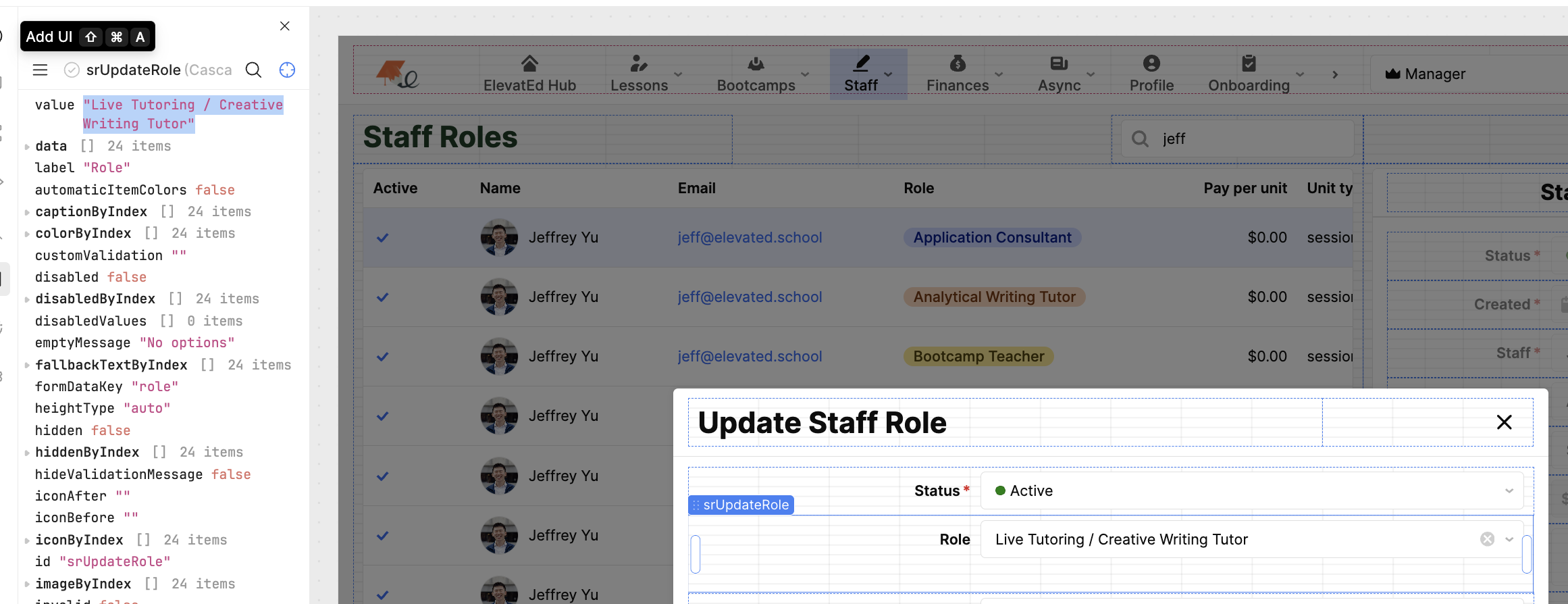
3 and 4. I recorded a video showing you what I see. Now there's some straight up weird behavior; it automatically prefills the Cascader with Application Consultant, even though I set it as Creative Writing Tutor. Clips

Following up @bobthebear – let me know if I can help provide any other info! Or if the Retool team has any insights.

My bad, I went full "Squirrel Mode" and found something shiny that distracted me.

From looking at your data structure, I don't think value should include the parentValue as well, especially since there is a variable specifically for that. the parentValue should match the value of a previous object, but in your structure you would have a value of "Live Tutoring / Analytical Writing Tutor" and parentValue of "Live Tutoring" which would give the path "Live Tutoring / Live Tutoring / Analytical Writing Tutor" (see below, but path is dynamically built using {parentValue} + " / " + {value})

The path that it displays is really just for visual representation and can be put together using:

def get_path(value, items):
    value_to_item = {item['value']: item for item in items}
    return " / ".join(reversed([value.strip()] + ([get_path(value_to_item[value]['parentValue'], items)] if value in value_to_item and 'parentValue' in value_to_item[value] else [])))

try using the code below: I really only changed

value: `${parent.value} / ${child.value}`,

to

value: `${child.value}`,

I also made some performance improvements, but in general all you should need to do is change line 122 and 99 in your original code

let originalArr = [
  {
    value: "Live Tutoring", label: "Live Tutoring",
    children: [
      { value: "Analytical Writing Tutor", label: "Analytical Writing Tutor" },
      { value: "Creative Writing Tutor", label: "Creative Writing Tutor" },
      { value: "Application Consultant", label: "Application Consultant" },
    ]  
  },
  { 
    value: "Live Bootcamps", label: "Live Bootcamps",
    children: [
      { value: "Bootcamp Teacher", label: "Teacher" },
    ]  
  },
  { 
    value: "Mock Interviews", label: "Mock Interviews",
    children: [
      { value: "College Consulting Interviewer", label: "College Consulting Interviewer" },
    ]  
  },
  { 
    value: "Async Editing", label: "Async Editing",
    children: [
      { value: "Async Trainee", label: "Trainee" },
      { value: "Async Editor", label: "Editor" },
      { value: "Async Heimdall", label: "Heimdall" }
    ]  
  },
  { 
    value: "Story Editing", label: "Story Editing",
    children: [
      { value: "Story Trainee", label: "Trainee" },
      { value: "Story Editor", label: "Editor" },
      { value: "Story Heimdall", label: "Heimdall" }
    ]  
  },
  { 
    value: "Bootcamp HW Grading", label: "Bootcamp HW Grading",
    children: [
      { value: "Bootcamp HW Trainee", label: "Trainee" },
      { value: "Bootcamp HW Grader", label: "Grader" },
      { value: "Bootcamp HW Manager", label: "Manager" }
    ]  
  },
  { 
    value: "Season of Ink", label: "Season of Ink",
    children: [
      { value: "Season of Ink Judge", label: "Judge" },
    ]  
  },
  {
    value: "Ongoing Admin", label: "Ongoing Admin",
    children: [
      { value: "General Work", label: "General Work" },      
    ]
  }
];

// If no selected staff, return original flattened without disabled logic
if (!srViewStaff.selectedItem || !srViewStaff.selectedItem.id) {
  return flattenRoles(originalArr);
}

// Prepare Staff Roles Data
const staffRolesData = srGetAllStaff.data;
const keys = Object.keys(staffRolesData);
const arrays = keys.map(key => staffRolesData[key]); 

// Filtered Roles for Selected Staff
const filteredDataSet = new Set(arrays[0].reduce((acc, _, i) => {
      const item = keys.reduce((obj, key, index) => {
        obj[key] = arrays[index][i];
        return obj;
      }, {});
      acc.push(item);
      return acc;
  }, [])
  .filter(item => item.staff_id === srViewStaff.selectedItem.id)
  .map(item => `${item.service}|${item.role}`)
);

// Optimize flattenRolesWithDisabled function
function flattenRolesWithDisabled(originalArr, filteredDataSet) {
  return originalArr.flatMap(parent => [
    { value: parent.value, label: parent.label },
    ...parent.children.map(child => {
      const isDisabled = filteredDataSet.has(`${parent.value}|${child.value}`);
      return {
        value: `${parent.value} / ${child.value}`,
        label: child.label,
        parentValue: parent.value,
        ...(isDisabled && { disabled: true })
      };
    })
  ]);
}

// Optimize flattenRoles function
function flattenRoles(originalArr) {
  return originalArr.flatMap(parent => [
    { value: parent.value, label: parent.label },
    ...parent.children.map(child => ({
      value: `${child.value}`,
      label: child.label,
      parentValue: parent.value
    }))
  ]);
}

// Return the flattened with disabled logic applied
return flattenRolesWithDisabled(originalArr, filteredData);

Wow Bob, this completely fixed the issue! Thank you so much!!

Sorry for the late reply -- I also went squirrel mode for a bit. Hopefully this helps other users who are using the Cascader component.

1 Like