Hello,
I have this sample data:
Which shows in a table like this:
The mapping for the "Users" column here is:
In the above table, users are shown with their "userId" in the "Users" column. But I'd like to show their real name. UserId 1 represents "Jonas", 23 "Benjamin" and 45 "Britney" so the table looks like this:
To achieve this, I created this Transformer:
But I can not get it to work. How do I pass the value of the cell to the transformer so that the transformer can return the real name which will than be used to show in the table's cell?
Thank you! 
PS. The sample app is live here.
Patrick
return variable2.value.map(item1=>{
  let users = item1.users.map(item2=>{
    let username;
    switch (item2.userId){
      case 1:
        username = "Johnas";
        break;
      case 23:
        username="sss";
        break;
      case 45:
        username="dddd";
        break;
    }
    return {...item2, username}
  });
  return {...item1,users};
})
Hi, it should be something like this?
can you past your code here next time?  because we can't copy it in the screenshot.
Hey @AnsonHwang,
Thanks! What is variable2 in the JS script?
Is it also possible via a Transformer?
BTW, the code was in the line:
"PS. The sample app is live here." ready to be copied/paste.

Patrick
Hey @AnsonHwang,
What I'm looking for is a Transformer (or anything else) that has one input parameter "userID" and outputs the name of the UserID that I can use to show in the table column.
Like
function userName(userID) {
  let userName;
  switch(userID) {
    case 1:
      userName = "Jonas";
      break;
    case 23:
      userName = "Benjamin";
      break;
    case 45:
      userName = "Britney";
      break;
    default:
      userName = "unknown";
  }
  return userName;
}
So I can use this in my "Mapped value"
{{ userName(item.userID) }}
Patrick
pls define a function in script which is located in setting of app
it should be loke this
window.userName=function (userId){}
I'd like to do this with a Transformer of a Resource JS query.
My question actually is, how to I pass a parameter to the Transformer or to a Resource JS Query? So I can call it from the Mapped Value in a cell of a Table?
@retool-team ?
Patrick
all the query(including js query) is async which means you need to use keyword await in your javascript expression. but it not support in the place where need the value.
I have a feature request here Is possible to use await in js expression?
Here is screenshot if you use JS query,
transformer is just return a value but can't access the value you pass to it.
Function is what you want.
Here is app json
4db05b8b-b837-4675-847d-e1832f09d4fbss.json (11.6 KB)
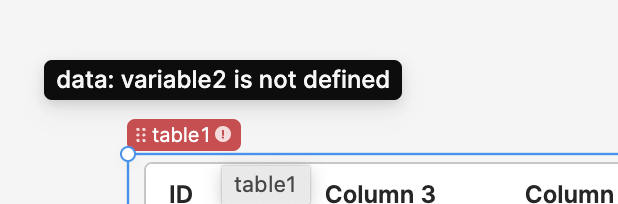
When I load the app, I get this:
Hello, sorry for mistake.
Now I rewrite the app according to you logics and data.
Here is export app json.
4db05b8b-b837-4675-847d-e1832f09d4fbss.json (18.3 KB)
1 Like
Also, we have can't access to your public app, so we can't check the detail data of your data.
So the better way is past the code and screenshot here.
Thanks.


