- My goal: We have PDF files that we want to show on retool, that may or may not be password protected. If the PDF is password protected, we might not have the password, so in that case the app should just render a message saying the PDF is password protected.
- Issue: The Retool PDF component will display a browser dialog prompting for a password. If the user clicks cancel, then the dialog just pops up again and it is impossible to dismiss it, and the app becomes unusable.
- Steps I've taken to troubleshoot: I did search for the string show in the dialog, and it linked me to this thread, so there appears to be some control if we could hook into the pdf library, but I'm not sure if that's possible or not as a Retool user.
- Additional info:
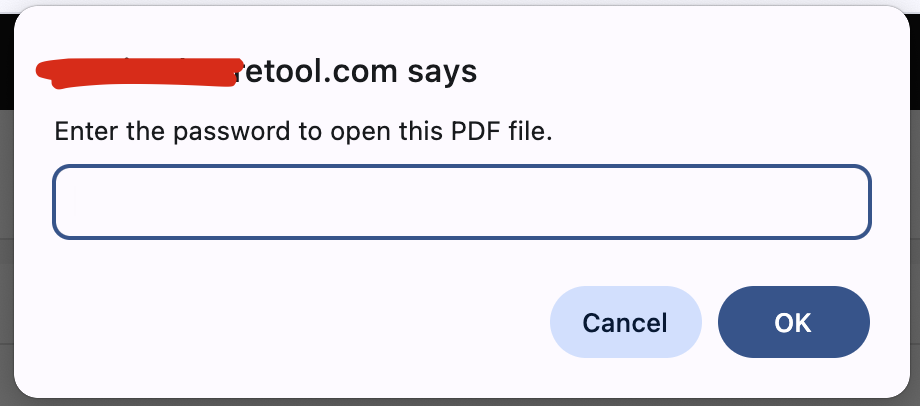
1 Like
Hey @willsewell, welcome! Great to see you in the community, and really appreciate the detailed post!
This is a known issue, and while we’re not able to prioritize it at the moment due to other work in progress, I’ve added a +1 to the internal ticket for you.
In the meantime, exploring a custom PDF component might be a good workaround. If you run into any blockers, feel free to reach out. Happy to help however we can! 
We are also experiencing this issue. (Browser: Google Chrome). This might be critical since I've tested this on an app and whenever the pdf component is loaded with the password protected pdf, it renders the app unusable even in edit mode. +1
Hi @grace_cuevas, it's been a while, welcome back to the Community forum! 
I hear you, and I understand how important this is. I've added another +1 internally to help boost traction. Thank you for your patience!
Really Miss that fix 
Hope you could add +1 for me. Because all products related to work with PDF just become broken 
Hey @AndrewS That sounds really frustrating, I'll make sure the team is aware, I just added +1 for you! 
Hello there! @willsewell @AndrewS @grace_cuevas thanks for patiently waiting, GREAT NEWS!  We’ve rolled out the fix in Retool Cloud version 3.363.0 on March 30. Go ahead and give it a try!
If everything looks good on your end, can you mark this comment as the solution by clicking the check mark icon  below the comment? Thank you so much!