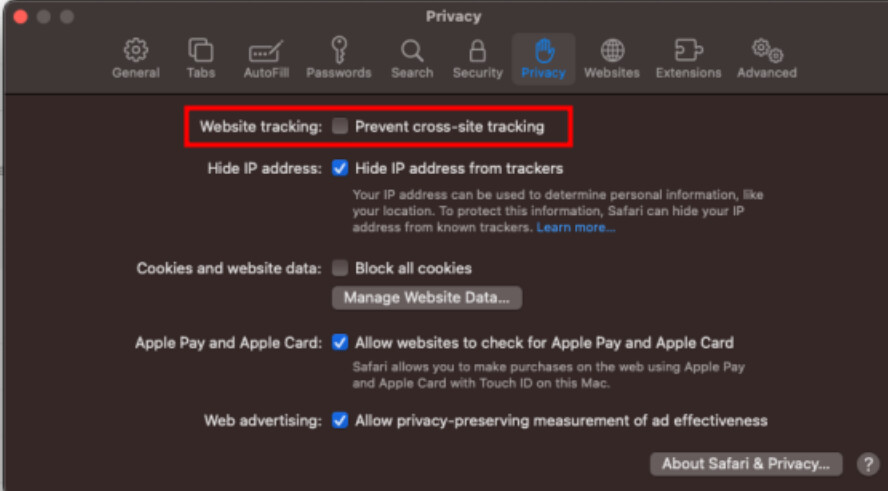
When our Retool app is embedded into a website with an iFrame, we are unable to sign into Retool from that iFrame due to Safari's "Prevent cross-site tracking" option blocking cookies of cross-origin iFrames from being set. Is there any way to work around this without disabling the "Prevent cross-site tracking" option outright?
Hi again! It seems like this is the currently supported behavior. Do you have any specific concerns? I'd be happy to put in an internal request on your behalf
The retool app is inside an iFrame, users cannot sign into retool through the embedded app on iOS (iPhone, iPad) even with the "prevent cross-site tracking" option turned off. When the user tries to sign in, the iFrame is redirected to another page that errors out, and redirected back to the retool sign in page
@victoria The issue seems to be that since Safari 13, for Cross-Origin iFrames to have access to cookies, express user interaction is required to give permission to such.
Therefore, without a prompt for permission to cookies, Safari users viewing Retool's login page through an iFrame is unable to store or access cookies that provide authentication. Hence, Safari users are stuck in a redirect loop where the login page redirects to the Retool application, only for the application to realize that the user is unauthenticated due to no cookies being set, and redirecting back to the login page.
This would mean that Retool would need to implement a user prompt and calls to the Storage API in order to accommodate embedding Retool apps for Safari users.
@victoria Hi, using an iFrame i'm having similar issues. I have an application form I use publicly on my website to get people to send us information, but safari/iphone users are met with a log in screen.
Great questions. We don't quite have a clear way around this Safari limitation yet At the moment, Embed (available only on the Business and Enterprise plans) could be path forward, but then you'd lose the Retool login. You could also try Portals (available only on the Business and Enterprise plans) if you want a custom portal and a Retool-handled login. I'm sorry I don't have better news for you—I did check in on the bug report to see if we have any new updates, but it looks like we're currently blocked here.
Welcome to the community, @Eric_Negron! Can you clarify your use case just a bit? I'm guessing that you have an embedded Retool app but are unable to log in, similar to what @amydevs initially described up above.
If that's the case, have you seen that you can circumvent the issue by disabling Prevent cross-site tracking in your browser settings? I certainly recognize that it isn't an ideal solution, though, and will reach out internally to potentially get an update.
Hey folks, just want to shed a bit of light on our recommendations here:
The issues discussed here are due to how Safari and other browsers handle third-party cookies, necessary for retool auth.
If embedding Retool we strongly recommend using Retool embed + hosting retool on the same top-level domain as the embedding application. This is discussed in our current embed docs. Doing so should ensure that cookies are treated as first-party, and retool is able to be embedded in Safari and other webkit browsers.
We introduced the ability to use custom domains on cloud in 2023 in response to issues like the post here.



 At the moment,