Built-in column sort not working on HTML column — need help mapping to hidden sort key

  1. My goal:
    I want to enable built-in column sorting on a table column that uses HTML format to display an image, name, and phone number in my Retool app. Ideally, clicking the column header should sort the data alphabetically by name, just like a normal text column.
  2. Issue:
    When the column format is set to HTML the sort icon toggles on header click, but the data does not reorder. Sorting works perfectly when the column format is changed back to Text, so the issue seems related to the HTML renderer breaking the built-in sorting behavior.
  3. Steps I’ve taken to troubleshoot: Verified that the column’s Source and ID are both set to name.
  4. Additional info:
    The HTML column shows an image and text:
{{ currentSourceRow.name }} {{ currentSourceRow.phone_number }}
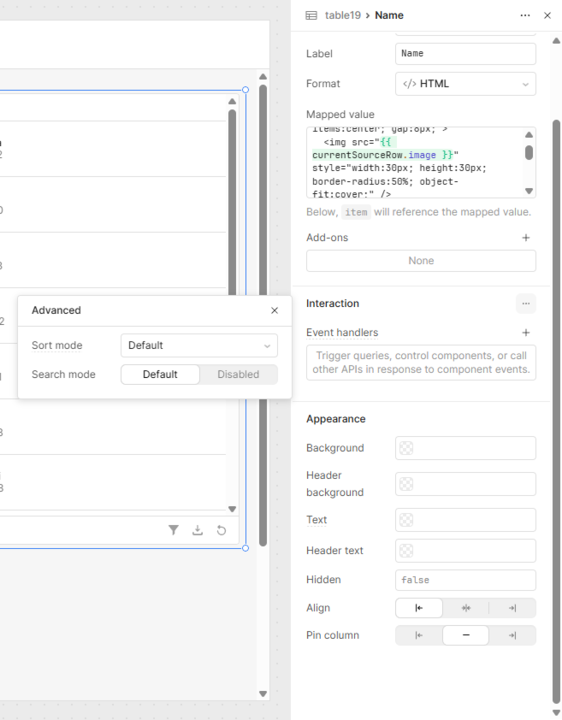
Hello @engineering-tajir,

I tested this in my app using the sample JSON transformer code, and it's working perfectly. The sorting toggle functions as expected. I've also included my HTML code for reference.

<div style="display:flex; align-items:center; gap:8px;">
  <img src="{{ currentSourceRow.image }}" style="width:30px; height:30px; border-radius:50%; object-fit:cover;" />
  <div style="display:flex; flex-direction:column; line-height:1.2;">
    <span>{{ currentSourceRow.name }}</span>
    <span style="font-size:12px; color:#777;">{{ currentSourceRow.phone_number }}</span>
  </div>
</div>

Please try performing a hard refresh of your app and check it in preview mode. Additionally, ensure that the sort mode for that column is set to default.


2 Likes

Hi @engineering-tajir,

Was @WidleStudioLLP's work around useful for you?

1 Like