TL;DR
REST API resources now support OpenAPI/Swagger specs (beta). Add a spec URL to a REST resource and your query editor becomes spec-aware: get autocomplete for endpoints, auto-populated parameters, schema-driven request bodies, and inline documentation—all directly in the query editor.
What's New?
REST API resources now have a new “Use an API spec” mode (beta). Add an OpenAPI/Swagger spec URL and the query editor becomes spec-aware—so you spend less time context-switching between docs and Retool, and more time building.
Instead of manually typing endpoint URLs, guessing parameter names, and formatting request bodies from scratch, you can now:
- Browse all available endpoints in a searchable dropdown
- See auto-populated parameters with types, descriptions, and required indicators
- Build request bodies with structured fields (including nested objects where applicable) instead of raw JSON
- View inline documentation pulled straight from your API spec
Read the documentation for the full details.
How it Works
1. Connect your spec
When creating or editing a REST API resource, select "Use an API spec" and paste your OpenAPI/Swagger spec URL. Click Load spec, and Retool will fetch and validate it. If your spec defines multiple servers, you'll see a dropdown to pick the right one (including support for server variables).
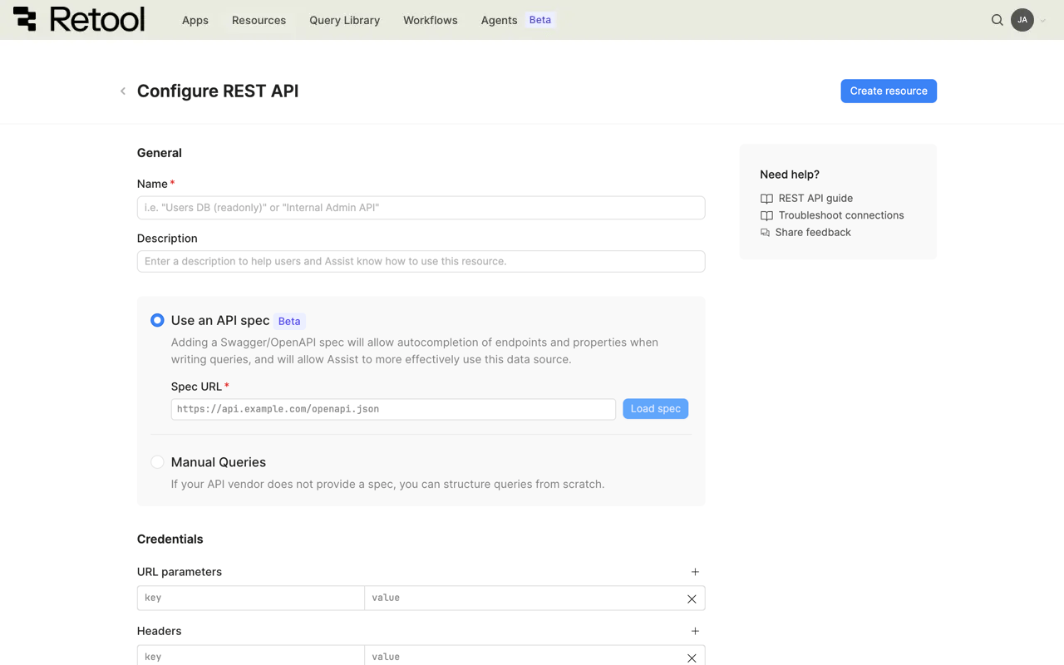
Tip: If you're new to OpenAPI, many API providers link to their official OpenAPI/Swagger spec URL directly within their main API documentation.
2. Write queries with guidance
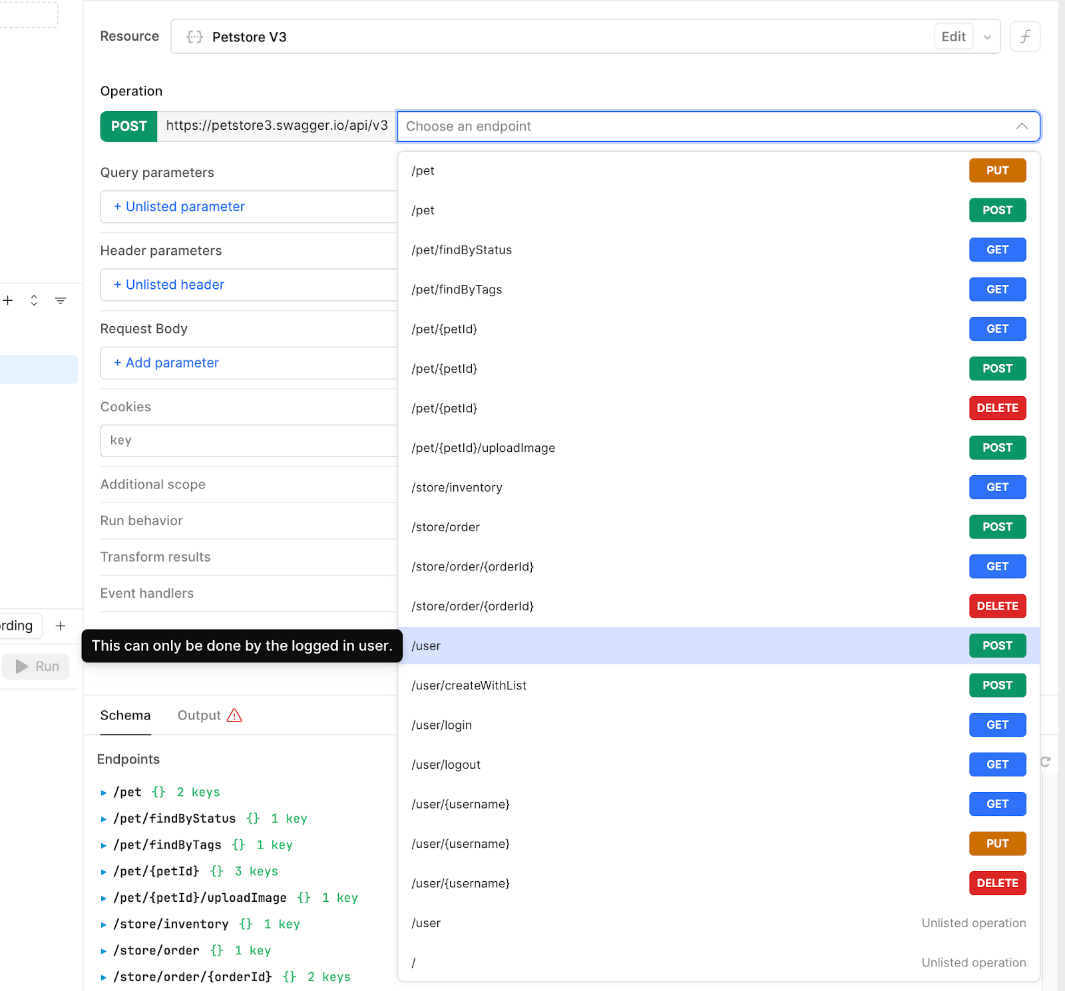
Once your resource has a spec loaded, the query editor transforms. You'll see a searchable dropdown of every operation in your API. Select one, and Retool auto-populates all the parameter fields—path, query, header, and request body—with the correct types, descriptions, and required markers.
For request bodies, you get structured form fields instead of a raw JSON editor. Nested objects are expandable sections. Required fields are clearly marked. You can still use {{ }} template expressions in any field.
3. Go beyond the spec when you need to
Loading in a spec doesn't lock you in. You can:
- Add custom parameters beyond what the spec defines
- Type any endpoint path to use an "unlisted operation" not in the spec
- Switch back to manual mode at any time from the resource settings
How does this compare to the OpenAPI resource type?
Retool already has a dedicated OpenAPI resource type. So why build this into REST API resources? The main shift is that a spec can now guide REST queries without constraining them.
If you’re wondering when you should use which mode, here’s a quick summary of key differences:
- Spec requirement: The OpenAPI resource is spec-first: you need a valid spec up front and queries are built from it. With a REST API resource, the spec is optional. You can turn on “Use an API spec” for guidance, or stay fully manual.
- Working outside the spec: OpenAPI resources expect you to stay within the operations/parameters defined in the spec. With REST + spec, you can still type any endpoint path (even if it isn’t listed) and add extra query/header params that your backend supports but your spec doesn’t capture.
- If the spec is incomplete or unavailable: OpenAPI resources are more sensitive to spec issues. Missing operations, stale schemas, or an unreachable spec URL can stop you from building/running the query you need. With REST + spec, the guided experience is additive: if the spec doesn’t cover a case (or can’t be loaded), you can fall back to manual mode and keep shipping.
- Mixing guided + manual entry: OpenAPI resources tend to be “one model for everything.” REST + spec lets you mix approaches: keep most endpoints spec-guided for speed and correctness, but handle edge cases manually (e.g. undocumented endpoints, experimental params) without needing a separate resource.
If you're currently using the OpenAPI resource type, Guided REST covers the same use cases with less friction. If you're using plain REST API resources, adding a spec URL is a low-risk upgrade.
We’ve also overhauled spec handling for better performance, especially with large specs, in both query editing and execution.
How to try it
- Create or edit a REST API resource
- Select "Use an API spec"
- Enter your OpenAPI/Swagger spec URL and click Load spec
- Start writing queries — you'll see the guided editor automatically
Moving forward, our plan is to take all existing functionality from the dedicated OpenAPI resource type and support it through this single, unified REST API resource. We strongly encourage all users to first try the new Guided REST API functionality.
We want your feedback
This is a beta release, and we're actively iterating. We'd love to hear:
- What APIs are you using this with? We want to make sure it works great with the specs you care about.
- What's missing? Are there parameter types, serialization styles, or workflows that don't work as expected?
- Is anything confusing? The guided editor is a new interaction model — let us know if anything feels unintuitive.
Drop your feedback in this thread or reach out to us directly. Your input shapes what we build next.