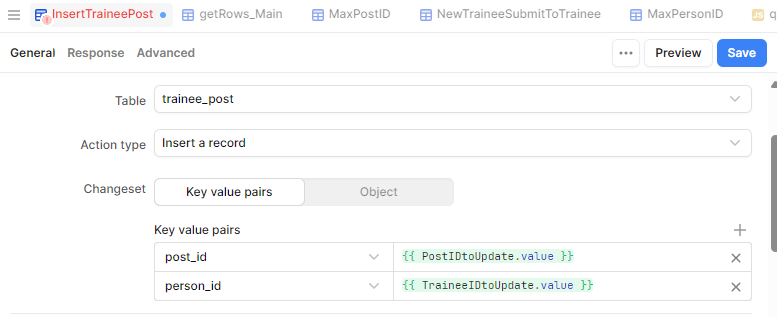
trainee_post (key = trainee_post_id). This table also has foreign keys post_id (linked to post_id in post) and person_id (linked to person_id in person)
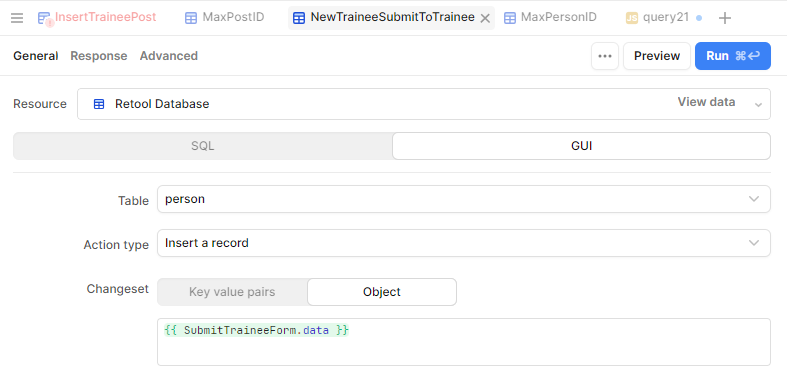
I am trying to use a form to add a new record to person and trainee_post.
I have successfully added a record to person, but I'm struggling to get a linked record added to trainee_post. I have no trouble with the post_id (which is from a selected row in a table), it's the person_id that I can't crack.
On submitting the form run the following via the event handler:
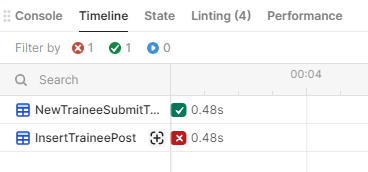
Outcome: The first query works fine, and the record is inserted into the person table.
The second query fails with the error "insert into "trainee_post" ("post_id", "trainee_id") values ($1, $2) returning * - column "trainee_id" of relation "trainee_post" does not exist"
I think the problem is that I am assigning the TraineeIDtoUpdate variable and running the InsertTraineePost before the NewTraineeSubmitToTrainee query has completed and the record inserted.
How do I get person_id from the newly inserted record to create a new record in a linked table?
Instead of assigning NewTraineeSubmitToTrainee.data.result[0].person_id to a variable and trying to make that whole process synchronous, try adding a script that triggers InsertTraineePost with an "additional scope" variable as a success event to NewTraineeSubmitToTrainee query. In the script, you can pass NewTraineeSubmitToTrainee.data.result[0].person_id directly to InsertTraineePost as a variable.
The first step will be to modify your InsertTraineePost to add the additional scope variable (I'll use personIdFromInsert below) as value for the person_id key. You will just type {{personIdFromInsert}} as the value; it will show as a linting error, but ignore that.
The second step is to add the following script to add as a success event that triggers InsertTraineePost with additional scope:
You might get that error running InsertTraineePost directly (like clicking the run button) since the variable would not be defined unless passed to the query. If you need to be able to run the query without passing the variable, you might need to create two queries.
Also, the message you posted has 'PersonIdFromInsert' with a capital P - the code I gave has a lower case p so double check that it is consistent in your app.
Thinking about this, and I think the issue is that for GUI SQL queries you can't use additional scope. If you rewrite as a SQL statement it should work.
Thank you @jg80. I found a workaround by making personIDFromInsert a variable and then by setting it's value and triggering InsertTrainee from within the Success event handler of the NewTraineeSUbmitToTrainee query.