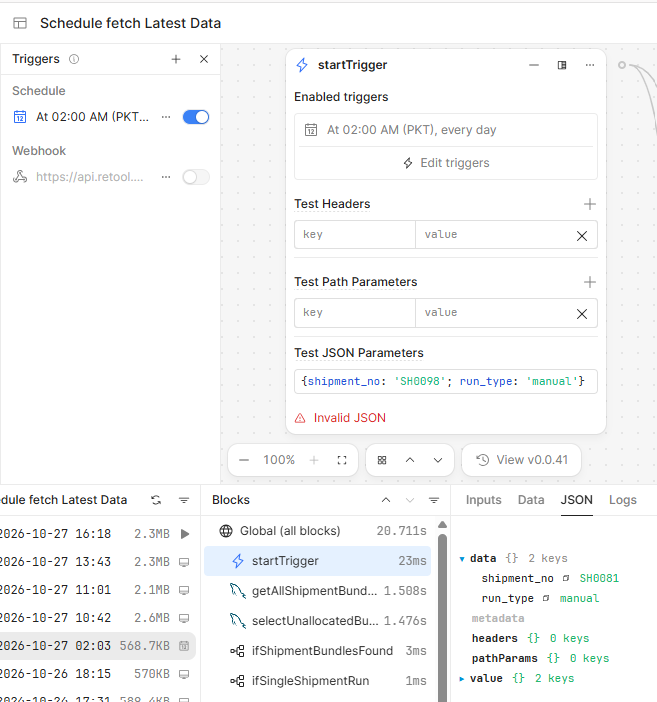
Issue
I tested a workflow using Test JSON Parameters in the startTrigger block, then published it without clearing them. The scheduled run used those test parameters as startTrigger.data.
Steps to reproduce
-
Add a schedule trigger (mine: daily at 02:00 PKT).
-
Set Test JSON Parameters, e.g. {"shipment_no":"SH0081","run_type":"manual"}.
-
Publish the release.
-
Check a scheduled run in Run history → startTrigger → Data.
Expected
Per the docs, test parameters shouldn’t apply to scheduled runs:
Actual
The scheduled run received the test JSON as startTrigger.data.
Questions
-
Is this intended behaviour? (A related thread suggests it is: startTrigger test parameters suddenly not working.)
-
If so, could the docs be updated to say so?
Summary
On a self-hosted Retool workflow, Test JSON Parameters left in the startTrigger block were applied as startTrigger.data on a scheduled (cron) run after publishing, which contradicts the docs stating test parameters apply to manual runs only — is this intended, and should the docs be updated?
AI Response
This is a known, Retool-confirmed bug: test JSON parameters can incorrectly carry over to scheduled runs, and a bug report has been filed with the workflows engineering team. As of the latest update it remains on the roadmap without a fix, so the recommended practice is to remove Test JSON Parameters once prototyping is complete. A foolproof workaround to reliably distinguish scheduled vs. manual runs is to reference workflowContext.triggerType, which evaluates to 'cron', 'webhook', or 'manual', and branch logic accordingly rather than relying on startTrigger.data for scheduled runs.
Sources
 Test JSON Parameters missleading or not working properly scheduled trigger
Staff-confirmed report of the identical issue (test parameters applied to scheduled runs) that includes the workflowContext.triggerType workaround and confirms a bug ticket is on the roadmap.
The Workflow Context object | Retool Docs
Official reference for the Workflow Context object, documenting the triggerType property used in the recommended workaround.
The Community Team is testing out a new automation. Let us know if it's helpful (or not) by leaving a  ,
 , or
 . Or by marking this post as the "Solution"! Let us know if you have any feedback here.