I do almost this exact same thing with contractors/services performed. Here is how I solved it using SQL Server. If you are using Postgres or something else the syntax will be different, but certainly possible
I use STRING_AGG in my query to concatenate the IDs of the services like so (I also concat the service name for easy display in the table):
select c.*, q.services_performed, q.services_performed_desc, et.employee_type
from contractors c
join (select contractor_id, STRING_AGG(sp.task_type_id, ',') as services_performed, STRING_AGG (task_type, ',') as services_performed_desc
	from contractor_service_performed sp
	join lu_task_type tt on sp.task_type_id = tt.task_type_id
	group by contractor_id) q on q.contractor_id=c.contractor_id
join lu_employee_type et on et.employee_type_id=c.employee_type_id
The result looks like this:
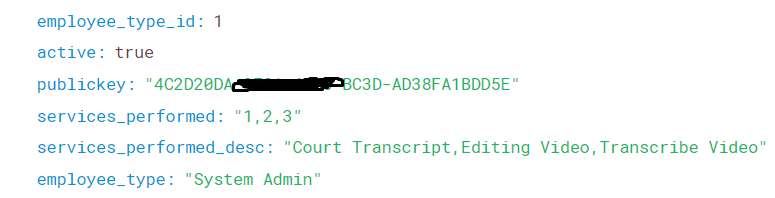
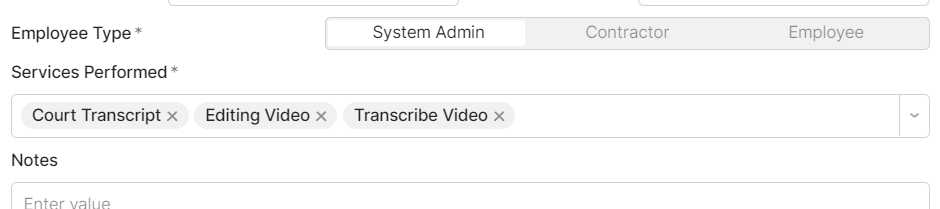
I am using a MultiSelect component to display the data:
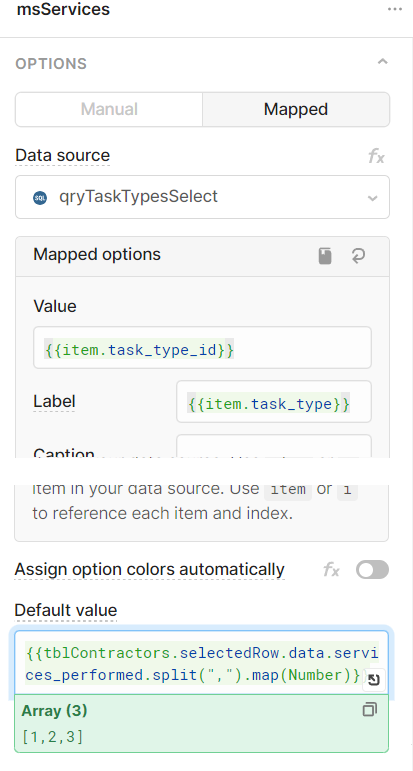
The MultiSelect's data source is the lookup table (lu_task_type) and the secest is how I do the Default value:
I recently discovered a new trick with SQL sever that let's you pass back JSON ([how-to] Return JSON from SQL Server to cut down on server calls and improve performance) which is what I would do in the future, but STRING_AGG() works pretty well.
The next part is updating any changes and adding new records.
For that I use a a stored procedure.
First I call it like this:
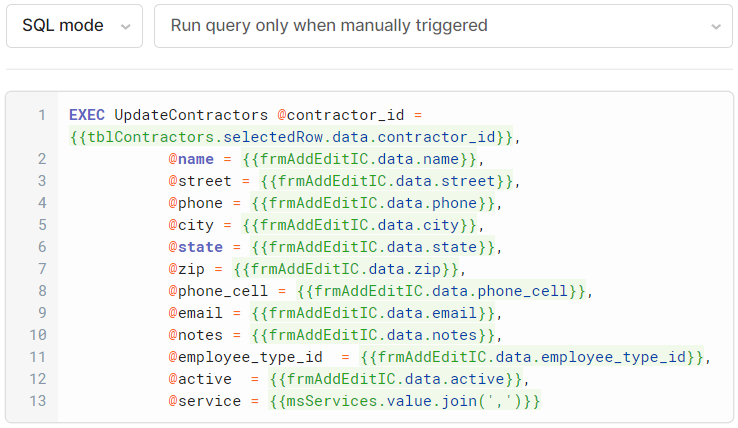
Notice the .join(',') on @services, that makes a comma delim list of the Services Performed IDs to send back to the stored procedure.
And here is the stored procedure:
CREATE   PROCEDURE [dbo].[UpdateContractors]
           @contractor_id integer,
           @name varchar(255),
           @street varchar(255),
           @phone varchar(25),
           @city varchar(255),
           @state varchar(255),
           @zip varchar(255),
           @phone_cell varchar(255),
           @email varchar(255),
           @notes text,
           @employee_type_id int,
           @active bit,
		   @service varchar(255)
AS
BEGIN

	BEGIN TRY
		BEGIN TRANSACTION
			UPDATE [dbo].[contractors]
				SET [name] = @name
				  ,[street] = @street
				  ,[phone] = @phone
				  ,[city] = @city
				  ,[state] = @state
				  ,[zip] = @zip
				  ,[phone_cell] = @phone_cell
				  ,[email] = @email
				  ,[notes] = @notes
				  ,[employee_type_id] = @employee_type_id
				  ,[active] = @active
			WHERE contractor_id=@contractor_id

			DELETE FROM contractor_service_performed
			WHERE contractor_id=@contractor_id

			INSERT INTO contractor_service_performed (contractor_id, task_type_id)
			SELECT @contractor_id, value from STRING_SPLIT(@service,',')
		COMMIT
	END TRY
	BEGIN CATCH
		IF @@TRANCOUNT > 0
            ROLLBACK TRANSACTION
        SELECT ERROR_NUMBER(), ERROR_MESSAGE();
	END CATCH
END
GO
First I update the contractors table, then I delete all related records in the contractor_service_performed table and then insert all of the new services into it. This way I don't need to worry about which were added or removed, I just start from scratch. I enclose all 3 in a transaction so relationships don't break due to an incomplete process.
You certainly could run these three queries within Retool without needing to make a stored procedure, but you lose the transaction capability.